
Library · Copy
Every client's copy, organized and on-spec
Write ad and marketing copy by channel and platform with live character counters and limits, readiness checks and AI drafting — organized by theme and ready for campaigns. Try the demo below, or start your own workspace.
Already have a workspace? Sign in
- Plans from $99/month
- Built for multi-client agencies
- Your brand across the console
Library · Copy
Ad and marketing copy management for agencies
Marketing copy is written everywhere — a doc here, a Slack message there, a note in someone’s head — and then someone has to remember which headline was approved for which platform. The Copy Library in AI Marketing Dashboard gives every client a single copy library: headlines, descriptions, captions, subject lines and SMS bodies, written per channel and platform with the character limits built in, so the copy that ships is the copy you actually approved.
Draft to sign-off
Write the line, then get it approved
The same line of copy goes from a first draft to a client's yes without leaving the library.
Draft
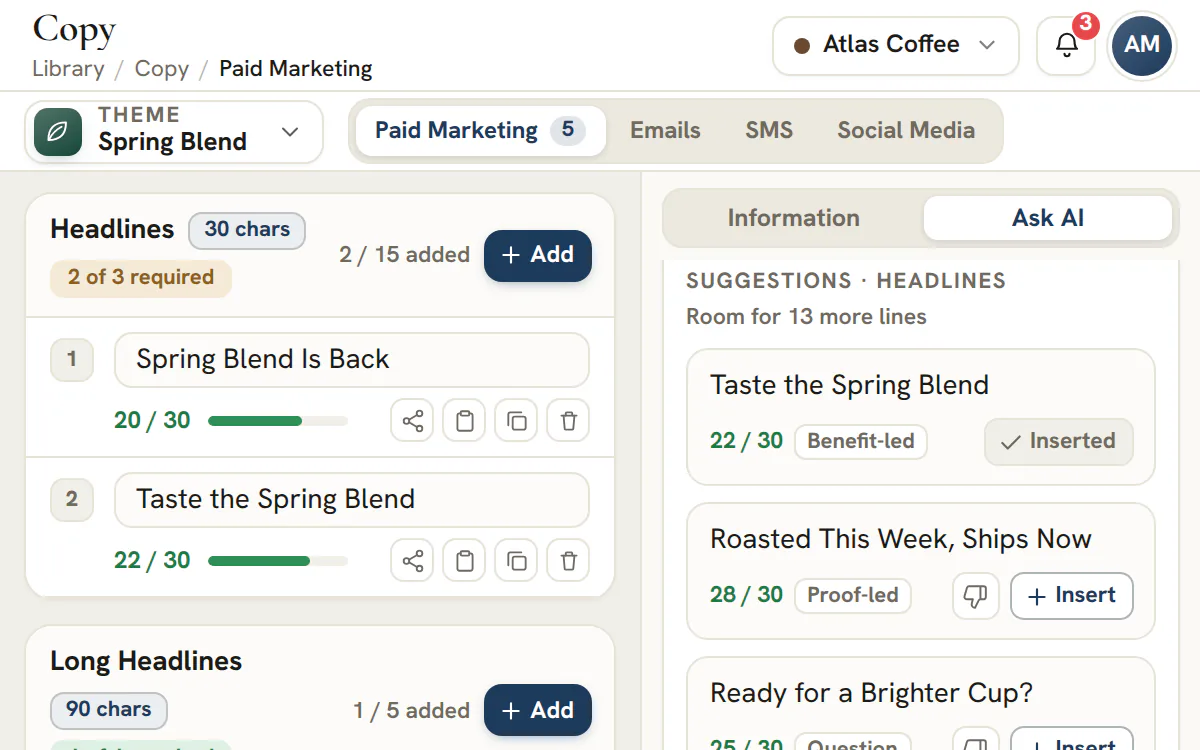
Drafts for the line you are stuck on
- Tone: confident, playful or urgent
- Press Write the full ad for a whole Google Search or Meta ad in one click
- A draft is counted against the limit before you insert it
- A thumbs-down steers later drafts for that client
Approve
Clients answer on the exact line
- Only a Client Admin can approve; any portal member can request changes
- An approval can be taken back within an hour
- Your internal comments never reach the portal
By channel
Every channel opens to the copy it needs
Pick a channel and a platform and the library offers only the copy types that surface asks for, each held to its own limit and showing how many required lines are still missing.
Paid Marketing
Headlines that fit before Google sees them
Google Ads headlines run to 30 characters, long headlines and descriptions to 90, short descriptions to 60. Meta Ads add primary text, headlines and descriptions.Emails
Subject lines that survive a phone
A subject line allows up to 80 characters, with a nudge to stay under 50 for mobile inboxes. The preview line is held to 40 to 140.SMS
One segment, or more
The message counts segments as you type, 160 characters to the segment. Past that it bills as more, and the field says so.Social Media
Posts, captions, hashtags and bios for Facebook, Instagram, LinkedIn and X, each counted against its own limit. Facebook shows a recommended length beside the hard one.
Keep every approved line in one place
Write against the limit, get the line approved, and let the campaign planners pull it from the library.
Plans start at $99/month.
On this page

Copy written for the channel and platform it runs on
Paid, Email, SMS and Social — Google, Meta, LinkedIn, X and more
Pick a channel and platform and the workspace shapes itself to that surface — Google responsive search headlines, Meta primary text, an SMS body, a LinkedIn post — each with the copy types that platform expects. A piece of copy is authored in the context it will actually appear, not in a generic box you reformat later.
Each copy asset is saved as its own record with its channel, platform and copy type, so a client's library is a real, queryable set of assets rather than a sprawling document nobody wants to scroll.
Live character counters and platform limits as you type
Stop discovering a headline is too long in Ads Manager
Every field shows a live character count against the real platform limit, so a 30-character headline or a 160-character SMS is caught while you write it — not when the ad is rejected or the text is silently truncated on a phone. The constraints of the medium are visible at the point of writing.
It is a small thing that saves a real amount of rework: copy that fits the first time, across every platform, without a separate cheat-sheet of character limits taped to someone's monitor.
Readiness checks so you know what is actually finished
See which assets are complete and which still need work
Each copy type has its required fields, and the workspace tracks how many are filled, so an account manager can tell at a glance whether a client's copy set is ready to launch or still missing the third headline. 'Done' becomes a fact you can see rather than a guess.
For an agency producing copy across many clients and platforms, that readiness signal is what keeps a launch from stalling on a missing line nobody noticed was missing.
Copy stored against the client and the angle it was written for
The filing rule your keywords, creative and plans already use
Headlines, descriptions and body lines are stored under the client that owns them and the positioning angle they serve, so the wording for a spring promotion sits with the keywords and artwork for that same promotion. A copy library arranged this way answers “what did we say for this campaign” in one click rather than one search.
Pick an account or an angle and only its lines stay on screen. That is deliberately identical everywhere else in the library, so a writer, a designer and a media buyer are always looking at the same slice of the account.
AI drafting to get the first version down
Start from a draft, not a blinking cursor
Generate on-brand first drafts for a channel and platform to break the blank-page problem, then edit them into the voice each client expects. A run fills the room left in the copy type you have open, such as the headlines still missing from a Google ad, and spreads the drafts across different angles so they are not ten takes on one idea. The craft and judgement stay with your writers.
When you want the whole ad at once, press Write the full ad and Ask AI returns every line of a Google Search ad or a Meta ad, each checked against the platform's limits. The output is a starting point you shape, not a finished asset you ship blind, so the library fills faster without the quality slipping.
Copy that flows straight into your campaigns
Selected in the plan builders, not copy-pasted
Because copy is scoped to a client, theme and platform, the paid, social, email and SMS plan builders pull the matching copy directly — the headline you approved here is the headline the campaign assembles, with no re-typing and no version drift between the library and the live build.
It closes the most error-prone gap in campaign production: the moment copy is manually moved from a doc into an ad and a typo or an old version sneaks in.
The character limits the library enforces, by channel and copy type
Every copy type has a limit, a count of lines marked required and a maximum, and the counter turns red the moment a line goes over.
Paid media, email and SMS
| Platform | Copy type | Characters | Lines |
|---|---|---|---|
| Google Ads | Headlines | 30 | 3 required, up to 15 |
| Google Ads | Long Headlines | 90 | 1 required, up to 5 |
| Google Ads | Descriptions | 90 | 2 required, up to 4 |
| Google Ads | Short Descriptions | 60 | Optional, up to 5 |
| Meta Ads | Primary Text | 125 | 1 required, up to 5 |
| Meta Ads | Headlines | 40 | 1 required, up to 5 |
| Meta Ads | Descriptions | 30 | Optional, up to 5 |
| Emails | Subject Line | 80 | 1 required, up to 10 |
| Emails | Preview Line | 40 to 140 | 1 required, up to 10 |
| SMS | SMS Message | 160 per segment | 1 required, up to 10 |
Social posts and profile text
| Platform | Copy type | Characters | Lines |
|---|---|---|---|
| Posts | 63,206, recommended 40 to 80 | 1 required, up to 10 | |
| Page Description | 155 | Optional, up to 1 | |
| Hashtags | 60 | Optional, up to 5 | |
| Captions | 2,200 | 1 required, up to 10 | |
| Hashtags | 100 | Optional, up to 30 | |
| Bio | 150 | Optional, up to 1 | |
| Posts | 3,000 | 1 required, up to 10 | |
| Headlines | 220 | Optional, up to 3 | |
| X | Posts | 280 | 1 required, up to 10 |
The counters check each line against these limits as you type. They do not read an ad platform's own rules, so confirm a launch that depends on the last character in the platform itself.
Writing for the slot: required lines, maximums and recommended ranges
Each platform shows how many of its required lines are filled, so a missing line is visible before the launch rather than during it.
- Required lines
- The lines a platform needs before its copy set counts as ready. Google Ads, for example, asks for 3 headlines and 2 descriptions, and a bar shows how many are met.
- Maximum
- How many lines of a type the library holds, such as up to 15 Google headlines. More options give a platform that mixes lines more to work with, so each line should stand on its own.
- Over limit
- A red warning that appears as soon as a line passes its limit. Trim until the counter turns green and the warning clears.
- Recommended range
- A softer guide beside a hard limit. Facebook allows 63,206 characters in a post but recommends 40 to 80, and the library warns when a post runs longer than that.
- Minimum
- Some types have a floor. The email preview line must run from 40 to 140 characters, and a shorter line is flagged.
- Segment
- An SMS counts 160 characters to the segment, and a longer message is billed as several, so the field shows the segment count beside the length.
Using Ask AI for copy: tone, approach and how to judge a draft
Ask AI drafts lines for the channel, platform and copy type you have open. You decide which ones become part of the library.
| Control | Choices | Effect |
|---|---|---|
| Copy type | Any type on the open platform | Shapes the drafts for that type and holds them to its limit. |
| Angle | An optional angle, offer or instruction | Steers what the lines argue. |
| Tone | Confident, Playful or Urgent | Sets the register. Urgent names a real deadline only when the client's brief holds one. |
| Approach | Shown on each draft | Labels each draft with its style of argument, for example benefit-led or a question. |
| Write the full ad | Google Search or Meta | Drafts every line of one ad in a click: headlines, descriptions, long headlines and short descriptions for Google Search, or primary texts, headlines and descriptions for Meta. Each line is held to its platform limit. |
- Read each draft's length against the limit before inserting it. Ask AI already avoids repeating lines the library holds.
- Check every promise against the client's brief: offers and prices are stated only when the brief has them.
- Insert saves the line at once and checks fit again, and it is refused while the type is full.
- Turn down what misses with a reason, such as Too generic, Off-brand voice or Unsupported claim, and later drafts for that client steer away from it.
Ten angles that keep a full set varied
For headlines, descriptions, captions and posts, one run of Ask AI fills the room left in that copy type and spreads the drafts across ten angles, so ten drafts are not ten takes on a single idea. The same list works as a checklist when you write by hand.
- The core service, said plainly.
- The buyer's problem, in their words.
- The outcome they want.
- How the work gets done.
- Proof and trust, using only facts the client has confirmed.
- The first step, kept small.
- Who the offer is for.
- A hesitation, answered.
- Timing, when there is a real reason for it.
- The place the client serves.
Getting a line approved: internal review, then the client
Copy is reviewed line by line, so a client can answer on the exact headline in question instead of on a document.
| Stage | Who acts | What happens |
|---|---|---|
| Draft | The writer | A line with no review record is a draft, and nothing is shared. |
| Agency review | A writer submits, an approver decides | The approver approves, or requests changes with a comment. |
| Approved | An approver | An approver can also approve straight from a draft. Approval is what allows sharing. |
| Shared | Someone who can publish | The line can enter the client's portal only after an internal approval. |
| Client review | The client | The client's portal admin approves, and any other member can request changes by pinning a comment to the spot. |
| After the answer | The agency | A portal admin can take back an approval within an hour. The agency can withdraw, ask again or reopen. |
Internal comments never reach the portal, and a client's reply is always visible to both sides. The portal itself is part of the Scale plan and Enterprise.
Copy that carries into campaign plans and previews
The planners read the same library, so the line you approved is the line the plan assembles.
- Paid: the paid media planner offers saved Google or Meta lines for the same theme and platform, and its ad preview shows one combination a platform could serve, not a promise.
- Email: the email campaign planner takes up to three subject lines, the first as primary and the rest as variants, plus a preview line.
- SMS: the SMS campaign planner picks from saved messages and counts segments as you work.
- Social: the social media planner draws captions and hashtag sets from the library for each network.
Plan
Plans for copy
Studio, at $99 a month, covers Copy, Ask AI and internal review. The Paid and Social planners start on Agency at $299, the Email and SMS planners are open on every plan, and client review needs Scale or Enterprise.
Frequently asked questions
What is the character limit for Google Ads headlines in the copy library?
The library enforces 30 characters for Google Ads headlines, 90 for long headlines and descriptions, and 60 for short descriptions. It marks 3 headlines and 2 descriptions as required for a complete set, and holds up to 15 headlines.
How does the library count SMS segments?
An SMS message counts 160 characters to the segment, and the field shows how many segments the message uses as you type. A longer message is billed as several segments, so the counter is a cost warning as well as a length check. Ask AI drops SMS drafts that run past one segment.
Does the copy library cover Facebook, Instagram, LinkedIn and X?
Yes. Facebook posts allow 63,206 characters with 40 to 80 recommended, Instagram captions 2,200 with up to 30 hashtags, LinkedIn posts 3,000 and X posts 280. Each network also has its own profile text where the platform offers it.
How do I get a client to approve ad copy?
Submit the line for internal review and have an approver approve it, then share it and ask the client for review. In the portal a client admin approves the line, or any member asks for revisions and pins a comment to the exact spot. That portal requires the Scale plan or Enterprise, and internal comments never reach the client.
Can Ask AI write my ad copy?
Ask AI drafts lines for the channel, platform and copy type you have open, in a tone you pick: Confident, Playful or Urgent. Press Write the full ad and it drafts a complete Google Search or Meta ad in a single click, every line held to its platform limit. Each draft shows its length against the limit, you insert only the ones you want, and every inserted line is checked again for fit. It states an offer or price only when the client's brief holds one.
Does the copy library connect to the campaign planners?
Yes. Each of the four campaign planners offers the saved lines for the same theme and platform, so the headline you approved is the headline the plan uses. The Email planner takes up to three subject lines, the first as primary and the others as variants. The Paid and Social planners start on the Agency plan.
Is the copy library included on every plan?
Yes. Studio, the entry plan at $99 a month, includes the copy library, Ask AI and internal review. The Paid and Social planners that use the lines start on the Agency plan, and review by the client in the portal requires Scale or Enterprise.