Library · Audiences
Know who every campaign reaches
Segments that re-count against the CRM, lists someone chose by hand and paid targeting groups with no contacts in them, saved for each client and reused across campaign plans. Create a workspace, or look inside the demo below.
Already have a workspace? Sign in
Library · Audiences
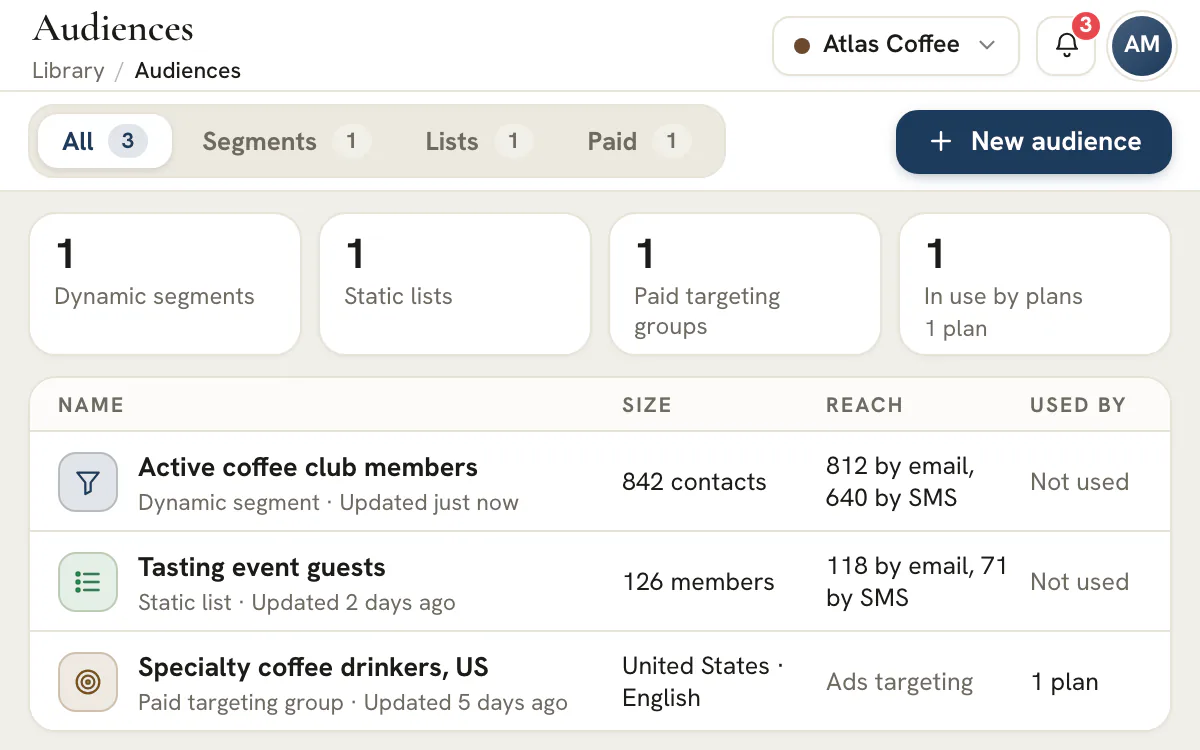
"Send it to the list" is where agency campaigns go wrong. The list is an export from last spring, nobody remembers whether the unsubscribes came off, and the Meta audience was built by someone else from a different spreadsheet. Audiences in AI Marketing Dashboard keeps the answer to who a campaign reaches inside the client's workspace. A dynamic segment reads the CRM and re-counts whenever it is used. A static list holds the contacts someone chose. A paid targeting group carries places, languages and ad platform audiences for Google and Meta, with no contacts in it at all. Plans refer to them, approvals bind to them and launches freeze them.
Build once, use everywhere
Build the segment and watch the count narrow
Choose the pipelines, add conditions, and the reach updates as you build, with a sample of who matches and their details masked.
Three kinds of audience for each client
Spreadsheet or saved audience
The list nobody trusts, and the one that explains itself
The difference shows on the day someone asks who exactly was in that send.
A spreadsheet export
The file has no memory of how it was made.
A saved audience
Segments and lists need CRM access. Paid groups do not.
Pick the right kind
Which audience does the job
The kind is chosen when an audience is created and cannot be changed afterwards, so choose it by what the audience is for.
Dynamic segment
Rules that follow the CRM
Static list
A fixed group
Paid targeting group
Targeting, no contacts
Export
A hashed audience file
Plans
One definition, many plans
Watch the walkthrough
Watch one segment get built, counted and used
This silent walkthrough picks a kind, sets the pipelines and conditions, reads how many contacts are reachable and attaches the result to an email plan, with each chapter listed beside the video.
40 seconds
0:00 Open Audiences for one client. Audiences are saved per client: dynamic segments, static lists and paid targeting groups.
0:05 Choose the kind first. The kind cannot be changed later. Segments follow rules; lists are kept by hand.
0:13 Set where to look and who matches. Choose the pipelines, then add conditions. The count updates as you build.
0:20 Check who it reaches. Reachable counts differ from the total. Unsubscribed and invalid contacts are left out.
0:25 Save it and see where it is used. “Used by” lists the plans that rely on this audience, so an edit never surprises anyone.
0:30 Use it in an Email plan. In the plan's Audience field choose Saved audience. Later edits send approved plans back.
Send to the right people, and be able to show why
Create a workspace, build a first segment from a client's CRM and read its reach before any plan uses it.
Plans start at $99/month.
A segment starts with where to look: the client's CRM pipelines, narrowed by stage or tag if you like, and every pipeline you may use when none is chosen. Conditions then say who matches, joined by all or any, with one level of nested group. There are 34 built-in fields across contact details, deal and attribution data and engagement, plus the client's own custom fields and membership of other audiences, and one segment can hold up to 30 conditions. People who filled in a form but never booked a meeting, or open deals whose last activity is more than 45 days old, take two conditions each.
No membership is stored. Who is in a segment is worked out from the CRM each time it is counted, exported or checked before a send, so a lead who moves from Qualified to Won, replies to an email or is marked do not contact changes the answer without anyone editing the segment. One evaluation engine serves the editor's count, a plan's audience count and the check made at send time, so all three apply the same rules.
The editor's count rail updates about half a second after your last edit. It shows the total, then how many contacts are reachable by email and by SMS, which is a smaller and separate number: contacts with no address, an invalid or repeated one, or a do-not-contact mark are left out, email also drops unsubscribes, and the rail itemizes the reasons. Up to ten sample contacts appear with their names, an email masked like j•••@acme.com and a phone number shown by its last four digits, each with a link to open the lead in the CRM.
Past 25,000 CRM leads a count becomes a floor, and the rail says so instead of presenting it as exact. A launch refuses an audience it cannot check in full, because a partial answer is not a send list. Counting needs CRM access, so a teammate without it sees paid targeting groups only, and the screen explains why.
A static list holds CRM contacts and nothing else. Add them by searching the client's CRM by name, email or company, by pasting emails or phone numbers, or by importing a CSV file. A CSV is read in your browser and the column you choose is sent for matching against the CRM; only contacts that already exist join the list, and nothing you paste is saved. A list holds up to 25,000 contacts.
Freeze copies everyone a segment matches today into a new list and leaves the segment as it was, so the list stays put when the CRM moves on. If more than 25,000 people match, or the count cannot be made in full, the freeze is refused rather than cut, and the usual exclusions still apply when the list is counted or sent to. That is the tool for an audit trail, a fixed VIP group or a send an approver has already signed off. Members page fifty at a time with search, you can remove selected contacts or clear the list, and a clear never removes a contact you are not allowed to see.
A paid group carries targeting only. Locations can include and exclude up to 50 places each way, languages run to 20, and demographics cover age bands from 18 to 65 and over, gender and, for Google, household income and parental status exclusions, which carry a warning because Search campaigns have not confirmed them. A special ad category field marks housing, employment, credit or politics ads, and the checks apply the stricter platform rules to the first three: on Google, no demographic or postal targeting for ads that can reach the US or Canada; on Meta, those ads must reach every age from 18 and every gender, with no postal codes. Politics ads get a reminder to confirm advertiser verification.
Google segments come from the client's own Google Ads account: once an Agency Admin connects it under Reports, a refresh pulls the account's lists and segments, and a group can save up to 25 of them. The editor checks each against the account's refreshed data, and the ones that run on Search are added in observation, adjusting bids and reporting without narrowing who sees the ad. Meta interests, behaviors and custom audiences are entered by their Meta id: up to 50 of each interest and behavior, and 25 custom audiences to include and 25 to exclude. These groups feed the Paid planner, which comes with the Agency plan and up; the Google Ads connection they draw on needs that plan too.
Email and SMS plans choose Saved audience instead of building a filter, and a Paid plan picks a targeting group in its Targeting step. The plan stores a reference, not a copy, so there is one definition of the audience. The Audiences list shows which plans use each audience, how many audiences are in use, and any launch running against one.
An approval is tied to the audience's definition: a segment's conditions or a list's members. Change either and the approved plans that use it go back for approval, with the editor naming them before you save. A rename or a new description never does. While a launch that uses it is open, changing who an audience reaches, archiving it or deleting it is refused, and the launch freezes a snapshot of the audience so what was approved is what gets checked at send.
To use contacts in Google Ads or Meta, export a segment or list as a customer-list file. Choose Google Customer Match or Meta Custom Audience, then email addresses, phone numbers or both. Each value is normalized and hashed with SHA-256 before it leaves the server, so the file holds no names and no plain-text address or number. Unsubscribed, do-not-contact, invalid and repeated entries are left out, and an unsubscribed email also keeps that contact's phone number out of the file.
Exporting is a deliberate act. You confirm a consent statement first, the export is recorded with your name before the file is released, and the workspace's other Agency Admins, up to five and within their notification settings, are emailed. It needs the CRM export permission and an assignment to the client, Agency Admins included, with limits of 10 exports per person an hour and 50 per client a day. An audience that would put more than 25,000 contacts in the file, or that cannot be counted in full, is refused, not cut. The app never uploads anything: you load the file into Google Ads or Meta Ads Manager yourself.
Lists of people are drawn outside analytics capture, and contact values are kept out of URLs, log lines and browser storage. Sample contacts show masked email and phone details, answers are marked no-store, and the receipt for a change carries ids and counts, not people. Restricted CRM pipelines stay behind the Agency Admin role: someone without it who names one is refused, and a segment that names a restricted pipeline, or one a teammate's CRM access leaves out, shows as Hidden pipeline to them.
A do-not-contact mark is read across every lead in the client's CRM, including leads hidden from the viewer, so a flagged address stays suppressed even when another contact shares it. Segments and lists need CRM access. Audiences is an agency tool: it has no client portal screen and no developer API, so a client never sees how they were segmented.
Start from the send you want to make, then work back to the fewest conditions that find those people.
| Client type | Segment | Conditions to use | Use it for |
|---|---|---|---|
| Local home services | Asked for a quote, never booked | Deal status is any of Open; Meeting booking has not booked; Created in the last 30 days | A reminder email or text inside the quote window |
| B2B services | Open deals gone quiet | Deal status is any of Open; Last activity more than 30 days ago; Deal value is at least your floor | A follow-up from the account owner |
| Online store with a waiting list | Waiting list, never emailed | Form submission has filled out the waiting-list form; Campaign email received never | The first launch email |
| Appointment-based practice | Booked once, quiet since | Meeting booking has booked; Last activity more than 90 days ago | A recall message |
| Event or webinar | Registered, no call booked | Form submission has filled out the registration form; Meeting booking has not booked; Created in the last 14 days | An invitation to book a call |
| Retainer or subscription business | Closed-lost, cooled off | Deal status is any of Lost; Created more than 180 days ago; Campaign email received not in the last 90 days | A win-back sequence |
| Paid media client | Won deals from Google ads | Ad click is Google; Deal status is any of Won | An exclusion upload so existing buyers stay out of prospecting |
| Multi-location business | One city at a time | City is any of the chosen cities; Deal status is any of Open | A local offer for each location |
Build each with two to four conditions and read the reach before adding a fifth. A segment with a dozen conditions is usually two audiences. Name it for its job, such as Quote asked, never booked, so the Used by list on the audience reads like a sentence.
Tip
Use the engagement fields for timing
The CRM records activity, campaign emails sent, replies, bounces, form fills and bookings, so a rule can say not emailed in 90 days or has not booked. It has no opened or clicked field, so do not plan a segment around either. Last activity more than 30 days ago also skips contacts with no recorded activity at all; add the none recorded option beside it in an any-group if they belong in the segment. The CRM holds the records these fields read.
The kind is fixed when an audience is created, so decide before you build.
| Situation | Choose | Why |
|---|---|---|
| The right people change as the CRM changes | Dynamic segment | Membership is recalculated from the CRM at each use |
| A fixed group named by the account manager | Static list | It changes only when someone edits it |
| A send an approver signed off must not drift | Static list | The approval covers the list's exact members |
| A spreadsheet from an event | Static list | Paste or import it; only contacts already in the CRM join |
| A fixed snapshot of who matched | Freeze the segment into a list | The list keeps the contacts it matched that day |
| Targeting with no contacts involved | Paid targeting group | It holds places, languages, demographics and platform audiences |
If a segment turns out to be a one-off, freeze it into a list instead of rebuilding. Segments and lists are the two kinds the Email and SMS planners offer as a saved audience, and a list tops out at 25,000 contacts, which is also the most a freeze will take. A client can hold up to 500 audiences, archived ones included. Archiving retires an audience and keeps its history, and it can be undone, but only deleting frees the space. Archiving is refused while an active segment or an open launch uses the audience, deleting is refused while a plan or another audience uses it, and a plan that points at an archived audience fails its audience check until you change it.
Most bad sends come from a count nobody questioned. This routine questions it.
Set where to look
Pick the pipelines, and stages or tags if the audience lives in one corner of them. With none chosen the segment reads every pipeline you may use.
Add the defining condition
Start with the one rule that defines the audience and read the count. Add the next only when the count shows it is needed.
Compare reach with total
Reachable by email and by SMS are smaller than the total for stated reasons. Read the left-out reasons before you trust a number.
Open the sample
Open two or three sample contacts in the CRM. If they are not who you meant, the conditions are wrong, however good the count looks.
Save and check Used by
Save, then see which plans use the audience. The editor names any approved plan an edit would send back for review.
To reuse one audience inside another, add an Audience condition set to is in or is not in. A segment can use up to five others, one level deep, and an audience that another one uses cannot use others itself. A count reads as a floor when the client has more than 25,000 CRM leads or a condition reads more email or activity history than one check can cover. An email launch refuses such an audience, and conditions that do not depend on history, or a static list, avoid the second cause.
A group holds targeting, never people. A paid launch ends with a person publishing it in the ad platform, so the group travels in the frozen launch spec for whoever publishes.
| Setting | Google Search | Meta |
|---|---|---|
| Locations | Included places are targets and excluded places are negative locations, up to 50 each way | Countries are written by code; regions, cities and postal codes are set in Ads Manager |
| Languages | The chosen languages replace English, up to 20 | Set by hand, because Meta uses its own locale ids |
| Age and gender | Bands you leave out become exclusions | Age range and gender are written into the targeting |
| Income and parental status | Groups you leave out become exclusions, with a warning that Search campaigns have not confirmed them | Not offered on Meta |
| Audiences | Up to 25 saved segments from the client's Google Ads account; each is checked against the account's refreshed data, and those that run on Search go in as observation | Interests and behaviors by Meta id, 50 of each, plus custom audiences: 25 to include and 25 to exclude |
| Special ad category | Housing, employment and credit ads whose places may include the US or Canada cannot carry demographic exclusions or postal locations | The category is written into the export, and the checks fail a group that narrows age or gender, or uses postal codes, on those ads |
Google segments appear after the client's Google Ads account is connected under Google Ads reporting. The list refreshes on request, at most once every 15 minutes and 24 times a day, and a group warns when that data is more than seven days old. Observation leaves the ad's reach as it was and lets you bid differently on, and report on, the people in a segment. The editor and the launch checks apply the same policy rules, so a demographic limit on a housing or credit group shows up in the editor before it can block a launch.
Plan
Which plan does what
Audiences, segments, lists and Email and SMS plans are on every plan. The Paid planner that uses a paid group needs the Agency plan and up, and so does connecting Google Ads.
The file leaves the app once it is downloaded. The agency and the client each own part of the checking.
| Step | The agency | The client |
|---|---|---|
| Consent | Asks how each contact joined and records the answer | Confirms the people agreed to advertising use, and holds the proof |
| Privacy notice | Asks whether the notice covers advertising and matching | Keeps the notice current and confirms in writing |
| Opt-outs | Keeps unsubscribe and do-not-contact marks current, because exports honor them | Forwards opt-outs received outside the CRM |
| What goes in the file | Exports the fewest identifiers that serve the job | Approves them in the brief |
| Sensitive details | Flags any segment built on sensitive information and asks before exporting | Decides whether that use is allowed |
| The upload | Uploads the file in the ad platform and notes the date | Owns the ad account that receives it |
| The file afterwards | Deletes the download once uploaded; the app keeps no copy | Sets how long audiences may live in the ad account |
| The record | Notes who exported what and when; the app also records each export and emails the other Agency Admins | Agrees how often exports may be run |
Exporting asks you to confirm that the people in the file gave consent for advertising use and that the upload follows the ad platform's rules, and it records that you did. The other Agency Admins are emailed. A person can run 10 exports in an hour and a client 50 in a day. Anything over 25,000 rows is refused outright, so narrow the audience first. None of this replaces the client's own legal advice: consent and notice are the client's to establish, and the rules differ by region, so ask their counsel which apply.
Permissions follow the data. A paid group holds no contacts, so it needs less than a segment does.
| Action | Needs |
|---|---|
| See paid targeting groups | Library access for the client |
| See or build segments and lists | Library access and CRM access for the client |
| Create, edit or delete an audience | Permission to create, edit or delete Library work, plus CRM access for segments and lists |
| Refresh Google segments | Permission to edit Library work, and a connected Google Ads account |
| Export a hashed file | The CRM export permission, Library access, CRM access and an assignment to the client |
| Use a restricted CRM pipeline | The Agency Admin role |
Agency Team members work only with the clients assigned to them, and an export needs that assignment for Agency Admins too. A restricted pipeline is never a delegable permission: only the Agency Admin role reaches it, and a segment that names one shows as a Hidden pipeline to everyone else. The same label appears when a per-client CRM grant excludes a pipeline from a teammate's view.
Audiences is part of every plan. Segments and lists feed the Email and SMS planners, which are also on every plan. Paid targeting groups feed the Paid planner and its launches, which need the Agency plan and up, and Google segments need the client's Google Ads account connected, which is an Agency feature too.
Segments and lists are made of CRM contacts, so they need Library access and CRM access for that client. Without CRM access a teammate sees paid targeting groups only, with a note that says why. Restricted CRM pipelines can be used only by an Agency Admin.
The total counts everyone the rules match. Reachable counts the people a send could actually address on that channel, so it drops contacts without an address, with a bad or repeated one, or who carry a do-not-contact mark, and the email count also drops unsubscribes. Email and SMS are counted separately, which means one contact can be reachable on one channel and not the other.
No. Contacts leave only as a hashed file that you download and upload yourself in Google Ads or Meta Ads Manager, and a paid targeting group holds no contacts at all. The app does not push a list to either platform. For audiences, the Google connection only reads: it fetches the account's lists and segments so a group can use them.
One row per person: SHA-256 hashes of the normalized email address, the phone number or both, with a column for each. It carries no names and no plain-text values. People who unsubscribed, are marked do-not-contact, have an invalid address or repeat an earlier row are not included, and an audience that would pass 25,000 rows is refused rather than cut, as is one that could not be read in full.
If an edit changes the audience's conditions or members, each approved plan using it goes back for approval, and the editor lists those plans before you save. A new name or description does not trigger that. A launch that uses it and is still open (awaiting approval, scheduled, running or waiting to be marked launched) blocks three things until it finishes: changes to who is reached, archiving and deleting.
No. Clients have no Audiences screen in their portal and the developer API does not expose it, so how a client was segmented stays inside the agency. A client sees only what your team chooses to share.
Up to 500. Once a client reaches that number, delete the ones that are no longer needed. Archiving retires an audience and keeps its history, but deleting is refused while any plan or other audience still uses it.
