
Agency marketing reporting
See every client’s marketing in one place
Organize paid media, web analytics, SEO, email, SMS and social by client in one reporting workspace. Create a workspace to open your Reports Hub, or explore how the reporting suite is structured.
Already have a workspace? Sign in
- Plans from $99/month
- Built for multi-client agencies
- Your brand across the console

Marketing reporting
The marketing reporting dashboard built for agencies
The Reports workspace in AI Marketing Dashboard organizes each client’s paid media, web analytics, SEO, email, SMS and social results in one dashboard. Teams can review channel summaries side by side, move from overview cards into detailed breakdowns and use a consistent structure for client conversations.
Where the numbers come from
Link an account and the report fills in. Every channel has a report.
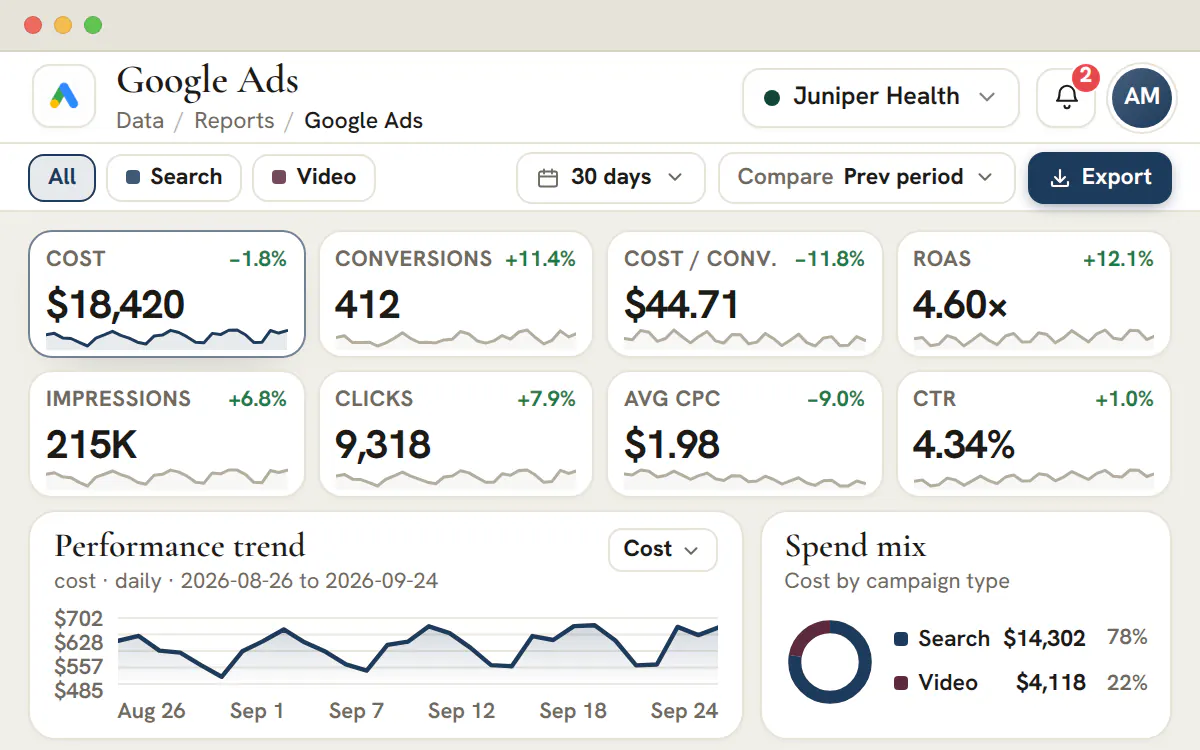
Meta Ads, Google Ads, Microsoft Advertising, LinkedIn Ads and Google Search Console, among others, fill a client’s report from the linked account, on the Agency plan and up. Site audits run Lighthouse through Google PageSpeed Insights. A channel without a linked account opens as a finished report layout.
Connected data sources
 Google Ads
 Meta Ads
 Microsoft Advertising
 LinkedIn Ads
 Google Search Console
 Google PageSpeed Insights (Lighthouse)
Connected reporting
A linked account fills the report
- One account per client, so one client’s figures never appear in another’s report
- You choose the dates to sync, and can sync earlier ones later
- Depth differs: Google Ads reaches search terms, Meta Ads reaches ad sets, placements and demographics, Search Console reaches queries, LinkedIn Ads reaches campaigns, ads and audience demographics, and Microsoft Advertising reaches campaigns, keywords, search terms, devices and networks
Report layouts
Open the report that matches the channel
Each channel has its own page, laid out the way that channel is reviewed. Pick a client in the header and the whole catalogue follows.
Web analytics
Outcomes beside every visit
Google Analytics 4 is laid out by channel, source, campaign and landing page, with key events and revenue in the same columns at every level.
Product screenshot
Email
Every send, with its rate
Mailchimp reporting lays out audience statuses, click-to-open rates, journeys and test winners, one tab each.
Product screenshot
Social
Instagram reporting follows reach, Reels, Stories and profile taps. Facebook, LinkedIn, X and YouTube each have a page of their own.
Product screenshot
Local
From visibility to calls to reviews
Google Business Profile reporting sets Search and Maps impressions beside customer actions and the review record.
Product screenshot
One reporting home for every client
Create a workspace, choose a client and open any report. Connected accounts and report layouts sit side by side.
Plans start at $99/month.
On this page


Paid advertising reporting across Google, Meta, LinkedIn, Microsoft and X
Paid channel summaries in one consistent view
Review Google Ads, Meta Ads, LinkedIn Ads, Microsoft Advertising and X Ads in a shared paid-media report with space for spend, ROAS, cost per acquisition and conversions. The report structure moves from account to campaign, ad group, keyword and asset, helping teams explain where results came from.
Because every ad platform reports a little differently, the dashboard presents impressions, clicks, cost, conversions and revenue in a consistent view per client. That organization makes channel reviews easier to follow and gives teams a repeatable format for client conversations.
Web analytics and search performance reporting
GA4 and Search Console, finally side by side
Review Google Analytics 4 and Google Search Console results in adjacent sections, with sessions, engaged sessions, conversions and attribution alongside organic clicks, impressions, average position and click-through rate by query and landing page.
Seeing acquisition and on-site behavior together helps teams build a clearer story about which channels bring visitors, which keywords rank and where engaged traffic converts. It gives client reviews more context than isolated channel screenshots.
SEO reporting and site-health monitoring
Rankings, crawl health and Core Web Vitals in one report
Review SEO audit findings such as crawl errors, indexability problems, broken links and prioritized on-page fixes alongside a site-health summary. Core Web Vitals, including Largest Contentful Paint, Cumulative Layout Shift and interaction latency, sit next to organic-performance views for a more complete review.
Search visibility moves slowly, which is precisely why it needs consistent reporting. A trend line a client can read at a glance makes the case for the SEO retainer far better than a one-off screenshot ever could.
Email and SMS marketing reporting
Lifecycle revenue you can actually attribute
Review email and SMS reporting in one lifecycle section — Klaviyo and Mailchimp each get their own report — including opens, clicks, deliverability, unsubscribes and revenue by campaign or flow. SMS delivery, click-through and opt-out rates sit beside email so the channel story reads as one picture.
Lifecycle marketing is where retained clients see compounding return, and it is also the hardest channel to summarize. Per-campaign and per-flow attribution makes that value obvious — without exporting a single spreadsheet.
Client reporting your agency can put its name on
Per-client dashboards, ready to present
Every report is scoped to a single client, so you switch subaccounts and the entire dashboard — paid, analytics, SEO, lifecycle and social — refreshes to that account. No cross-client leakage, no manual filtering and no chance of sending the wrong numbers to the wrong client.
Brand the workspace as your own and present clients with a clean, professional report that reflects your agency, not a third-party tool. Reporting stops being the monthly chore nobody wants and becomes a reason clients stay.
A reusable reporting structure for every client
Replace one-off decks with a consistent workspace
Use the same report organization across clients so campaign, session, send and ranking summaries appear in familiar places. A repeatable layout reduces the time spent rebuilding the presentation layer for every review.
The workspace keeps channel previews and detailed report views together, giving account teams a consistent place to prepare for recurring client conversations. Data-source setup remains a separate step.
How to choose a marketing reporting tool for an agency
A reporting tool earns its place when it shows whose numbers it is looking at, keeps clients apart, admits its limits and leads to a decision. Hold every option to those four, this one included.
The familiar path runs from each platform's own dashboard to a spreadsheet, once the monthly report takes a day, and then to a business-intelligence tool. Each step fixes one problem and brings another.
| Approach | Where it works | Where it hurts |
|---|---|---|
| Each platform's own dashboard | Exact figures, straight from the source | One login and one set of definitions per channel, so a cross-channel story means many open tabs |
| A spreadsheet | Total control over layout and wording | Someone re-exports and re-pastes every month, formulas drift, and nobody can say which cell came from which account |
| A general business-intelligence tool | Charts for almost any data source | Every client needs its own model and refresh routine, and the person who built it becomes a single point of failure |
| An agency reporting workspace | One catalogue of reports per client, in your branding, beside the projects and meetings where findings get acted on | Fewer custom charts, and only some channels link to a client's own account today |
Four questions to ask before you commit
- Does it say which numbers come from the client's account and which are illustrative?
- Does it open one client at a time, so two accounts cannot be mixed by accident?
- Does it work out ratios such as click-through rate from totals instead of averaging rows?
- Can a finding become a task with an owner and a date in the same workspace?
The rest of this guide shows how AI Marketing Dashboard behaves on each question, including the places where it is limited today.
Which reports use a linked account and which are layouts
The reports named below fill from an account the client has linked, one more runs real audits on public pages, and the layouts listed after them hold illustrative figures.
| Report | What fills it | How deep it goes today |
|---|---|---|
| Google Ads | A linked advertiser account | Campaigns, ad groups, ads, keywords, search terms, audiences, demographics, devices, ad schedule and assets, with a CSV download per tab |
| Meta Ads | A linked ad account, through a read-only Facebook Login | Daily results, then tables by campaign, ad set, ad, placement and demographic, with a CSV download of each table |
| Microsoft Advertising | A linked advertiser account | Daily results, then tables from campaigns down to keywords, search terms, devices and networks, with a CSV download of the tables |
| LinkedIn Ads | A linked ad account | Daily results including leads and cost per lead, tables by campaign group, campaign and ad, and audience demographics, with a CSV download of the tables |
| LinkedIn Pages | A linked Company Page | Page views and followers, how posts performed, and the profile of the followers |
| Facebook and Instagram | A linked Facebook Page or Instagram professional account, through a read-only Facebook Login | Ten daily figures for a Page and twelve for an account, read-only, with breakdowns not yet synced |
| Search Console | A linked property | Daily clicks, impressions, click-through rate and average position, with top queries and pages |
| Bing Webmaster | A linked verified site, connected with an API key | What people searched, what Bing's crawler found and what was indexed |
| SEO Site Audit | Google PageSpeed Insights, with no client sign-in | Real Lighthouse audits of the public pages you list, on mobile and desktop |
| The layouts | Illustrative figures in a finished layout | X Ads, Google Analytics 4, Klaviyo, Mailchimp, the combined social report, the X and YouTube reports, and Google Business Profile |
Plan
Plans and connected reporting
Agency, at $299 a month, is the first plan that can link an account to a client, and Scale and Enterprise include the same. Studio, at $99 a month, opens the layouts with illustrative figures, and the SEO site audit runs real audits on every plan.
Each connected report has a guide of its own: Google Ads reporting, Meta Ads reporting, Microsoft Advertising reporting, LinkedIn Ads reporting, LinkedIn Page reporting, Facebook Page reporting, Instagram reporting, Search Console reporting, Bing Webmaster reporting and the SEO site audit. The layouts are a good place to rehearse a review, and social media reporting is the easiest one to start with.
The ad platforms link the same way. An administrator authorizes the provider once, links one account to each client, then chooses which dates to fetch. By default nothing is fetched until a person asks, so every figure belongs to a day somebody chose to bring in.
A monthly client review you can run in six steps
The routine works for any mix of channels, linked or not, and it ends with a task rather than a slide.
Choose the client
Use the header switcher. Reports open one client at a time, and a view with none chosen asks you to pick one, so nothing from another account slips in.
Read what stands behind each report
Open the channels the client uses and check whether a linked account fills them. A report without one shows setup steps or an illustrative layout, which is good for the shape of the conversation and useless as the client's results.
Close the gaps first
If a report says an account or property is missing, ask an administrator to link the right one before you read a single number. For the site audit, add the pages you want tested.
Ask one question, then pick the dates
Write down what you are trying to learn, such as whether cost per lead moved after the creative change. Choose the range that answers it, and keep any comparison range the same length.
Read in the order the client thinks
Start with what was spent, move to what it produced, then look for the cause. Your own notes should say what changed in the account.
End with an owner and a recheck date
Record the finding with its source, period and likely cause. Then create one task in the client's project, name its owner, and say when you will look again so the next report closes the loop.
The task lives in Projects, and the conversation can happen in a Meetings video call, where you can talk the client through what you found.
Why platforms disagree about the same campaign
A gap between an ad platform, web analytics and a CRM is normal. Five common causes explain most of it.
| Cause | What happens | What to do |
|---|---|---|
| Attribution | Each platform credits a conversion to itself, using its own window and rules | Name the source of every conversion count, and never add two platforms' conversions together |
| Day boundaries | Google Ads and Microsoft Advertising days follow the account's time zone, LinkedIn days are read in UTC here, and Search Console days follow Pacific Time | Compare weeks or months across channels, not single days |
| Reporting lag | Conversions can be credited days after the click, so the newest days keep changing | Review complete periods and fetch recent dates again before a call |
| Definitions | A lead, a conversion or an engagement means something different in each tool | Write the definition beside the number the first time it appears |
| Privacy thresholds | Platforms hide some rows, such as rare search terms, to protect the people behind them | Treat term and query lists as a sample of the whole, never as the total |
None of these makes a report wrong. Each makes it a statement about one source and one set of dates. In the connected reports, click-through rate, cost per click and cost per lead are worked out from the totals of the days you fetched rather than by averaging rows. A day a platform did not report is left as a gap instead of a zero.
White-label reporting, client scoping and who sees what
The workspace carries your name, each report is scoped to one client, and the reports themselves stay with your team.
Agency owners
Set it up once
Brand the workspace with your logo, company name, colours and fonts, then decide who reads which client's reports. Connecting accounts and fetching dates stay with administrators.
- Branding is part of every plan
- Account connections and date fetches cannot be delegated
- Report access follows the clients a team member is assigned to
Your team
Read, question, act
Switch to a client, read the report that fits the question and write the finding down with its source and dates. The follow-up becomes a task with an owner and a recheck date.
- An illustrative layout can look much like a linked account's report, so check the source first
- One client is open at a time
- Copy the task link into your note to the team
Your clients
See the story, not the tool
Clients do not log in to Reports. They see what you present: a conversation, a shared note, or a file in their shared drive. The branded client portal carries chat, projects, notes and files between reviews.
- Their portal can wear their brand or yours
- Each client sees only what has been shared with them
- Notes you have not shared stay internal
Plan
Where the client portal comes in
The client portal is part of the Scale plan at $699 a month, and of Enterprise. Reports are not a section of the portal, so on every plan the review itself is something your team presents.
How many clients one workspace can report on
| Plan | Price | Client accounts | Team seats | Linked ad and search accounts |
|---|---|---|---|---|
| Studio | $99 | 3 | 3 | Illustrative layouts only |
| Agency | $299 | 15 | 10 | Included |
| Scale | $699 | 50 | 25 | Included |
| Enterprise | Quoted | No cap | No cap | Included |
Reporting mistakes that cost agencies a client's trust
Most reporting failures are not about missing data. They are about a number being read as something it is not.
- Presenting illustrative figures as the client's own results. Check whether an account stands behind the report before the call.
- Comparing a complete month with a partial one. A fetch that stops mid-month makes a healthy account look as if it fell.
- Averaging percentages. Work click-through rate and cost per lead out from the totals instead.
- Treating a platform's conversion count as confirmed revenue. Attribution is the platform's claim, and the client's books and CRM settle it.
- Hiding what is missing. If a channel is not linked, say so and show it as a layout.
- Finishing with a slide instead of a decision. Every review should leave with an owner and a recheck date.
Where AI fits around marketing reporting here
The numbers in a report are never written by a model. The work that follows a finding is where the workspace uses AI.
A report shows figures from a linked account or from an illustrative layout, and nothing generates or adjusts them. After a finding, the Library can draft keyword ideas, ad copy, blog posts and, on the Agency plan and up, landing pages for review by a person, and plans that include transcription turn a client call into a recap with suggested actions.
Frequently asked questions
What is a marketing reporting dashboard for an agency?
It is one workspace where a client's marketing channels are reported together instead of in a dozen separate platform logins. The Reports hub is a per-client catalogue grouped into paid advertising, web analytics and search, SEO and technical, lifecycle marketing, social and presence, and communications, and each entry opens its own report for whichever client is selected.
Which marketing channels can an agency report on in one dashboard?
Paid advertising covers Google Ads, Meta Ads, LinkedIn Ads, Microsoft Advertising and X Ads. Analytics and SEO cover GA4, Search Console, Bing Webmaster Tools and Lighthouse site audits. Lifecycle covers Klaviyo and Mailchimp. Social and local presence cover the combined social report plus Facebook, Instagram, LinkedIn, X, YouTube and Google Business Profile, and Twilio covers voice calls.
How do you stop one client's numbers appearing in another client's report?
Every report is scoped to a single client. The client switcher in the header sets the account, and the catalogue and every open report re-scope to it, so one account's figures are never mixed into another's. Switch client and the connection states, the headline metrics and the tables all follow the switch.
Can the reporting dashboard carry our agency's branding instead of a vendor's?
Yes. The console is white-label, so your logo, colours and typography are applied across the workspace and clients invited to the portal see your agency rather than a third-party tool. The report structure itself does not change, which is what makes the monthly conversation feel like your agency's process rather than a raw platform export.
Do all the data sources have to be connected before the reports are useful?
No. Every report opens for the selected client straight away. Google Ads, Meta Ads, Microsoft Advertising, LinkedIn Ads, LinkedIn Pages, Search Console and Bing Webmaster switch to the client's own figures once an account is linked on a plan that includes connected reporting, and the site audit tests real pages. Each remaining report shows its finished layout with illustrative numbers, which is enough to agree a report's shape with a client before any account is linked.
What is the difference between a reporting dashboard and a monthly slide deck?
A deck is rebuilt from fresh exports every month and starts ageing the moment it is sent. A dashboard fixes the structure instead: the same tabs, date ranges and period comparison sit in the same place for every client, so an account manager spends the hour before a call reading the numbers rather than rebuilding a layout around them.
What should a marketing reporting tool show a client?
Four things belong on the first screen: what was spent, what it produced, how that compares with the last period, and what happens next. Behind that, the tool should show where each figure came from and for which dates, so illustrative figures or a partial period are never mistaken for the client's results.
What is an ads reporting dashboard?
It gathers the results of paid platforms into one view for each client: spend, clicks, conversions and the ratios built from them, over a date range with a comparison. In this workspace the Google Ads, Meta Ads, Microsoft Advertising and LinkedIn Ads reports fill from a linked account, while X Ads is a layout with illustrative figures.
Which reports connect to a client's own accounts?
On the Agency plan and up, an administrator can link a client's own account to the LinkedIn Ads, Google Ads, Meta Ads, Microsoft Advertising, LinkedIn Page, Facebook Page, Instagram, Search Console and Bing Webmaster reports in AI Marketing Dashboard. A Facebook Page report reads ten daily figures and an Instagram professional account twelve, read-only. The SEO site audit runs real Lighthouse tests on public pages through Google PageSpeed Insights, with no client sign-in. X Ads, Google Analytics 4, Klaviyo and Mailchimp open as finished layouts with illustrative figures, as do the combined social report and the X, YouTube and Google Business Profile reports.
Can clients log in and read their own reports?
Not today. In AI Marketing Dashboard, the Reports area belongs to the agency workspace, which your team signs in to. The client portal, included from the Scale plan, gives each client a branded space for chat, projects, notes, files and approvals, but it has no Reports section. Talk the client through the report, then send the written summary through the portal.
Does the reporting dashboard use AI?
The figures in a report are never written by AI. They come from a linked account or from an illustrative layout, and connected reports work every ratio out from totals. AI appears elsewhere in the workspace: it drafts keyword ideas, ad copy and blog posts in the Library, landing pages on the Agency plan and up, and writes meeting recaps on plans with transcription.
How many clients can one workspace report on?
A Studio workspace holds 3 client accounts. Agency raises that to 15, Scale to 50, and Enterprise removes the limit. Each client has its own set of reports, and a linked account can belong to only one client, so figures never cross over. Prices run from $99 to $699 a month before tax, with Enterprise quoted separately.
Can I download report data from the workspace?
The connected Google Ads report offers a CSV download of each tab, and the Meta Ads, LinkedIn Ads and Microsoft Advertising reports one of each table and of the daily detail, for members who hold the export permission. The Facebook and Instagram reports offer no download yet, and the Export button on a report layout creates no file; it shows a confirmation or a notice. For a file-based workflow, export from the ad platform itself and keep this workspace for the client review.
How do the connected ad reports get their figures?
An administrator authorizes the provider once for the workspace, links one account to each client, then chooses the dates to fetch. By default nothing is fetched from an ad account until a person asks, so each figure belongs to a day someone chose to bring in. Dates that were not fetched show as missing instead of being drawn as zeros.
Social media reporting and local presence
Organic reach and Google Business Profile, tracked together
Report organic reach, engagement and follower growth across Facebook, Instagram, LinkedIn, X and YouTube — each with a dedicated report — then add Google Business Profile views, searches, calls and direction requests for clients who win locally. The combined social report sets the networks side by side, and the per-network reports go deeper on the metrics only that platform publishes.
Social and local search are often an agency's most under-reported work. Putting them on the same dashboard as paid and SEO shows the full, cross-channel effort behind a client's growth — and makes renewal an easy conversation.