
Paid media planning
Plan Google and Meta campaigns end to end
Build a structured paid-campaign blueprint per client — pull saved copy, creatives and keywords, set targeting and tracking, review a platform-style preview, then submit it as a brief. Try the demo below, or start your own workspace.
Already have a workspace? Sign in
- Plans from $99/month
- Built for multi-client agencies
- Your brand across the console
Paid media planning
Paid media campaign planning software for Google and Meta
Before a single dollar of ad spend goes live, a paid campaign has to be designed — the platform, the objective, the copy, the creatives, the keywords, the audience and the budget all decided and agreed. Most teams do that scattered across docs, spreadsheets and the ad managers themselves, and the plan falls apart the moment it leaves someone's head. Paid Planning in AI Marketing Dashboard turns that step into a structured, guided builder: a paid-campaign blueprint per client that pulls in the approved assets you already have, shows a platform-style preview as you assemble it, and hands the finished plan to your team as a brief. This is where campaigns get built — measuring how they performed afterwards is a different job.
The plan builder
Assemble the campaign from what the client already has
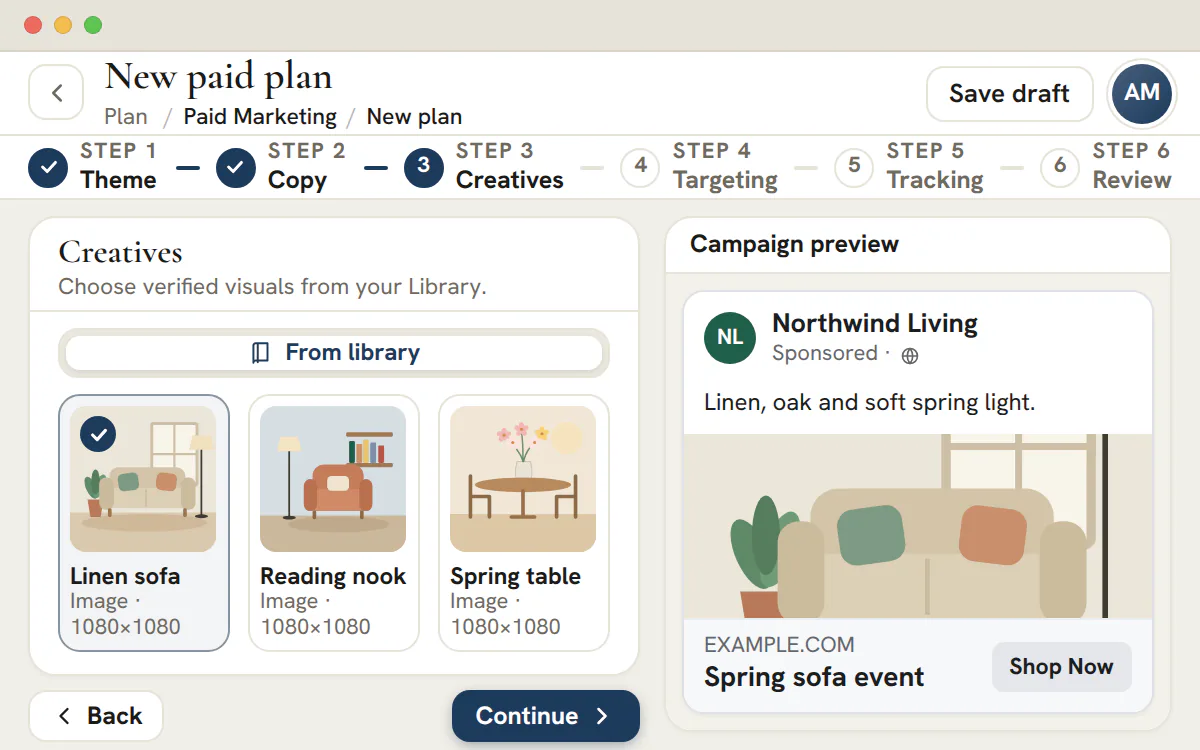
Copy, creatives and keywords come from the client's Library, so a plan is built from material your team already wrote and designed.
See the ad before anyone signs off the spend
- Google Search is the default; Search, Display and YouTube can launch, and the other Google types are plan only
- Meta plans choose from Sales, Leads, Traffic, Awareness and Engagement
- Google's length limits are checked as you type
Plan to sign-off
From saved assets to an approved plan
Each step settles one decision, so a reviewer sees the whole campaign, including the cost, before anything is built in an ad platform.
Pull in the assets
Choose copy, creatives and, for Google, keyword lists from the client's Library, or write new lines inside the plan.Set targeting and budget
Audiences, locations, budget and bidding sit in one step, with an optional targeting group from the Library.Tag it for measurement
Mark the conversion events the plan is judged on, set the landing page and, for Google, the display path, and add the UTM parameters the campaign will carry.Get it approved
Submit for approval and a reviewer decides. The approval is tied to the plan's content: edit the plan afterwards and it reads Changed since approval until it is approved again.
Plan the next campaign from the assets you already have
Add a client's copy, creatives and keywords, then plan Google and Meta campaigns from them and send each plan for approval.
The Paid planner comes with the Agency plan, from $299/month.
On this page

Google and Meta ad blueprints built step by step
One guided builder for every paid campaign you plan
Every paid plan starts from a clear set of decisions, so the builder asks for them in order rather than dropping you into a blank document. You pick the marketing theme the campaign belongs to, choose the platform — Google or Meta — and set the campaign type and objective, and the wizard adapts to what you chose: a Google plan adds a keyword step, a Meta plan focuses on audiences and creative. The result is a consistent, structured blueprint instead of a freehand brief that looks different every time.
Because each plan is scoped to a single client, your roster of campaigns stays organized by account and angle, and anyone on the team can open a blueprint and immediately understand what is being built and why. Planning a search campaign for one client and a prospecting campaign for another follow the same predictable shape, which is what makes the work reviewable and repeatable across a busy agency.
Pull saved copy, creatives and keywords into the plan
Reuse approved assets instead of starting from a blank page
The builder is wired straight into the client's marketing library, so the copy, creatives and keyword lists you have already produced are right there when you need them. As you build a Google or Meta plan it surfaces the saved ad copy for the right platform, the saved creatives for the theme, and — for Google — the keyword lists scoped to that client, so a campaign is assembled from material the team has already written, designed and approved.
When a plan needs something new, you are never stuck: you can write fresh copy inline, add keywords by hand with their match types, or add the missing lines and artwork to the Library first and pick them here. Pulling from the library is the fast path that keeps a campaign on-brand and avoids re-creating assets that already exist, while writing inline covers the gaps — so the plan is always complete before it leaves the builder.
Audience, budget and optimization targeting in one step
Decide who sees the campaign and what it costs to run
A campaign is only as good as where it points, so the targeting step gathers the delivery decisions in one place: the audiences you want to reach, the locations to run in, the budget to commit, and how the campaign should optimize. Capturing these alongside the copy and creative means the plan is a full picture of how the campaign will actually run, not just what the ad will say.
Settling targeting and budget at planning time is also what makes a plan approvable — a reviewer can see the spend and the audience before anything goes live, and account leads can sanity-check that a campaign matches the client's scope and pacing. The decisions live with the plan, so when the campaign is built in the ad platform there is no ambiguity about who it is for or what it is allowed to cost.
Conversion tracking and a UTM builder, set at planning time
Make the campaign measurable before it ever launches
Measurement is decided in the plan, not bolted on afterwards. The tracking step records which conversions the campaign should count and builds the UTM parameters its links will carry, so every click is tagged the same way from the first impression. Baking this into the blueprint means the data is clean from day one instead of being patched together once spend is already flowing.
Standardizing UTMs at planning time is the difference between attribution that just works and a tangle of inconsistent tags across campaigns. By the time the plan is launched, the source, medium and campaign naming are already agreed, so the campaign, whether the app creates it or a person builds it in Google or Meta, simply follows what the plan specifies — and the downstream reporting lines up because the tagging was deliberate.
Interactive Google and Meta ad previews as you build
Review a platform-style preview before approving spend
It is hard to sign off on a campaign you can only imagine, so the builder renders a representative preview as you assemble it: a Google-style search ad with its headlines, display URL and description, or a Meta-style feed ad with its creative and copy in a familiar platform layout. Stakeholders can review the planned content in context instead of relying on a flat description.
The preview updates from the plan, so swapping a headline, choosing a different creative or editing the copy is reflected instantly. That feedback loop can reveal awkward line breaks or long headlines at planning time, while the final ad remains subject to the destination platform's own rendering and policies.
Submit the finished plan as a brief for approval
Hand planning cleanly to delivery in Projects
A plan is only useful if it turns into work, so the final step converts the finished blueprint into a real brief: you assign the teammates who will build it, write a description, choose a reviewer and submit the plan. It becomes a review task in the Projects board for the named reviewer, who approves it or requests changes in Team > Approvals or on the plan itself, and Launch takes only a plan that is approved as it stands.
Because the brief lives in the same Projects system as the rest of the agency's delivery, the review task shows up on the board, in someone's task list and in the activity feed, and it deep-links back to the exact plan it came from. Planning hands off to execution without a single thing being re-typed or copied between tools — the campaign you designed is the campaign your team picks up and ships.
What a paid media plan has to settle before any spend
A paid plan is the written answer to six questions: where the campaign runs, what the ad says, who it reaches, what it costs, how it is measured and who signed it off.
Leave one of those open and the decision moves into the ad platform, where whoever is logged in makes it quickly and nobody reviews it. The paid planner asks the questions in a fixed order, one client at a time, and keeps the answers on a single plan, so a reviewer reads one record instead of a chat thread, a spreadsheet and a screenshot.
| Step | What you decide | What it feeds |
|---|---|---|
| Theme | The client's theme, a campaign name, Google or Meta, a campaign type and an objective | The Library copy, creatives and keywords the later steps offer |
| Copy | Headlines and descriptions for Google, or primary text, headline and description for Meta | The ad preview and, on a Google launch, the ad itself |
| Creatives | Images or video from the client's Library | Required for Meta and every Google type but Search; a Search ad is text only |
| Keywords | Google only: saved keyword lists, match types and negative keywords | The keyword set of a Search launch |
| Targeting | Locations or a Library targeting group, the budget and the bidding strategy | The budget and, for Google Search, the bid in the launch spec |
| Tracking | Conversion events, the landing page, the Google display path and UTM parameters | The ad's final URL and its tracking suffix |
| Review | A reviewer, a note for them, owners and context for the team | Approval, then Launch |
The Theme step ties the plan to one of the client's positioning themes, so the copy, creatives and keywords offered later are the ones filed under that theme in the Library. Lines written there first can be approved before anyone builds the plan, and artwork comes from the creative asset library.
Plan a Google Search campaign, step by step
Search is the default Google type, and a launch can create Search, Display and YouTube campaigns. Performance Max, Demand Gen and Shopping can be planned and approved, and the planner marks them plan only.
Choose Google, then Search
Name the campaign, pick the client's theme, choose Google and then Search, and set the objective: lead generation, conversions, traffic, brand awareness or engagement.
Pick the ad copy
A Search plan holds 3 to 15 different headlines and 2 to 4 different descriptions. Pull lines from the client's ad copy library, or write new ones in the plan with a counter beside each.
Add keywords and negatives
Apply saved keyword lists or type your own, give each a match type and add negative keywords for the searches you do not want. A Search plan needs at least one keyword before it can launch.
Set targeting and budget
Choose locations, or a Library targeting group that sets locations, languages and demographics together. Without a group, typed locations are matched to a short list of countries when the plan launches. Enter a daily budget in the ad account's currency and pick a bidding strategy.
Add the landing page and tracking
Enter the full https address the ad sends people to, an optional display path and the UTM parameters. The preview rebuilds the display URL as you type.
Read the preview and submit
The preview shows one combination of your lines the way Google can serve it: up to 3 headlines joined by a vertical bar, up to 2 descriptions and the display URL. Choose a reviewer, add a note and submit.
The ad limits the planner checks while you write
The planner holds Google's responsive search ad rules and Meta's text lengths. It flags a line that runs over its limit as you write it, and the remaining rules are checked when you launch.
| Field | Google Search | Meta |
|---|---|---|
| Headlines | 3 to 15 different lines, up to 30 characters each | One headline, counted against 40 characters |
| Descriptions | 2 to 4 different lines, up to 90 characters each | One description, counted against 30 characters |
| Primary text | Not used | One text, counted against 125 characters |
| Display path | Two optional parts, up to 15 characters each; the second needs the first | Not used |
| Landing page | A full https address on a public site; the example.com placeholder is refused | Required for Sales, Leads and Traffic plans |
| Typed locations | Matched to 6 countries: United States, Canada, United Kingdom, Australia, Germany and France. Anything finer is set in Google Ads | Countries the app can name, with a warning for the rest |
| Budget | A daily budget; a lifetime budget is flagged because a launch needs a daily one | Daily or lifetime |
| Keywords | At least one, plus optional negatives | Not used |
Google mixes the lines it is given, so write each headline to read well beside any other. A served ad shows up to 3 headlines and 2 descriptions, in a combination Google chooses, and the third headline and the second description are not always shown. No single line should need another to make sense.
The Google Search limits run again as launch checks, together with rules the builder leaves to launch: a minimum number of different lines, at least one keyword, and no exclamation mark in a headline, which Google does not allow. A repeated line counts once whatever its capitalization, so a pasted duplicate does not help you reach the minimum. Meta's lengths are display lengths: the builder counts against them, and the launch checks do not refuse a longer line.
Choosing a budget, a bid strategy and a tracking setup
Three settings decide most of what a paid plan costs and what it can prove afterwards.
Daily budget and bidding strategy
The planner offers Maximize conversions, Target CPA, Maximize clicks and Manual CPC for Google, and Maximize conversions, Target CPA, Maximize clicks and Maximize reach for Meta. Maximize conversions is the default. Target CPA asks for a target cost per conversion and Manual CPC for a maximum cost per click, both in the ad account's currency.
Match the strategy to the objective from the first step. A lead generation plan that bids for clicks is asking the platform for traffic, not leads, and a reviewer should ask why.
Landing page, display path and UTM parameters
The landing page is where the ad sends people. The display path is only the words shown after the domain in the ad, so it never changes the destination. When a Google Search plan launches, its UTM parameters are added to the campaign as a tracking suffix, and utm_source is sent as google even if the plan says otherwise. Pick one naming pattern for utm_campaign across a client's plans so reports group them without cleanup.
Conversion events record intent, not a tag
The Tracking step lets you mark which events the campaign is judged on: a conversion tag, lead events, purchase events and a CRM sync. Those switches document the plan. They do not install a tag on the client's site or create a conversion action in the ad account. For a plan that bids on conversions, the launch checks remind you to confirm an active conversion action in Google Ads before the campaign is enabled.
Tip
Name the number in the plan's note
Write down which result the client will be judged on. Once the client's account is connected, the results of a Search campaign are reported in Google Ads reporting.
From an approved plan to a paused campaign
Approval covers exactly what was reviewed. Launch is where the platforms differ.
Submitting a plan creates a review task in Projects for the reviewer you picked and locks the plan, so the version being judged cannot move. That decision is recorded in Team > Approvals or from the plan's own page, and completing the Projects task alone approves nothing. The reviewer either approves the plan or returns it with a written reason that the submitter can read. Any teammate holding the Approve permission for the client can decide, and an Agency Admin can approve their own plan, which is recorded as a self-approval.
Change what an approved plan would launch, such as its copy, targeting, budget or tracking, and its status flips to Changed since approval. Edits to the owners and the description in the brief are not part of the content. A changed plan cannot launch until someone approves the new version, so no campaign goes out on content nobody reviewed.
| Plan | What the app does | What you do |
|---|---|---|
| Google Search, Display or YouTube | Checks the plan against Google's limits and the client's mapped Google Ads account, asks you to confirm the budget, then creates the campaign paused. Display and YouTube are created as Demand Gen campaigns on their own channel, and YouTube uploads the Library videos first | Turn the campaign on from Live on Google Ads when you are ready to spend |
| Meta, any type | Checks the plan and the client's saved Meta accounts, then creates the campaign, ad set and ads in the client's ad account, paused | Turn it on from Live on Meta when you are ready to spend |
| Any plan, launched by hand | Builds the launch spec, or for Meta an export of the campaign, ad set and ad, all paused, and opens a task | Create the campaign in the ad platform from the spec, then mark it launched |
| Performance Max, Demand Gen and Shopping | The checks fail with a plan-only message, so no launch is created | Build the campaign in Google Ads from the approved plan |
Anyone with the Edit permission can ask for a launch. Starting it, and recording a hand launch as done, takes the Publish permission, so a request from someone without it waits in Approvals for a person who has it. Each launch runs its checks first and lists every check with its result, and where the plan can fix a problem the check links to the step that does. Failures stop the launch, and warnings are left for you to weigh.
The budget confirmation exists because Google can spend up to twice the daily budget on some days. The campaign is created in the account mapped to that client in Google Ads reporting, and if Google refuses a part of it, the launch stops and its record says what was and was not created.
Note
An automatic launch needs a connected account
Creating the campaign from the app needs the client's Google Ads account mapped and connected in Google Ads reporting or, for Meta, an Agency Admin's Meta connection with the client's ad account and Page saved in Meta settings. If there is no connection, or the plan type cannot launch from the app, the same spec goes out as a hand launch.
A reviewer's checklist before a paid plan is approved
The launch checks test limits and completeness. A reviewer tests judgment, and six questions cover most of it.
- Do the objective and the bidding strategy agree? A lead generation plan that bids for clicks needs a reason in the note.
- Does every headline read well beside any other, and does each line still make sense without its neighbors?
- Is the landing page the one the client expects, on https, and does the UTM pattern match what the client's reports group by?
- Do the negative keywords cover the searches the client has said it does not want?
- Is the daily budget the figure the client agreed, in the ad account's currency?
- Is conversion tracking confirmed in the ad account itself, and not only switched on in the plan?
Plan
Plan availability
Paid planning starts with the Agency plan, $299 a month, which also brings Social planning and connected reporting. Studio, at $99 a month, keeps the Email and SMS planners and leaves Paid and Social out. Organic posts are planned in social campaign planning.
Frequently asked questions
What is paid media campaign planning software?
It is software for deciding and recording a paid campaign before any money is spent: platform, objective, ad lines, keywords, audience, budget, tracking and sign-off. The paid planner does this per client from the client's Library, then hands the approved plan to a launch step. It plans and hands off. It is not an ad manager, and it does not report results.
Which paid campaigns can the planner create for me?
Search, Display and YouTube plans and Meta plans, once the client's Google Ads or Meta account is connected. Launch builds the campaign in that connected account as a paused campaign, so nothing spends until someone turns it on. Performance Max, Demand Gen and Shopping are plan only, and any plan can still go out by hand from a frozen spec and a task.
How many headlines and descriptions does a Google Search plan need?
At least 3 different headlines, up to 15, each up to 30 characters. It also needs 2 to 4 different descriptions of up to 90 characters. Repeated lines count once, so pasting the same headline twice does not help, and a served ad shows fewer lines than you supply.
Does the paid planner connect to Meta Ads?
Yes, when you launch. An Agency Admin connects Meta once, then saves a Page, an ad account and a pixel for each client in Meta settings. A Meta plan is built, previewed and approved like any other, and Launch then creates the campaign, ad set and ads in that account, paused, or hands the same plan over as an export and a task. Once it runs, its results are read in Meta Ads reporting.
What happens when a paid plan is edited after approval?
The approval covers the exact content that was reviewed, so a change to the copy, targeting, budget, tracking, name or theme changes the plan's status to Changed since approval. Edits to the owners and description in the brief do not. The plan cannot launch until a reviewer approves the new version, and it is locked while it waits for a decision.
Which plans include the paid media planner?
The Paid planner needs the Agency plan or higher. Agency costs $299 a month in US dollars and adds the Social planner and connected Google Ads reporting. Studio, at $99, covers the Email and SMS planners only, so a Studio workspace can plan text and email sends but not paid or social campaigns.
Can I use a Library targeting group in a paid plan?
Yes. The Targeting step can use a paid targeting group from the Library's Audiences in place of typed locations. The group sets locations, languages and demographics together, and the launch checks it before use. Because the group is part of the plan's content, changing who it reaches means the plan needs approval again.