
Marketing positioning
Turn positioning into campaigns
Document each client's marketing angle — audience, message pillars, owner and timing — brainstorm new angles with AI, then thread them through your whole library and campaign plans. Try the demo below, or start your own workspace.
Already have a workspace? Sign in
- Plans from $99/month
- Built for multi-client agencies
- Your brand across the console
Marketing positioning
Marketing positioning and campaign messaging software for agencies
Most of the work an agency produces — the ads, the emails, the landing pages — flows from a positioning decision that usually lives in one strategist's head or buried in a kickoff deck nobody reopens. The Themes workspace in AI Marketing Dashboard makes that decision a first-class, documented object: a marketing angle per client, with its audience, message pillars, owner and timing written down once, so every downstream asset and campaign is built off the same strategy instead of being reinvented per deliverable. It is the layer that sits upstream of your copy, creatives and campaign builders — the reason a client's marketing feels intentional rather than improvised.
Positioning with AI
Brainstorm angles, then keep the ones that fit
AI suggestions arrive as drafts. A strategist decides which become themes the rest of the Library builds on.
Five lenses
Ask for the angle you are missing
- Save a suggestion with one click as a draft theme
- Press More ideas to extend the shortlist without repeating what the client already has
- Nothing is shared with the client until you share it
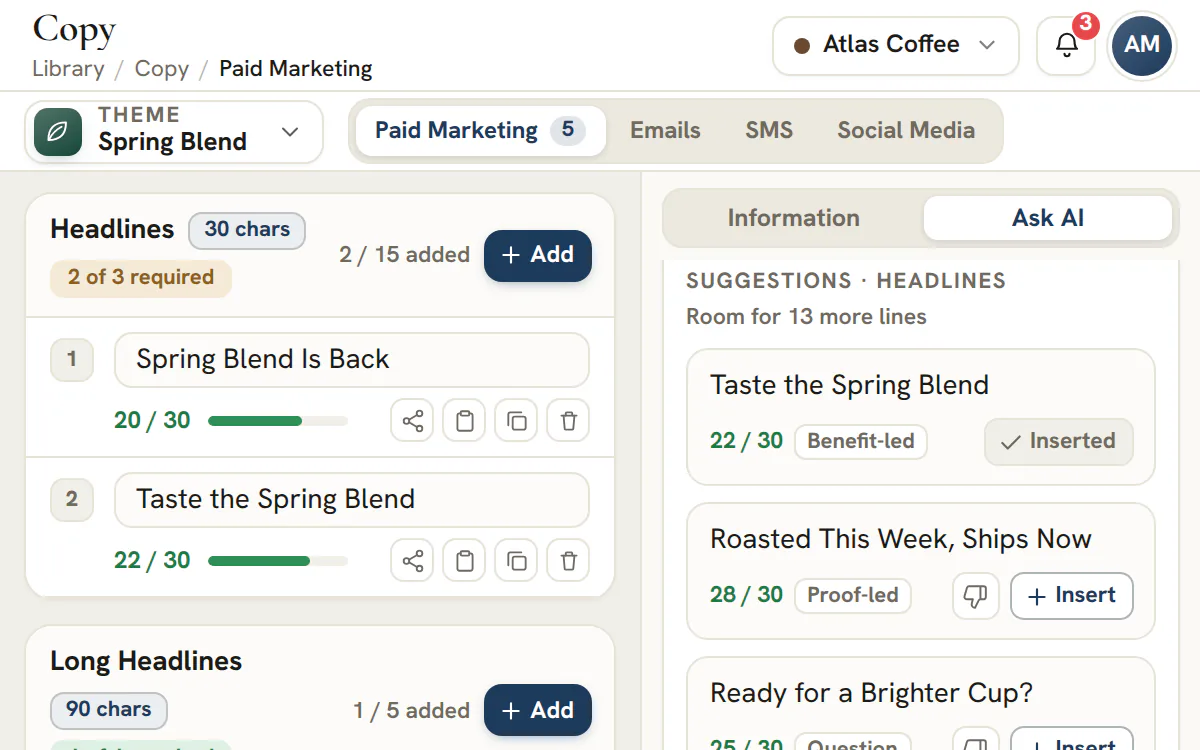
- Once a theme exists, Ask AI in the Library drafts copy for it, as shown here
From angle to approved work
One decision, four places it shows up
Write the theme
Name the angle, its audience and message pillars, then give it an owner and a status. Seasonal and offer-led angles carry a promo window.File the Library under it
Keywords, copy, creatives, pages, forms and emails are organised by theme, so every asset knows which angle it serves.Pull it into a plan
The paid, social, email and SMS planners offer the assets filed under the chosen theme, and a plan's approval is tied to its content.Show the client the strategy
Share a theme to the client's portal with one switch. Library assets pass your review first, then the client's own review.Scale plan
Start every campaign from a written angle
Add a client to your workspace and write their first theme.
Plans start at $99/month.
On this page

A documented positioning angle for every client
Strategy you can point to, not strategy you remember
A theme is a single, named marketing angle for a client — its type, its status and its owner all recorded — so the strategic decision behind a quarter of work exists somewhere a teammate can read it. Instead of positioning living in a strategist's head, a Slack thread or a deck that gets stale, each client's angles sit in one place where anyone picking up the account can see what direction the marketing is taking and why.
Because the angle is an object rather than a memory, it survives handoffs, new hires and the inevitable mid-campaign pivot. When a client has several angles in play — a flagship push, an always-on retention play, a seasonal promotion — they line up side by side with a clear owner and status on each, so the team always knows which positioning is live, which is being drafted and who is accountable for it.
Audience and message pillars that give the work a spine
The few things every asset should say, agreed in advance
Each theme captures who it is talking to and the message pillars the campaigns will lean on — the two or three core ideas that should show up across the ads, the emails and the pages. Settling the target audience and the pillars at the strategy level means the people writing copy and briefing creatives are working from the same brief, not their own interpretation of a vague goal.
That shared spine is what keeps a client's marketing coherent as it scales across channels and contributors. A media buyer, a copywriter and a designer can each produce on-brief work without a meeting, because the audience and the pillars are written into the theme they are all building from — and a reviewer can check a deliverable against the stated pillars instead of a gut feeling.
An owner and a promotional window on every angle
Who is accountable, and when it runs — set before the assets exist
Every theme names the strategist who owns it, picked from the real people in your workspace rather than a generic label, and carries a lifecycle status — draft, scheduled, active, archived — that says exactly where the angle has got to. Positioning without an owner quietly becomes nobody's job; putting a face and a state on each angle means a client's strategy has someone accountable for it and a status anyone can read at a glance.
Seasonal and offer-led angles also carry the promotional window they live inside, so the timing is a strategic choice made upfront rather than something each person improvises while building an individual asset. Together the owner, the status and the window make the calendar legible: you can see which angles are live now, which are queued for a moment later in the year, and where two pushes might collide for the same audience.
Brainstorm new positioning angles with AI
A shortlist to react to, instead of a blank page to fill
The hardest part of positioning is the first draft, so Themes carries an Ask AI workspace that turns a one-line brief into a shortlist of complete angles. Choose the lens you want to think through — core positioning, a promo or offer, an audience you are not speaking to, an objection that keeps costing you deals, or a seasonal moment — describe what you are after, and each suggestion comes back with a name, a written angle, a target audience and message pillars, already scoped to the client you are working on. A single run returns a focused shortlist drafted together in one pass, so the angles complement each other instead of repeating one another, and More ideas extends the list when you want further options.
Suggestions are starting points, not decisions. Any one of them saves as a draft theme in a single click, landing in the client's grid exactly like a hand-written angle so a strategist can rewrite, sharpen or discard it before anything downstream is built off it. Because Ask AI reads the client's existing themes, Profile, website, published research and brand guide, including the words its customers use, and never repeats an angle the client already has, a second brainstorm pushes the thinking forward rather than looping back over ground the account has already covered.
The canonical organizer your whole marketing stack hangs off
One angle, threaded through every downstream asset and plan
A theme is the canonical organizer — the key — that the rest of the marketing tooling references. Keyword lists, copy, creatives, landing pages, forms and emails in the Library are all organized under a theme, and the paid, social, email and SMS campaign planners pull exactly the assets scoped to that angle. A single positioning decision therefore threads through every downstream deliverable instead of each tool keeping its own disconnected idea of the strategy.
This is the line that matters: the theme is not the finished copy and it is not the campaign builder — it is the upstream organizer they both depend on. When a planner assembles a paid campaign, it surfaces the copy and creatives already filed under that client's angle; when a strategist refines the angle, every tool downstream is pointing at the same source. The connection is what makes the stack feel like one system rather than a folder of unrelated documents.
How to write a theme a copywriter and a media buyer can both use
Positioning and campaign messaging become useful once they are written down. A theme earns its place when two people who have never met can brief from it and produce work that fits together.
Name the idea, not the channel
Call it by what the client stands for this quarter, such as Month-end, handled, rather than Facebook push. Channels are chosen later, inside the plans.
Say who it is for
Write the audience in a line a media buyer could turn into a targeting brief. If you cannot picture one real person, the audience is too wide.
Write the angle
One or two sentences that finish the thought: choose this client because. The angle is the reason, and the pillars that follow are the evidence.
Add the pillars
List the few claims every asset should be able to support, each one something the client can prove. A pillar any competitor could also claim is a slogan, not a pillar.
Choose General or Promo
General suits an angle that runs all year. Promo suits a time-boxed offer, and its window is written as plain words, such as the dates the offer runs.
Give it an owner and keep it as Draft
Pick the strategist who answers for the angle, and leave the status on Draft until it has been reviewed.
| Field | Example entry |
|---|---|
| Name | Month-end, handled |
| Audience | Owners of small trading companies who dread closing the books |
| Positioning angle | We close your books on a fixed schedule, so you can stop chasing numbers |
| Message pillars | A fixed monthly close date; one accountant who knows your business; reports in plain English |
| Type, status and owner | General, Draft, the account strategist |
General or Promo, and what each status means
Two types and four statuses cover the life of an angle, and the status is always changed by a person, never by a date.
| Status | Meaning | Worth knowing |
|---|---|---|
| Draft | Being written, or just suggested by AI | Nothing downstream depends on it yet |
| Scheduled | Lined up to run later | Needs the theme to be approved, or approval skipped, in review first |
| Active | The angle in use now | The same approval rule applies |
| Archived | History | Collapses into an Archived section and leaves the pickers for new work, while the assets filed under it keep their label |
A promo window is a note, not a scheduler. Writing a start and end date in it tells the team and the client what the offer covers, but the status stays where a person left it. Plan a moment to move a finished promotion to Archived, rather than expecting the date to do it.
Brief Ask AI so its suggestions are worth keeping
AI is quick at a first draft and has no way of knowing your client's year. Give it the lens and the gap, then let a strategist decide.
| Lens | What it explores | Run it when |
|---|---|---|
| Core positioning | The lasting reasons this client gets chosen at all | A new client has no written angle yet |
| Promo & offer | Time-boxed offers and the moments they hang on | A sale, a launch or a deadline is coming up |
| New audience | A buyer the current themes do not yet speak to | Every existing theme addresses the same buyer |
| Objection & proof | The hesitation that stops people buying, answered with proof | Enquiries arrive but stall before anyone buys |
| Seasonal moment | Calendar-driven pushes you can plan ahead of | A busy or quiet season is approaching |
Add one line about what you need, such as the audience you are missing. A single run returns a focused shortlist of complete angles drafted together, each with a name, an angle, an audience and pillars, scoped to the client you have selected. If you want more, More ideas extends the list. Where your role allows it, Ask AI reads the client's Profile, website, published research and brand guide, and a note on the panel says what it used. It also sees every theme the client already has, archived ones included, so it does not hand back an angle you have already written.
Everything arrives as a draft, and nothing is shared with the client. A one-click AI Campaign from the Library overview follows the same rule when it drafts five themes at once: you review, edit or discard each one before it goes anywhere.
Follow a theme through the Library and the campaign plans
A theme is the filing key for creative work, so choosing it early saves a lot of sorting later.
| Tool | How the theme is used |
|---|---|
| Keywords and Copy | Target and negative lists, and ad and social copy, are filed under a theme |
| Creatives, Site pages, Forms and Emails | Each asset is organized by the theme it serves, and every picker offers the client's themes |
| Blogs | Posts are grouped by theme, with a section for posts whose theme was removed |
| Booking scripts | A script set belongs to a theme, and can be duplicated to another one |
| Campaign plans | The paid, social, email and SMS builders list the assets filed under the theme you pick |
The practical effect is that a plan is assembled from approved parts. Pick the theme in the paid campaign planner or the social planner and the ad copy, keyword lists and creative assets for that angle are the ones offered, which makes it harder for a campaign to drift onto another message. The paid and social planners belong to the Agency plan and above.
Tip
Archive a finished theme instead of deleting it
An archived theme keeps its history and the assets filed under it. Deleting a theme leaves its keyword lists and copy without a theme, and those two tools hide such orphans.
Share a theme with the client: your review first, then theirs
The client sees the strategy only after your team has signed it off, and they can answer it in the same place.
Submit it for internal review
Anyone who can edit the Library can send the theme in. A reviewer then approves it, asks for changes or skips approval.
Share it once it has passed
The share switch waits for an approval or a skip. A theme that was already shared before reviews existed keeps working and is marked as predating approvals.
Request the client's approval
Add an optional note. That note is the one piece of your own wording the client sees on the request.
The client answers in the portal
The client sees the angle, the audience, the pillars and the promo dates. A client admin can approve, and any portal member can ask for changes.
Reopen or undo if needed
A portal admin can undo an approval within an hour, and your team can withdraw a request or reopen the review.
Plan
Sharing needs the client portal
Writing, reviewing and archiving themes is part of every plan. Showing a theme to a client needs the client portal, which means the Scale or Enterprise plan.
Five mistakes that make a theme useless, and one rule worth remembering
Most weak themes fail in the same few ways, and each one is cheap to fix while the theme is still a draft.
- Naming a theme after a channel, so the whole team debates the medium when the message was the point.
- Writing pillars any competitor could sign, which leaves the copywriter nothing distinctive to prove.
- Keeping more themes active than your team can brief and review, so none of them gets a proper campaign.
- Leaving a promo window vague, when the dates are the part a media buyer and a client both need.
- Treating a client's silence as approval, instead of requesting their answer and recording it.
Note
Editing an approved theme does not reopen its review
A change after approval is not detected automatically, so an authorized reviewer reopens the review when the change matters. Treat a rewrite of the angle or pillars as a reason to do exactly that.
Frequently asked questions
What is a marketing theme in an agency workflow?
A theme is one named positioning angle for one client, written down with its audience, message pillars, owner and status. It sits upstream of the keywords, copy, creatives, pages and campaign plans, which are all filed under it, so everything made for that angle starts from the same brief instead of each person's memory.
How many themes should a client have at once?
The product sets no limit. A better test is whether a copywriter could write for each theme without asking you a question, and whether your team can brief and review all of them. If you have more active themes than that, archive the ones that have finished or never earned a campaign.
What is the difference between a General and a Promo theme?
A General theme is an angle that runs all year, such as why a client gets picked at all. A Promo theme carries a time-boxed offer and a promo window written as plain text. Both have the same fields, owner and status, and a seasonal or offer-led idea from Ask AI arrives as a Promo draft.
Does the promo window start or stop a theme automatically?
No. The window is text that tells your team and the client when the offer applies. The status never changes by date, so a person moves the theme to Archived when the promotion ends. That keeps an offer from disappearing or appearing on the strength of a typo in a date.
Why can't I set a theme to Active or Scheduled?
Where the approval layer is on, Active and Scheduled wait until the theme has been approved or approval has been skipped. Submit it for review, or ask someone who holds approval rights to approve or skip it. Draft and Archived are always available, so the theme is never stuck.
Does Ask AI use my client's information?
Where your role allows it, Ask AI reads the client's Profile along with its website, brand guide and published research, including what that research found about the words, questions and objections of its customers, and a note on the panel states what it used. It also sees every theme the client already has so it avoids repeating one. Suggestions arrive as unshared drafts, and anyone who can create Library content can run it.
Can clients see our themes, and what exactly do they see?
Only themes you share, and only after your internal review, on the Scale and Enterprise plans. The client sees a card with the angle, the audience, the message pillars and the promo dates, with the theme's own color and icon. Your owner field and internal comments are not part of what they read.
What happens to a client's assets when I archive a theme?
Nothing is removed. An archived theme drops into a collapsed Archived section and leaves the pickers for new work, while the keywords, copy and creatives filed under it keep their label. Ask AI in the other Library tools will not draft for an archived theme. Deleting is different, because it leaves keyword lists and copy without a theme.