
Client meetings
Run client meetings that don't get forgotten
Schedule the call, meet over built-in video, capture the agenda, notes, decisions and actions, and get an AI transcript and recap — all tied to the client's work. Try the demo below, or start your own workspace.
Already have a workspace? Sign in
- Plans from $99/month
- Built for multi-client agencies
- Your brand across the console
Client meetings
Client meeting management software for marketing agencies
A client call is only as valuable as what survives it. The Meetings workspace in AI Marketing Dashboard manages the whole arc — scheduling, the video call itself, the agenda, the live notes, the decisions and the follow-up actions — in one place, then turns the recording into a searchable transcript and a written recap. Every meeting is tied to the client it belongs to and the work it touches, so context never lives only in someone’s memory.
AI recaps
Record the call, keep the decisions
Built-in video meetings can be recorded, transcribed and summarised for everyone on the account.
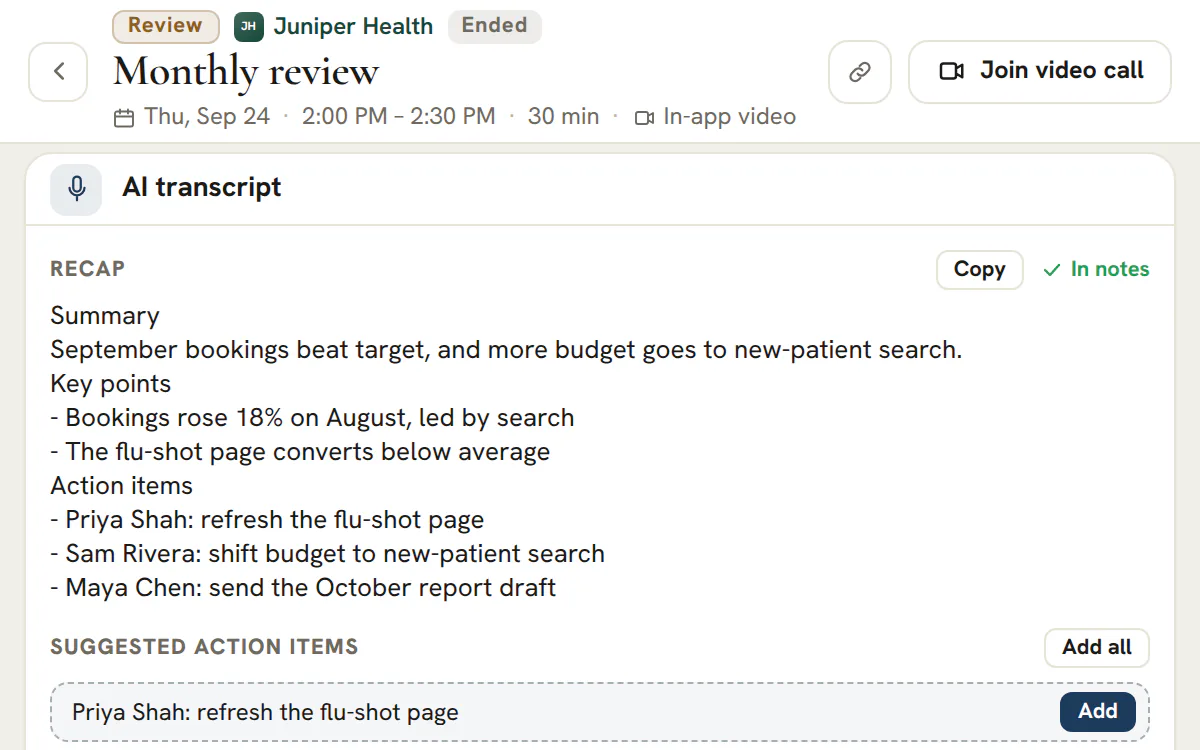
Transcripts and recaps
Read the recap, search the transcript, add the actions
- A transcript you can search and copy
- A written recap to copy or add to the meeting notes
- Agency includes 10 transcription hours a month, Scale 40
The calendar and the Hub
Everything about a call, on one page
Schedule it, run it in video or with a pasted link, and capture what was agreed.
Calendar
Five views, and the whole day on screen
Day, week, month, year and agenda. Week and day run midnight to midnight, with hours outside your working day tinted.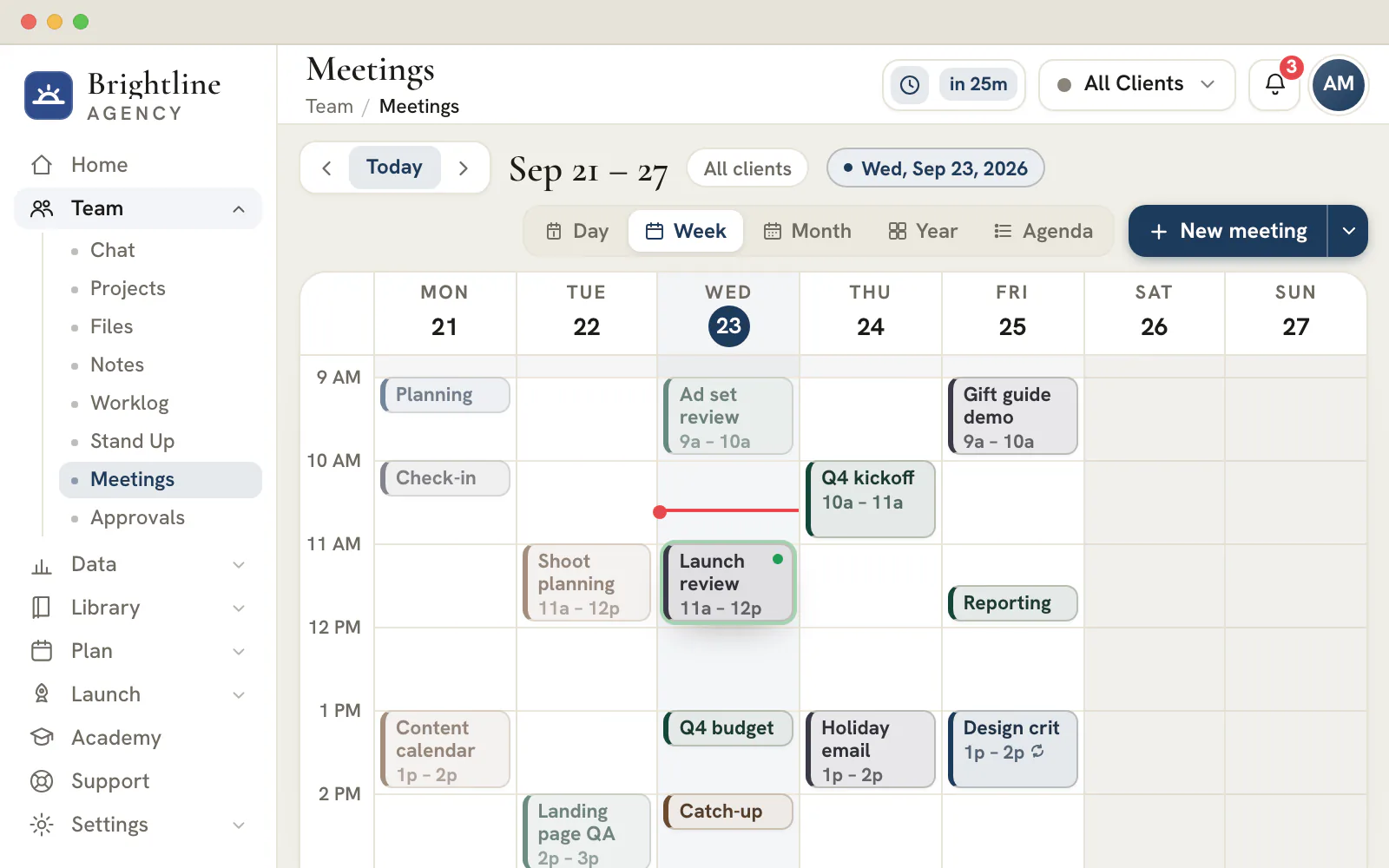
Illustration
Meeting Hub
Run the call from one page
Every meeting opens a hub with the previous meeting's recap at the top.
- An agenda you check off as you go
- Live notes in rich text
- Decisions, recorded as they are made
- Action items that land in a project of their own
Video
Built-in room, or a pasted link
Host in the built-in video room, or paste a Google Meet, Microsoft Teams or Zoom link and it travels with the invite.Time zones
Each meeting keeps its own clock
Give a meeting a time zone and everyone sees it recalculated on their own clock. Changing your view never moves the meeting.Overlays
See what else is on
Lay the company calendar, approved time off and booking-page calendars over the grid before you pick a slot.
Make every client call count after it ends
Book the first meeting in your new workspace and keep what was agreed beside the client's work.
Plans start at $99/month.
On this page

Scheduling that lives next to the work, not in a separate calendar
Week and agenda views, with the right people invited
Book a meeting in a week-grid or agenda calendar, set the type, day, start time and duration, pick a platform or location, invite attendees from your team and the client's contacts, and add a description — then reschedule in place when plans change. The grid adapts to each meeting's length, so a fifteen-minute check-in and a ninety-minute workshop both read clearly at a glance.
Every meeting carries its join link, either the built-in video room or the Google Meet, Teams or Zoom address you paste in, so the meeting your team books is the meeting the client actually joins. Because scheduling sits inside the same workspace as projects and files, booking a call never means leaving the account you are working on.
Built-in video meetings — or your client's preferred platform
Join a real call in the console, or use your Meet/Teams/Zoom link
Default a meeting to built-in video and attendees join a real, branded in-app call — participant grid, screen sharing, mute and camera controls, a live roster and in-call chat — without anyone installing anything. There is no external room to wrangle; the call opens where the meeting was booked.
Prefer the client's tooling? Choose Google Meet, Microsoft Teams or Zoom, paste the meeting's link, and it goes out with the invite and the Join button, while in-person and phone meetings simply skip the link. One scheduler covers however your clients like to meet.
An agenda, live notes and action items for every meeting
Run the call from a structured hub
Each meeting opens a hub with an agenda you can check off as you go, a live notes area for what is actually said, a record of decisions, and action items you assign so the follow-up has an owner before the call even ends. Nothing has to be retyped into another tool afterward — the structure of the meeting is captured as it happens.
Because actions and decisions are first-class, the meeting produces accountable outcomes, not just a page of notes. The next time you open the account, what was agreed and who owns it is right there.
AI transcripts and recaps from the recording
Record the call, get the transcript and the summary
Turn on recording for a built-in meeting and the call's audio is captured, transcribed with speech-to-text into a timestamped transcript, and distilled into a written recap — so the person who could not attend can read what happened in two minutes instead of watching an hour of video.
The recap and full transcript attach to the meeting, becoming part of the client's permanent record. Searchable, shareable and dated, they turn a one-time conversation into a reference your whole team can rely on.
The client's whole workspace, right beside the meeting
Projects, files, the channel and the notebook, in context
The meeting hub carries a live rail of the client's real work — current projects and tasks, the shared files, the team channel and the notebook — pulled from the rest of the console, not a stale copy pasted in. When a question comes up on the call, the answer is one glance away instead of a tab-hunt.
It is the difference between a meeting that floats free of the account and one that is grounded in it. Walk into every client call already surrounded by the context that call is about.
Recaps and a real meeting history per client
Every call links to the one before it
A recent-recaps rail keeps the last conversations a click away, and each meeting links to the genuine previous meeting for that client — chronologically, not a hand-picked guess — so you can pick up exactly where you left off and the first meeting with a new client shows an honest 'first meeting' state.
Over time that becomes the narrative of the relationship: what you discussed, what you decided, what you shipped. It is the institutional memory that keeps account changes from resetting a client relationship to zero.
Plan, run and close a client call in six steps
A client call goes well when the work around it is done in order: the right account, a purpose, a room, the right people, a record and a follow-up.
Begin on the right account
Check which client the header is showing and which calendar view you are in. Every time on screen is written on your own clock, and the Up next card counts down to the next meeting for the client in view.
Name it, type it, pick an agenda
Give the meeting a title that states its purpose, choose one of seven types and tick the box that starts it with that type's agenda. The items are a running order you can edit.
Fix the time, the zone and the room
Choose the date, start and length, then the time zone those times are written in. Pick in-app video, or paste an https join link for Google Meet, Microsoft Teams or Zoom. A phone call needs no link, and an in-person meeting takes a place instead.
Invite the people who need to be there
Add teammates and the client's contacts from the attendee list. Teammates you invite are notified, and a repeat setting turns a standing call into a series.
Run it from the Meeting Hub
Tick agenda items as you cover them, take notes in the rich-text Live Notes and write down only what was agreed under Decisions. The hub saves as you go.
Close the loop before the next thing starts
Give every action item an owner, send the open ones to Projects and copy or download the recap for anyone who was not on the call.
Seven meeting types and the agenda each one starts with
The type you pick decides the running order you start from. Edit it freely: the template is a prompt, not a rule.
| Type | Starting agenda | Reach for it when |
|---|---|---|
| Weekly Sync | Wins since last week · Campaign performance review · Blockers & asks · Priorities for next week | A standing check-in with a client |
| Review | Goals recap · Results vs targets · Learnings & insights · Decisions needed · Next steps | A campaign or a quarter has finished |
| Kickoff | Introductions · Goals & success metrics · Scope & deliverables · Timeline & milestones · Roles & communication | A new engagement is starting |
| Working Session | Session goal · Work through the material · Capture decisions · Assign follow-ups | You are building or planning together |
| Standup | Yesterday · Today · Blockers | A short team sync that you want to hold live |
| 1:1 | How are you doing? · Wins & challenges · Feedback both ways · Growth & next steps | A manager and a teammate |
| Interview | Introductions & background · Role overview · Candidate questions · Evaluation & next steps | A hiring conversation |
Internal meetings such as a 1:1 or an interview are scheduled on the agency's own account instead of a client's. Their action items stay in the hub, because Projects tasks belong to a client. A team that would rather write its standup than hold it can use Stand Up, which replaces the meeting with a daily written check-in.
Tip
A repeat is a set of real meetings
Repeat a meeting daily on weekdays, weekly, every two weeks or monthly, for up to 12 occurrences. Each one is a real meeting with its own hub, so notes and decisions never bleed between weeks. You can reschedule or delete a single occurrence, or delete the whole series.
Running a kickoff that sets the account up well
A kickoff has one job: to end with decisions that stop the first month from being renegotiated. The Kickoff agenda already follows that order.
| Agenda block | Leave with | Record it as |
|---|---|---|
| Introductions | Who owns what on each side | A line in the Live Notes |
| Goals and success metrics | The few measures the client will judge the work by | A decision |
| Scope and deliverables | What is included and, just as important, what is not | A decision |
| Timeline and milestones | The first dates both sides will hold you to | Action items sent to Projects, with the real dates set on the tasks |
| Roles and communication | Who approves work, where questions go and how often you meet | A decision, then a repeating Weekly Sync |
Send the agenda to the client's contacts yourself before the call, for example by email, so they arrive prepared; the app notifies only the teammates you invite. Afterward, share the recap the same day, while the answers are fresh. The decisions you recorded are the record to point to when a scope question comes up three weeks later.
Notes, decisions and action items are three different records
Mixing them is how an agreed change gets lost in a page of notes. The hub keeps them apart on purpose.
| Record | What belongs in it | What happens to it next |
|---|---|---|
| Live Notes | What was said: context, questions, numbers. Headings, lists, quotes and dividers are available | Stays with the meeting and goes into the recap export |
| Decisions | Only what was agreed, one line each | Appears in the next meeting's Last meeting recap automatically |
| Action items | One job with one owner | Goes to Projects as a task for client meetings, and open items are offered again at the next meeting |
| Recap | The whole meeting on one page: agenda, notes, decisions and actions | Copied, or downloaded as a Markdown file |
A useful test for a decision: could a teammate who missed the call act on it without asking anyone? If not, it is still a note. The hub's side rail shows the client's current projects, files, chat channel and notebook beside the agenda, so reference material is a glance away.
A task created from an action item starts in your first open status at medium priority, assigned to the owner when that person is a teammate, and due a week after you send it. Move the date to the real deadline.
Scheduling across time zones so nobody has to do the math
Each meeting remembers the clock it was written on, and everyone else sees it converted to theirs.
- Choose the zone in the composer. It starts on the zone your calendar is showing, so a meeting matches what you were looking at when you booked it.
- Use the zone control in the calendar toolbar to see next week in a client's city. It changes only the view on your device and never moves a meeting.
- Week and Day draw the whole day, midnight to midnight, and tint the hours outside your working day, so an awkward slot is visible before you offer it.
- Open the Calendars menu to overlay holidays and important dates, approved time off and booking-page calendars before you choose a slot.
Note
External rooms need a pasted link
A Google Meet, Microsoft Teams or Zoom meeting carries the https link you paste in, and the composer asks for it. The tool does not create the room for you, so create it in that service first. Only the person who scheduled a meeting, or an administrator, sees the Edit option.
Recording, transcripts and recaps: what the Agency plan adds
Recording belongs to in-app video meetings. It turns a call into a searchable transcript and a short written recap, and it is the one part of this tool that depends on your plan.
Plan
Transcription hours by plan
Agency includes 10 hours of transcription each month and Scale includes 40. Studio includes none, and Enterprise includes unlimited hours. Settings shows the hours used so far this calendar month. Apart from that, the Meetings tool is part of every plan, though the booking-page overlay only has bookings to show on plans that can publish booking pages, Agency and up.
- Host the meeting on in-app video. A meeting held on Meet, Teams or Zoom, by phone or in person has no recording here, and neither does a call started from a Chat conversation.
- Press Record & transcribe in the call. You are asked to confirm that every participant has consented before it starts. An administrator, the person who scheduled the meeting or a teammate granted recording permission can start it.
- After the call, the hub shows a transcript with a speaker label on every segment, then a recap in three parts: a summary, key points and action items.
- Search or copy the transcript, add the recap to the Live Notes, and turn suggested action items into real ones singly or in a batch.
The recap is drafted from the transcript and asked to stay faithful to it, but treat it as a first draft. Read it before it goes to a client, and keep the human version of the decisions in the Decisions tab.
Frequently asked questions
How many hours of AI transcription does each plan include?
The Agency plan includes 10 hours of transcription a month and Scale includes 40. Studio includes none, and Enterprise includes unlimited hours. Settings under Subscription shows how many hours you have used against your allowance.
Who is allowed to start a recording?
An agency administrator, the person who scheduled the meeting, or a teammate who has been granted recording permission. Starting it asks you to confirm that every participant has consented to being recorded. Recording works only for a saved meeting hosted on in-app video.
Can I get a transcript of a Zoom or Google Meet call?
Not here. Transcripts come from recording a meeting held on the in-app video option. A Google Meet, Microsoft Teams or Zoom meeting carries the link you paste in and takes place on that service, so the hub keeps its agenda, notes, decisions and actions but has no transcript.
Can I schedule a client call that repeats every week?
Yes. Choose daily on weekdays, weekly, every two weeks or monthly, and set up to 12 occurrences. Each is created as a real meeting with its own agenda, notes, decisions and actions. You can edit or delete one occurrence, or remove the whole series with an undo.
Can a teammate change a meeting that I scheduled?
Only the person who scheduled a meeting, or an administrator, sees the Edit option. Everyone else can open the meeting and its hub, but the time and details do not shift under the person who booked it. An administrator can step in if the scheduler has left the team.
How do I share a recap with someone who missed the call?
Open the meeting's hub and choose Copy recap, or Download recap as a Markdown file. The export holds the agenda with its ticks, the notes, the decisions, the action items with their owners and the transcript recap when there is one, ready to paste into an email or a note.
What happens to action items that are still open at the next meeting?
When the next meeting for the same client opens, the hub names the previous meeting and offers to carry over its open action items. Items already sent to Projects show a link to their task, and decisions from the last call appear in the recap at the top.
What does a sent action item look like in Projects?
A task arrives in the meeting's own project, whose name carries the meeting title, its date and the words Action Items. The task starts in your first open status at medium priority, goes to the owner when that owner is a teammate, and falls due a week after you send it. It links back to the meeting, and sending it again updates it.