
Agency workspace
A white-label workspace for your agency
Brand the console with your logo, manage your plan and billing, control team seats, lock down security and tune notifications — the agency account configuration that lives in the same workspace as the work. Try the demo below, or start your own workspace.
Already have a workspace? Sign in
- Plans from $99/month
- Built for multi-client agencies
- Your brand across the console
Agency workspace
White-label workspace and billing settings built for marketing agencies
The settings that make a console feel like your own — your logo, your plan, your team and your security posture — are usually scattered across a billing portal, an identity provider and a half-dozen admin screens. Settings in AI Marketing Dashboard keep the configuration of your agency's account in a single place: brand the workspace, choose the subscription that decides your limits, manage who has a seat, lock down account security, and tune notifications — all without leaving the console your team already works in. This is the operational foundation that lets a studio run its own business while it runs its clients' marketing.
Make it yours
Brand it, publish on it, build on it
White-label branding is on every plan. Custom domains come with Scale, and API keys with Enterprise.
On every plan
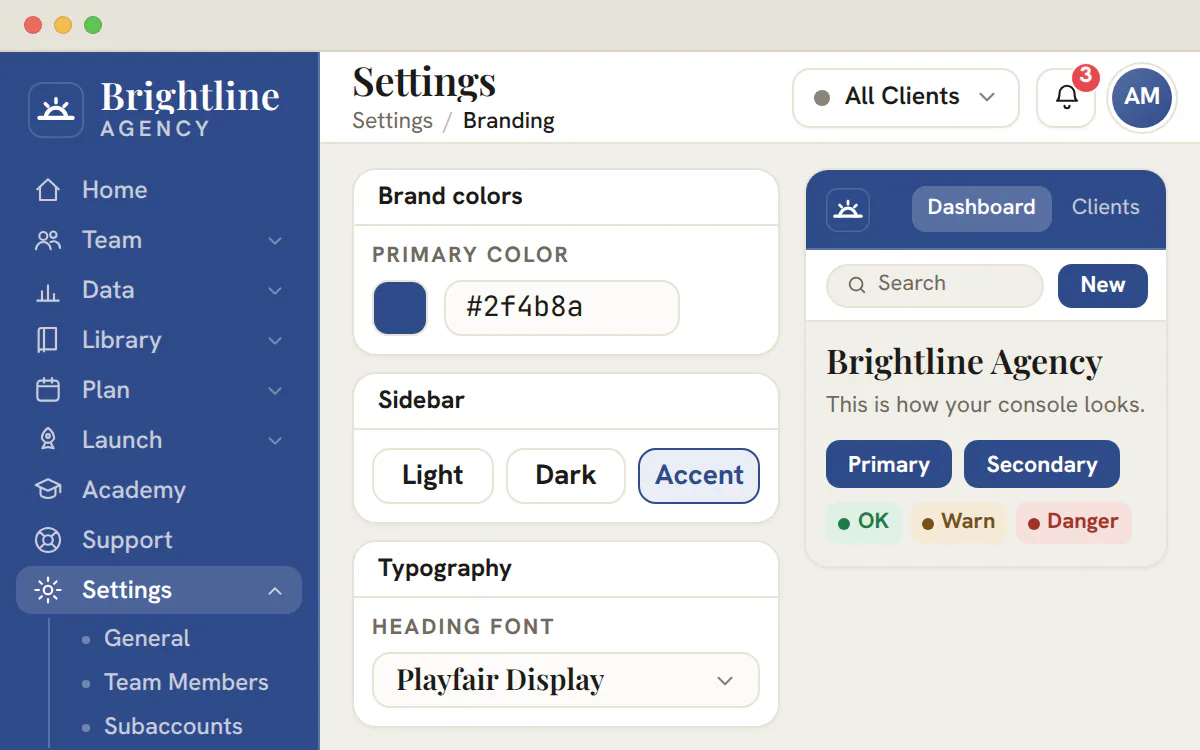
Your logo, colours and fonts on the console
- A light, dark or exact brand-colour sidebar
- Colours that fail a readability check are refused
- Each client's portal has its own brand settings too
- Sign-in pages keep the product's own brand
Scale and Enterprise
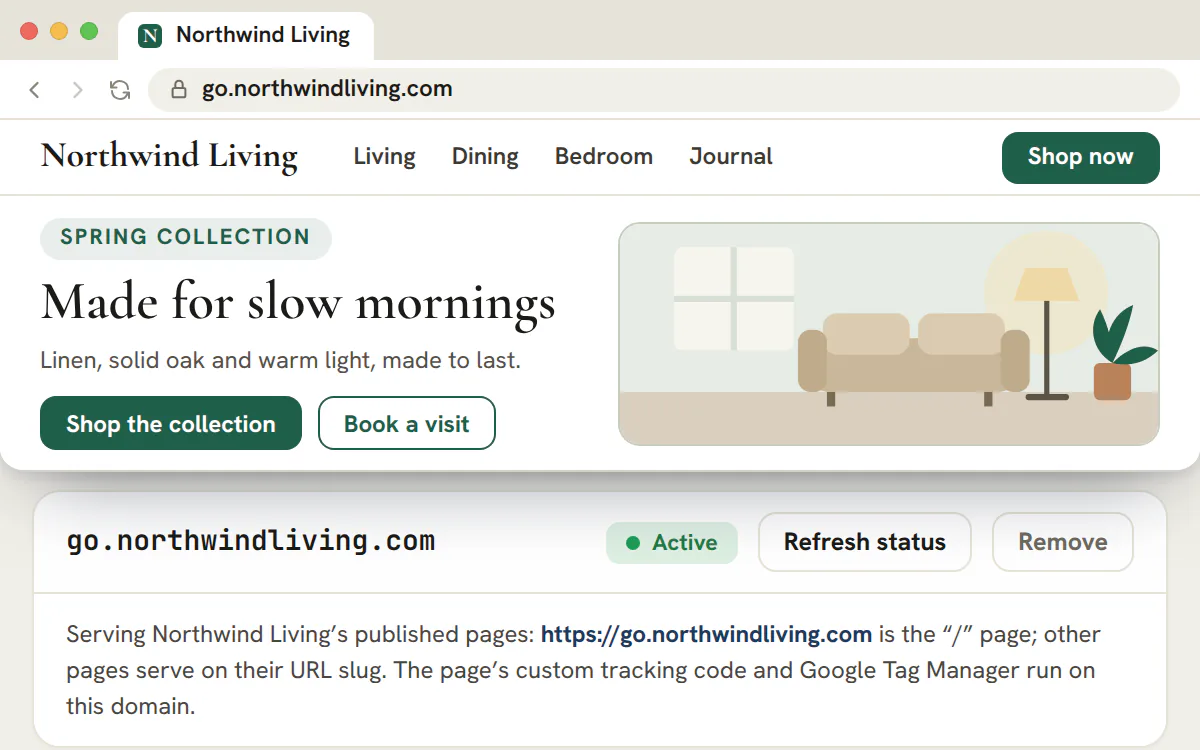
Publish a client's pages on their own domain
- Up to 20 domains per workspace
- Choose the page that answers the domain's home address
- Google Tag Manager and custom code run on custom domains
- The client portal itself is not served on a custom domain
Enterprise
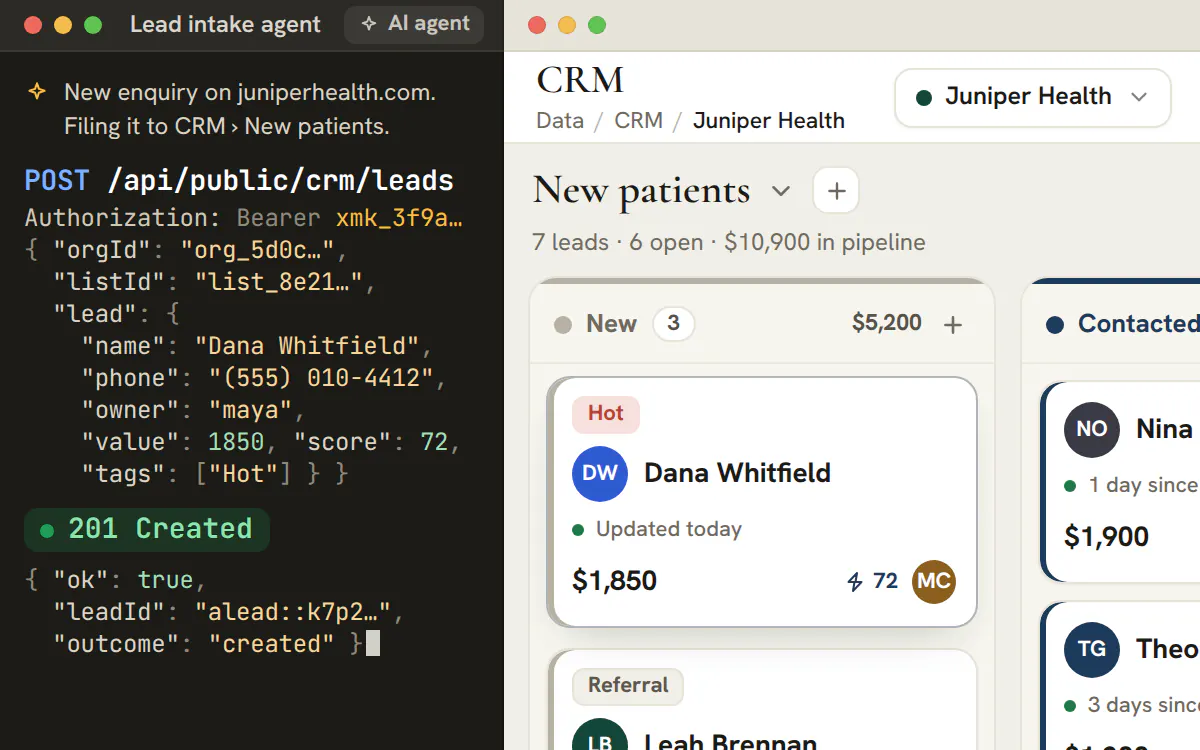
Let your own tools and AI agents call the workspace
- Read and write scopes, picked per tool
- The secret is shown once, when you create the key
- A reference page for each API in Settings
Pricing
Plans sized to your client roster
Start on the plan that fits your clients and team today. Every plan includes projects, CRM, chat, meetings, the marketing library and AI drafting; larger plans raise the client and seat allowances and add connected reporting, the site and email builders and the branded client portal.
Studio
$99/month
For solo operators and boutique studios running their first client accounts.
- Client accounts
- 3
- Team seats
- 3
- AI transcription
- Not included
Includes
- Projects, CRM, chat, files, notes and worklog
- Meetings with built-in video calls
- Themes, Copy, Keywords, Creatives, Blogs and Forms
- Ask AI and one-click AI Campaigns
- White-label branding across the console
- Most popular
Agency
$299/month
For growing agencies running multi-channel work across a full client roster.
- Client accounts
- 15
- Team seats
- 10
- AI transcription
- 10 hrs / mo
Everything in Studio, plus
- Site builder and Email builder in the Library
- Publish landing pages and booking pages
- Paid and Social campaign planners
- Meeting recording with AI transcripts and recaps
- Connected Google Ads, Microsoft Ads, LinkedIn Ads and Search Console reporting
Scale
$699/month
For established agencies and resellers managing a large client roster.
- Client accounts
- 50
- Team seats
- 25
- AI transcription
- 40 hrs / mo
Everything in Agency, plus
- A branded client portal for every account
- Client pages and forms on their own domains
- The largest self-serve client and seat allowances
- More included transcription every month
Enterprise
Custom pricing
Unlimited client accounts, team seats and meeting transcription, plus API keys for integrations and AI agents. Arranged directly with our team.
Prices in USD per month, excluding tax. Annual billing is charged for 10 of 12 months.
On this page

White-label branding that the whole console wears
Your logo and company name, everywhere it counts
Upload your logo and set your company name and the authenticated workspace puts on your brand. The sidebar and each client portal are white-labeled, while the public sign-in screens show the product's own logo.
Because it lives on the durable workspace record, the brand persists across the console rather than resetting between sessions or screens. For an agency reselling its operations as a white-labeled experience, this is the difference between bolting your name onto someone else's software and handing clients a workspace that feels unmistakably yours from the first login.
Subscription tiers and billing, managed in one place
Pick a plan and your limits follow
Manage your subscription from the same settings screen, choosing the tier that fits the size of your studio — Studio, Agency, Scale or Enterprise. The plan is not just a price: it decides how many seats you get, how many managed clients you can run, and which builders are unlocked, so upgrading is how you raise every limit at once instead of negotiating each cap separately.
Plan changes run through checkout, and the active tier is reflected back into the console so the gates and usage you see match what you are paying for. To be plain about the boundary: card-on-file management lives with the billing provider, while everything about which plan governs your workspace — and what that plan grants — is right here in settings.
Team seats and access scaled by a settings change
Invite, assign roles and watch your seat usage
Workspace access is managed from settings: invite teammates by email, assign their role, and see live seat usage measured against the cap your plan allows. The invite is a real organization invitation — the person receives an email, accepts, and takes a seat — so growing the team is a configuration step rather than a support ticket or a spreadsheet of logins.
When you approach the limit, the seat counter shows it before an invite fails, so you know exactly when scaling the team means scaling the plan. This is account-level access control for the agency itself — who belongs to your workspace and what they can do — distinct from rostering staff profiles or assigning people to individual client accounts elsewhere in the console.
Account security controls that actually do something
Passwords, two-factor and live device sessions
Set or change your password, enroll in two-factor authentication with a TOTP authenticator app, and capture backup codes for the day you lose your phone — the standard protections a workspace holding client data should require, available without leaving the console.
You can also review the devices currently signed in to your account and revoke any session you do not recognize, and delete the account outright when it is time. These are genuine identity flows wired into settings, so the people protecting your agency's workspace are using the same screen they configure everything else from.
Personal notification preferences
Choose what appears in your in-app feed
The notifications panel lets each person choose which categories appear in the in-app bell and Activity Center. Preferences belong to the signed-in membership, so one teammate's choices never change another teammate's feed.
Beside the bell, each category can reach a person by email, sent right away, bundled within a minute, held while they are away or gathered into a weekday morning summary. Where the workspace offers device alerts, it can also arrive on a phone or computer they have turned on. Outside their working hours, device alerts are skipped and bundled email waits for one catch-up message.
Multi-tenant organization controls for the agency
Your org, your isolated workspace, managed here
Each agency is its own organization backed by its own isolated workspace, and the org controls live in settings. Manage the organization identity — its name, slug and logo — and the tenancy that wraps everything else, so the boundary that keeps one agency's clients, team and work hard-separated from another's is something you administer directly rather than something hidden in the platform.
This is the tenant layer the rest of the console scopes to, which is what lets a single sign-in serve a whole roster of clients without anything bleeding across accounts. Configuring the organization is configuring the container your entire agency operates inside — the top-level setting from which every per-client and per-tool scope below it inherits.
What white-label covers in this workspace, and what stays on the product brand
White-label here means your brand on the surfaces your team and your clients work in. The sign-in doors and the public site stay with the product.
| Surface | What it carries | Where it is set |
|---|---|---|
| The agency console | Your logo, company name, colors, fonts and browser tab title | Organization and Branding in Settings |
| Each client's portal | The client's own logo, name, colors and sidebar | Portal Brand on the client account, or the portal's own Profile for the client admin |
| The new-staff welcome flow | Your workspace name rather than the product's | Organization in Settings |
| Sign-in and sign-up pages, the public site, social cards and icons | The product's own identity | Not configurable |
The brand is applied on the server, so the first paint already wears it and nobody sees the default look flash before yours.
Plan
Branding is on every plan
Branding checks a permission, never the plan, so Studio carries the same logo, colors and fonts as Enterprise. The client portal that applies a brand per client is the part that needs the Scale or Enterprise plan.
Brand the console in six steps and preview it before you leave the page
Changes save as you make them, and a miniature console above the controls shows the result.
Set the name and logo in Organization
Your agency name and logo are kept in Organization settings, and Branding points to them. An uploaded logo appears as a compact mark beside the name and never replaces it.
Choose the primary color
Type a hex value or start from a preset. If white text on that shade would be hard to read, the editor refuses it and says why, instead of saving a color that never paints.
Add a secondary color if you want one
It colors gradients and accents. Left empty, it simply follows the primary color.
Pick the sidebar
Choose Light, Dark or Accent, or set an exact sidebar color. An exact color must clear the same readability check against the sidebar's own text.
Choose the fonts
Pick one heading font and one body font from seven curated families: Hanken Grotesk, Inter, Poppins, Montserrat, Cormorant Garamond, Playfair Display and Lora.
Finish with the tab title and status colors
Override the browser tab title, and the success, warning and danger colors if your brand needs different ones. A reset removes an override and returns to the default.
Tip
Let a designer own the brand
Branding is a delegable permission, so a designer can maintain it without billing or team powers. Anyone without it sees the panel read-only, with a note saying why.
How a client portal inherits your brand and where the client's own choices win
Each portal is resolved from layers, so a client can customize a little or a lot without breaking the look.
- What is set for the client's portal: its name, logo, colors, sidebar and fonts.
- Anything left empty falls through to your agency brand.
- Anything your brand also leaves empty falls through to the product default.
You can set a client's colors and sidebar on the client account under Portal Brand, where the logo is the client's profile picture. The client's own admin can adjust the portal's appearance from the portal's Profile. That editor previews a miniature portal from the draft, and its logo preview switches between sidebar, card, page and transparency views, so a logo with a hidden white box is caught before it ships.
What a client sees is a separate decision from how the portal looks, and it is made on the client account rather than here. Pair a branded portal with a client training academy and the first visit feels like their own product.
Plans, limits and billing: what counts toward a cap and what happens at one
The caps are simple to state and easy to misjudge, so here is exactly what each one counts.
| Limit | How it is counted |
|---|---|
| Client accounts | Every client counts, archived ones included, until it is permanently deleted. Your agency's own account never counts. |
| Team seats | Every active teammate, admins included, plus pending invitations that have not yet lapsed, which happens after 30 days. People invited to a client portal never use a seat. |
| Meeting transcription | Included hours per calendar month, reset on the 1st (UTC): 10 on Agency, 40 on Scale, unlimited on Enterprise, none on Studio. |
| AI drafting | Not capped by plan, though fair-use rate limits apply equally on every plan. |
At a limit you cannot add a client or invite a teammate, and the message names which limit you reached. Nothing already in the workspace changes. An upgrade applies the moment checkout completes. A downgrade waits for the end of the billing period, deletes nothing, and locks the tools outside the new plan. Annual billing charges ten months of the twelve, prices are in USD excluding tax, and card details stay with the billing provider.
Only workspace admins see Subscription and Billing. Usage meters for clients, seats and transcription sit above the plan cards, and each card tells you whether your current roster would fit. The team roster and client management are where those numbers come from.
Who can see and change each Settings section
Settings sections are shown to the people who can use them, so a member is never faced with a wall of controls they cannot touch.
| Section | Who sees it | Who can change it |
|---|---|---|
| General, Notifications and Security | Everyone | Each person, for their own account; admins also set workspace-wide reminders |
| Organization, Branding, Data Settings and Booking | People who can view the workspace | Organization needs the workspace edit permission; Branding also needs the branding permission |
| Subscription and Billing | Admins who manage billing | The same admins |
| Permissions | Admins and anyone who manages team permissions | Nobody here: it is a read-only overview that links to Team Members |
| Projects | Anyone who can view projects | Statuses and priorities need team-permission rights; custom fields need project edit rights |
| Developer | Every agency user, as reference pages | Creating keys needs the integrations permission and the Enterprise plan |
Custom domains and API keys: the two plan-gated extras
Both are set up from Settings and the client account, and both come with limits worth knowing before you promise them to a client.
Custom domains for client pages
A domain is added from the client's Data Settings. It moves from waiting on DNS, to verifying, to active, and a failed check shows as an error. Each domain is pinned to one client, so a page can never be served from another client's address, and reserved hosts are refused. A workspace holds up to 20 domains.
A custom domain requires Scale, at $699 a month, or Enterprise. The pages it serves are built in the site builder, which is part of the Agency plan and above.
API keys for integrations and AI agents
A key belongs to the workspace rather than to a person. You choose separate read and write scopes per area, such as leads, projects or the Library, and can pin a key to one client. The secret appears once, when you create the key. Existing keys keep working if you leave Enterprise, but creating new ones needs the plan. Leads filed by a key arrive in the CRM like any other.
Frequently asked questions
Can I white-label the client portal with each client's own logo and colors?
Yes, on the Scale and Enterprise plans, which include the portal. Each client can have its own name, logo, colors, sidebar and fonts, set from the client account or by the client's admin from the portal Profile. Anything left empty falls back to your agency brand, then to the product default.
Does white-labeling hide the AI Marketing Dashboard name everywhere?
No. The console, the client portals and the new-staff welcome flow carry your brand. The sign-in and sign-up pages, the public site, social cards and icons keep the product's identity, so clients meet the product's logo on the page where they sign in.
Why did the branding editor refuse my brand color?
White text sits on the primary color throughout the console, so the editor checks that the shade has enough contrast with it, at the common 4.5 to 1 reading standard. A very light yellow fails. The editor explains the refusal and keeps your previous color. An exact sidebar color gets the same check against its own text.
Who can change the branding or the subscription?
Branding needs the workspace edit and branding permissions, which an admin can delegate, for example to a designer. Subscription and Billing is limited to admins who manage billing, and that permission cannot be delegated. Someone who can open Settings without the branding permission sees Branding read-only, and anyone who does not manage billing never sees the subscription section.
What counts toward my client and seat limits?
Every client counts, archived ones included, until permanently deleted, and your own agency account does not count. A seat is any active teammate plus an unexpired pending invitation, which lapses after 30 days. People invited to a client portal never use a seat. At a limit you cannot add more, and nothing existing changes.
What happens to my data if I downgrade a plan?
Nothing is deleted. Clients, teammates, pages and transcripts all stay. A downgrade takes effect at the end of the billing period, tools outside the new plan lock, and you cannot add clients or seats beyond the new limits. Upgrades apply as soon as checkout completes.
How does annual billing work?
An annual plan is billed once a year at ten times the monthly price, and checkout confirms the exact amount before you pay. Prices are in US dollars and exclude tax. The payment form belongs to the billing provider, so this console never receives or stores card details.
Can I put a client's landing page on their own domain?
Yes, on Scale and Enterprise. Add the domain from the client's Data Settings, publish the DNS records the app shows, and watch it verify. The domain serves only that client's pages, and a workspace can hold up to 20 of them. Portals are always served from the product address.