
Library · Forms
Lead-capture forms that actually convert
24 field types, real validation, multi-step paging, templates, a responses view and embed snippets — built per client and ready for any campaign. Try the demo below, or start your own workspace.
Already have a workspace? Sign in
- Plans from $99/month
- Built for multi-client agencies
- Your brand across the console
Library · Forms
Online form builder for marketing agencies
Lead capture is where a campaign earns its keep, and a clunky form is where conversions quietly leak away. The Form Builder in AI Marketing Dashboard includes 24 field types, real validation, multi-step paging, templates and embeddable share links — so your team can build a genuinely good lead-capture or survey form per client and put it anywhere a campaign needs one.
Build to responses
Four steps from a blank form to a lead
Build, Preview and Responses are three tabs of one screen, so a form is tested where it is built.
Pick the fields
Drag from four groups: layout and content, text inputs, choices and upload, and feedback. Start blank, or from one of five templates, from a contact form to event registration.Validate and page it
Mark fields required, set length and number limits, check email, URL and phone formats, and add page breaks for a multi-step flow.Share or embed
Publish it, then copy a link or an embed code for the client's site or an email, or drop the same form into a Site page.Read the responses
Responses show in a table beside views and completion, and export to CSV when you need them elsewhere.
After the submit button
Every response becomes a lead
A published form files each submission into the client's CRM, where the team already works.
A pipeline made for the form
- A hidden honeypot field and a minimum fill time run before any lead exists
- New leads reach the agency bell, with a link to the lead in the CRM
- The embed script passes campaign details, so each lead keeps its source
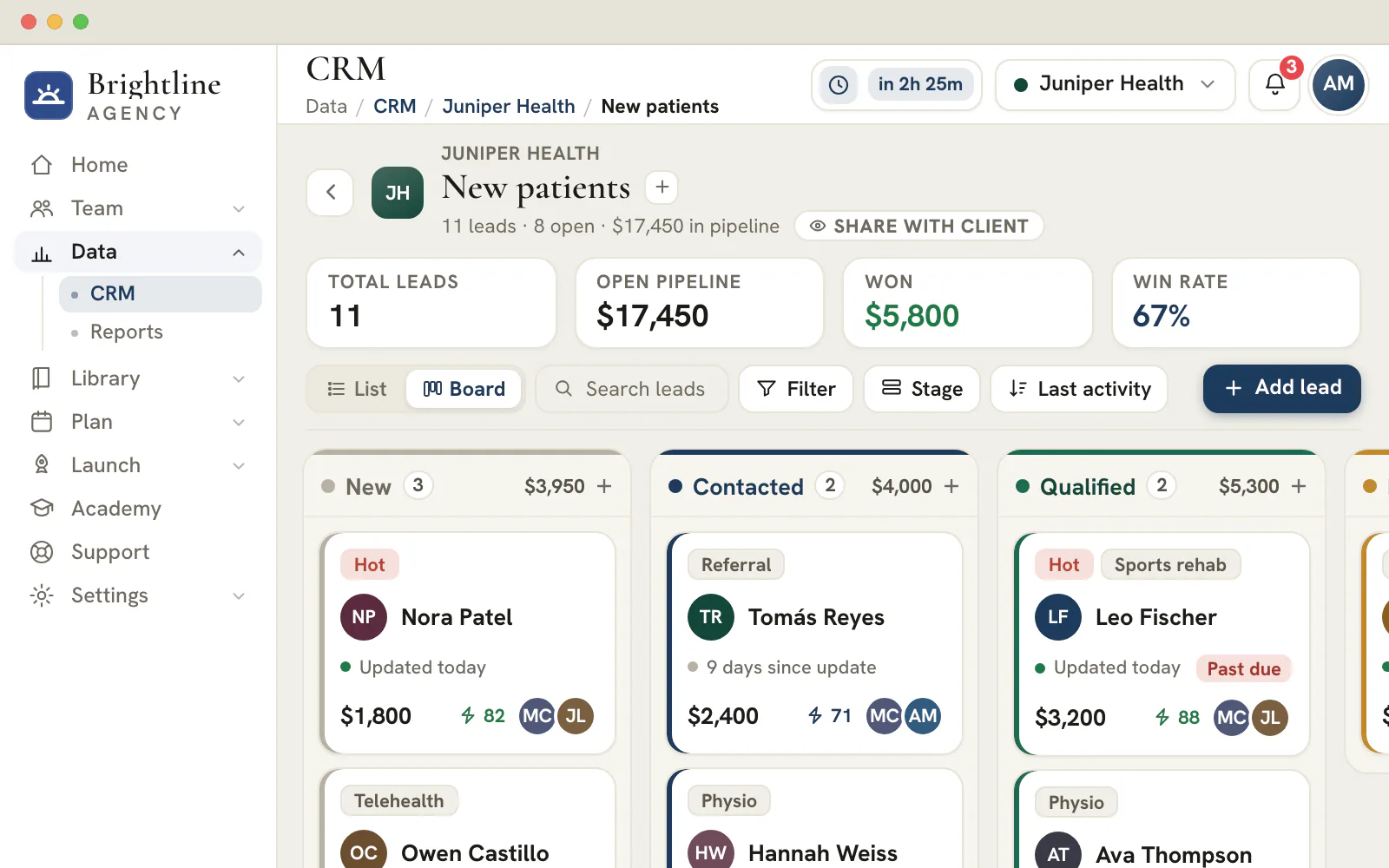
Capture the lead where the campaign ends
Build the form once, publish it, and let every response land in the client's CRM.
Plans start at $99/month.
On this page

24 field types for any form you need to build
Layout, inputs, choices and advanced fields
Drag in any of 24 field types — text, email, phone, name, address, website, dropdowns and multi-select, ratings, opinion scales, consent checkboxes, hidden fields, page breaks and more — grouped into layout, inputs, choices and advanced. A simple newsletter sign-up and a detailed intake survey are built in the same workspace, with the right field for every question.
Each field has its own settings — label, placeholder, help text, default value, required toggle and half- or full-width layout — so the form reads cleanly and behaves exactly as the campaign intends.
Real validation and multi-step paging
Catch bad input and break long forms into steps
Add validation per field — required, min and max length, number ranges, and email, URL or phone format checks — so the data you collect is usable, not a pile of typos to clean up later. Drop in page breaks and a long form becomes a friendly multi-step flow with progress and Next/Back, which is one of the most reliable ways to lift completion rates.
The result is a form that respects the person filling it out: it asks for the right things, in digestible steps, and tells them clearly when something needs fixing.
Start from a template, see it work as you build
Five starters and a genuinely fillable preview
Begin from one of five starter templates instead of a blank canvas, then switch to the Preview tab to fill the form yourself — it is a working, validating, multi-step renderer. What you test in preview is exactly what a respondent will experience.
That live preview closes the gap between building and shipping: you catch an awkward field order or a missing step before the form ever reaches a real visitor.
A responses view with CSV export
See submissions and hand them to the client
Submissions land in a Responses table you can scan and export to CSV, so a client's leads are easy to review and easy to pass to a sales team or a spreadsheet. The form is not just a capture point — it is the start of a workflow you can act on.
Per-form view and fill counters give a quick read on how each form is performing, so you can tell which capture points are pulling their weight.
Share a link or embed the form anywhere
A standalone link plus iframe and script snippets
Every form has a share link and ready-made iframe and script embed snippets, so it drops straight into a landing page, a client's own site or an email follow-up. The same form you built here works wherever the campaign needs it to live.
It is also wired to the landing-page builder, so a page's form section can render a real form from this tool — one form, reused across the surfaces a campaign touches.
Every form filed under its client and its campaign theme
Where the rest of that campaign already lives
A lead-gen form belongs beside the landing page it sits on and the offer it collects for, so each one is filed under a client first and the campaign theme second. Finding last quarter's webinar form means opening last quarter's webinar, rather than scrolling a flat list of forty entries all called “Contact”.
Change the account in the switcher and the list becomes that client's forms. It is the filing rule the keyword lists, copy, creative and landing pages already follow, which is what keeps a growing roster navigable.
Which form fields become which lead fields in the CRM
The type of a field, together with its label, decides what lands on the lead. Everything else stays in the form's Responses record.
| Field you add | Lands on the lead as | Worth knowing |
|---|---|---|
| Name | Name | Without it the lead is named from the email address, then as Website lead. |
| A repeat submission of the same form or landing page with the same address updates that lead instead of adding another. | ||
| Phone | Phone | Format-checked before the visitor can continue. |
| Website | Website | Checked for a web address. |
| Address | Location | The address lines are combined into one location. |
| Short text labelled Company, Business, Organization or Employer | Company | Matched on the label, so name the field that way. |
| Short text labelled Job title, Role or Position | Title | Matched on the label as well. |
| Hidden field labelled utm_source, utm_campaign, gclid and similar | Source, campaign and click ID fields | A value you set here beats what the page or browser reports. |
| Dropdowns, choices, ratings, scales and long answers | Stay in the Responses record | The lead carries the marketing projection, and the full answers stay with the submission. |
Source defaults to Website form and First touch names the page or the form the visitor used. The lead's channel is worked out from the tags: a Google click ID or source reads as Google Ads, a Facebook click ID as Meta Ads, a Microsoft click ID as Microsoft Ads, with newer networks recognized by their own IDs, email sources as Email, and anything unrecognized as Organic or Direct.
Choosing the right field for each question
A form converts when each question has the field that makes answering it easiest, and when you ask only for answers someone will use.
| The question | Field to use | Why it helps |
|---|---|---|
| Who is asking? | Name | Fills the lead's name directly. |
| How do we reply? | Checks the format and keys the lead for de-duplication. | |
| What is a good number to call? | Phone | Rejects a number with too few digits. |
| What do they want most? | Dropdown or Multiple choice | One answer from a short list keeps replies comparable. |
| Which topics interest them? | Checkboxes | Allows more than one answer. |
| How did we do? | Star rating | A one-tap score for feedback forms. |
| Would they recommend us? | Opinion scale | A numbered scale with labels at both ends. |
| May we contact them? | Consent | Carries your own wording and starts out required. |
| Which campaign sent them? | Hidden field | Holds a tag the visitor never sees. |
Each form is filed under a campaign theme, so check the audience and message in Themes before you decide what to ask.
Tip
Require only what you will act on
A required field the team never reads is friction with no return. Mark Required for the contact detail you will use and leave qualifying questions optional, then pair two short fields on one row with the half-width setting.
Validation rules and the exact messages visitors see
Each rule shows a plain message beside the field, and the server checks the same rules again against the published form.
- Required
- A blank answer shows This field is required. A consent box asks the visitor to check it to continue, and choice fields ask for a selection.
- Email, Website and Phone format
- Enter a valid email address, Enter a valid URL, and Enter a valid phone number. The Email, Website and Phone fields apply them automatically.
- Length limits
- Short and long text fields can set a minimum and a maximum, and the message states the number of characters.
- Number range
- A Number field can set a minimum and a maximum, and rejects anything that is not a number.
- Pattern
- A custom pattern shows Please match the required format. when the answer does not fit.
- Server check
- The server validates every submission against the published version, so a visitor cannot skip a rule by changing the page.
Splitting a long form into steps without losing people
A page break turns one long form into a short flow, and each step is checked before the visitor moves on.
- Start with the easiest questions, such as name and email, so the first step feels small.
- Group the rest by topic and end each group with a page break.
- The label on a page break becomes the text of the Next button, so make it say what comes next, as the Event registration template does with Continue to tickets.
- Visitors see a progress bar and a count such as Step 2 of 3, with a Back button after the first step.
- Required fields are checked on each step, so a visitor cannot reach the end with a gap behind them.
Of the five starter templates besides the blank form, only Event registration is multi-step out of the box. Contact us, Lead capture, Newsletter signup and Feedback survey each fit on one screen, and you can add a page break to any of them.
Publishing, embedding and testing a form without polluting the CRM
Preview is safe to submit as often as you like. A published form is not, because every real submission files a real lead in the client's CRM.
Try the failure cases in Preview
Submit it empty, then with a wrong email, and read each message. Preview runs the real form, but a preview submission stays in your browser session and never reaches the CRM.
Set what happens after the submit
Choose a confirmation message or a redirect to a thank-you page, and set the submit button text, in Form settings.
Publish
Publishing freezes a snapshot with a public link. Edits after that wait in the draft until you republish, and the form counts its views and fills.
Test the live link by hand
Use obviously labelled test data, then remove that lead from the CRM. Wait a moment before sending: a submission sent within 2 seconds of the form loading is treated as spam and never reaches the CRM.
Share the link or embed the form
The Share dialog offers a link, which also suits an email from the email builder, and an embed code. Paste the whole embed code into the client's page, because its short script passes the page's campaign tags into the form.
Plan
Forms are on every plan
Forms, publishing and embedding are included from the Studio plan at $99 a month. A form on the client's own domain needs Scale or Enterprise, and a landing page that hosts it needs the landing page builder on the Agency plan.
Keeping the campaign source on every lead, embedded or not
Several sources can describe where a visitor came from, and the form resolves them in a fixed order so the lead gets one clear answer.
| Priority | Source of the tag | When it applies |
|---|---|---|
| First | A hidden field you configured | Always, because your configuration beats inference. |
| Second | The tags in the address of the page that held the form | When they carry any campaign or click signal, taken as a whole. |
| Third | The visitor's stored last touch | When the page address carries nothing. |
| Fills gaps | The visitor's stored first touch | Only the first-touch fields on the lead. |
Pin a source by adding hidden fields with a default value, such as utm_campaign set to the offer's name, when one embed serves one campaign. Leave them out when the same form serves several, and let the page's own tags describe each visit. The agency CRM then shows source, channel and campaign beside every lead.
Frequently asked questions
How do form submissions reach the CRM?
Each submission from a published form files a lead in a CRM pipeline named after the form, or after the landing page when the form sits on one. A repeat submission of the same form or page with the same email updates that lead instead of adding a duplicate, and the team looking after the client is alerted. Answers the lead has no column for stay in the Responses view.
Can I build a multi-step form?
Yes. Add a page break between groups of fields and visitors see a progress bar with a count such as Step 2 of 3, plus Back and Next buttons. Each step is validated before the visitor can move on, and the page break's label becomes the Next button's text. The Event registration template shows the pattern.
How do I embed a form on a client's website?
Publish the form, open Share, and copy the embed code. It is an iframe plus a short script that passes the page's campaign tags into the form. Paste both into the page's HTML where the form should appear. Without the script the form still works, but the lead loses the page's campaign details.
Does the form builder stop spam?
Two checks run before a lead is created: a hidden decoy field that no human fills, and a minimum time between the form loading and the submit. A submission that fills the decoy is quietly dropped, and one that arrives within 2 seconds of loading is recorded as spam. Neither reaches the CRM. The server also re-checks every answer against the published form and limits how quickly one visitor can submit.
Can I export form responses?
Yes. The Responses tab lists every submission with a column for each field, and an export button downloads them as a CSV file. Answers keep their original labels even after you edit or delete a field, so older submissions stay readable when you hand them to a sales team or open them in a spreadsheet.
Is the form builder included on every plan?
Yes. Studio, at $99 a month, already includes Forms with publishing and embedding, so every paid workspace has them. Putting a form on a client's own domain needs the Scale plan or Enterprise, and a landing page that hosts the form needs the Site builder on the Agency plan.
What does a visitor see after submitting a form?
Either a confirmation message you write or a redirect to a page you choose, such as a thank-you page on the client's site. Both are set under Form settings, along with the submit button text. If the submission cannot be delivered, the visitor sees an error with a Retry button instead of a false success message.