Launch · Social Marketing
Publish approved posts and keep the record
Check each approved post on the networks it names, hand it to the person who publishes, and record it with its live link. Social launches come with the Agency plan and up. Look inside the demo below, or create your own workspace.
Already have a workspace? Sign in
Launch · Social Marketing
The post was approved on Monday. On Thursday somebody publishes it from a screenshot in a chat, the caption carries one hashtag too many for its network, and nobody can say afterwards who posted it or where it lives. A social media publishing workflow for agencies has to survive that moment. Social Marketing, under Launch in AI Marketing Dashboard, is built around it: only a post that is approved unchanged can be launched, each network's limits are checked first, a task goes to the person who posts, and a publisher marks the post published with its live link. The agency's record for the client then shows what was approved, who asked for the launch and who recorded the post.
The publishing record
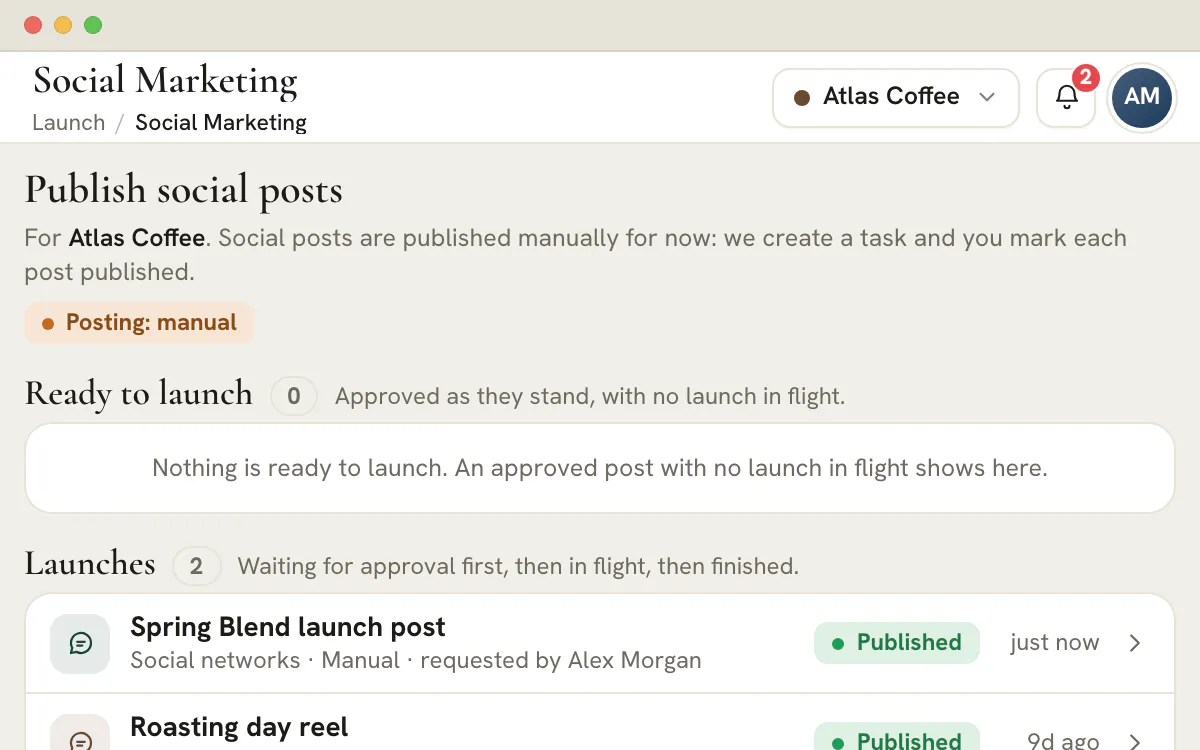
Launch holds the approved post, tests it on each network it names and records who marked it published, with the link.
One post per network, with its own count
Who does what
Three roles meet on one launch, and the record names each of them.
Library edit access
Publish permission
The assignee
After approval
Check each network
Hand it over
Post on each network
Mark it published
Plan a post for a client, get it approved and see how it measures up on every network it names.
Social launches are included from the Agency plan, at $299/month.
The checks read the post as it stands, and a launch only goes ahead for a post approved exactly as it is. Its caption and hashtags are measured on every network the plan names, the way that network counts: 63,206 characters on Facebook, 2,200 on Instagram, 3,000 on LinkedIn and 280 on X, where a web link weighs 23 and an emoji counts twice. A post over a limit, an Instagram post with no picture or video, or more than 30 hashtags on Instagram is a problem and stops the launch. Fixing it means editing the plan, which makes the approval stale, so the corrected post is approved again before it can go out. The post is frozen when the launch is set up, and while the launch is open the plan's builder is locked and the spec is stored with the launch, so nothing edited afterwards can change what the person posting sees.
Smaller findings are warnings, left to a person: more hashtags than a network advises, a tag that will not link because it holds a symbol or punctuation, artwork stored inside the plan instead of as a file link, a network the app has no rules for, and a plan with no picture at all when none of its networks needs one. What gets frozen is one post per network, each with its caption, hashtags, creatives and character count on that network.
Two permissions keep the roles apart. Library edit access on the client lets someone run the checks and put in a request, and their button reads Request launch approval. The Publish permission, added to edit access, starts a launch directly. On its own it approves or declines a request, cancels one and marks a post published. A requester can withdraw their own request while it waits, and a decline always carries a written reason.
The split lets an editor prepare the whole launch while a publisher answers for it, and on a small team one person can hold both. A request rings the bell for the client's publishers and, subject to their notification settings, reaches up to five of them by email. It shows under Launches in Team > Approvals and opens an Approve launch task in Projects. Nothing moves until a publisher approves, and for social there is nowhere for it to move to: people post, not the app. An agency team member needs both the permission and an assignment to the client, while an Agency Admin holds every permission, so check who can publish for a client before promising a Friday post.
A hand launch opens a task in Projects, in the client's agency-only Marketing Plans project. Its title names the post and its networks, as in Launch Spring Blend post on Facebook, Instagram. It goes to the publisher who started the launch or approved the request, a requester is added as a watcher, and the task is marked high priority, due in seven days and linked to the launch. Because it lives in Projects, it shows on the board and in the assignee's own task list beside the rest of their work, which is where a due date gets noticed.
The task says what to do and what to do last: post on each network from the exported spec, then record the launch on the Launch page, adding the live link if there is one. Completing the task does not mark the post published, so a ticked box cannot stand in for a live post. While it waits, the launch row carries the chip Waiting for manual launch and the line Waiting to be published by hand.
When the post is live, a publisher goes to its launch and picks Mark as published. A link is optional, but one that is given has to be a complete https address, and the note can run to 2,000 characters. The row reads Published, the task closes with a comment that quotes the link, and the plan reads Published in the planner. The person who asked for the launch and the publisher who approved it are told, by bell and, subject to their notification settings, by email, unless one of them recorded it. The record links to the address with the words Open the live link.
A launch holds one link. A post that ran on four networks still has one record, so put the first address in the link field and the others in the note, beside the time it went out and the name of the person who posted. If a network changed something, such as a cropped picture or a shortened caption, say so there. The spec shows what was approved, and the note shows what happened. Once a post is marked published its plan is locked, so a new version starts from a duplicate.
The Launch page is read one client at a time, so its lists are that client's publishing history: posts waiting for approval, posts waiting to be published by hand, and then the finished ones, with the newest hundred shown. Each row names the post and the person who asked, with a status chip and how long ago. Above the lists, four counts show what is outstanding before anyone scrolls: plans that are ready, launches waiting for approval, launches in progress and launches completed. Switching the client in the header switches the page with it, and All Clients asks you to choose one first.
Opening a launch shows, for each network, the caption, its character count against the limit and how many creatives go with it, then the checks it passed and a timeline of every step. Export spec (JSON) downloads the whole frozen post. That answers the questions a client call produces: which version was approved, who recorded it as published and where it lives. The record belongs to the agency. It is not part of the client portal, and its tasks stay agency-only.
No posting connection to any social network exists in AI Marketing Dashboard. The workflow does not sign in to Facebook, Instagram, LinkedIn or X, does not post, and does not queue or schedule anything for later. It does not read back whether a post went live, so Published is a publisher's statement and not a network's confirmation, and performance is a reporting matter that this workflow does not touch. One check on every social launch says the same, in its own words: Posting isn't connected yet. The export carries each picture's name and, where it has a web file link, that link, and uploading the picture is a manual step too.
What it does automate is everything around the post: the approval that binds the caption, the network checks, the task, the notifications and the record. Whether your team posts from the network itself or from a scheduling tool it already uses, the launch looks the same, and the exported caption and hashtags serve either. Social launches come with the Agency plan and up.
The workflow runs from an approved caption to a recorded link. These are the stages, who owns each one and where the product holds the record.
The first four stages are tested and logged by the product. The fifth belongs to the person at the network, and the sixth is the habit that makes the whole workflow worth having.
| Stage | What happens | Who | Where it is recorded |
|---|---|---|---|
| Approved | A reviewer signs off the caption, hashtags, networks and artwork as one unit | A reviewer with the Approve permission | Team > Approvals and the plan |
| Checked | The launch tests the post on every network it names | Anyone with Library edit access | The checks in the launch dialog |
| Asked or started | An editor requests the launch, or a publisher starts it directly | An editor, then a publisher | Launches in Team > Approvals and the Launch page |
| Handed over | A task opens for the person who will post, linked to the launch, where the spec is exported | The publisher who started or approved it | Projects, in Marketing Plans |
| Posted | Somebody publishes on each network from the export | The person assigned | The networks themselves |
| Recorded | A publisher marks the post published, with the live link and a note | A publisher | The launch's record and timeline |
The Launch page tests the post before it is frozen. This list covers what only the person at the network can check.
A problem keeps the launch switched off. A warning is shown and left to a person.
| Finding | Grade | What to do |
|---|---|---|
| No network chosen | Problem | Choose at least one network in the plan |
| No caption and no hashtags | Problem | Write the caption before launching |
| Hashtags only, with no caption | Warning | Add a caption that says what the post is about |
| A post, caption plus hashtags, over its network's limit (X: 280 characters. Instagram: 2,200. LinkedIn: 3,000. Facebook: 63,206.) | Problem | Shorten the caption or drop hashtags, then have the new version approved |
| More than 30 hashtags on Instagram, the one network with a hard cap | Problem | Remove tags until the count fits |
| A hashtag set above the size a network advises | Warning | Trim the set, or split the post into two plans |
| A hashtag that will not link | Warning | Keep to letters, numbers and underscores |
| Instagram among the networks, with no picture or video attached | Problem | Attach a creative to the plan |
| No creative at all, and no Instagram to require one | Warning | The posts will go out as text only |
| Artwork stored inside the plan, with no file link | Warning | Download it from Library, Creatives before posting |
| A network the page has no rules for | Warning | Check that the post fits before publishing |
Fixing a problem means editing the plan, and an edit to an approved post makes its approval stale, so the corrected version goes back to a reviewer. That loop is deliberate: the caption that gets published is the caption that was approved.
Mark as published takes two optional fields, and the record is only as good as they are.
Marking the launch moves its row to Published and closes the Projects task, with a comment that carries the link. The planner then shows the post as Published, and the requester and the approving publisher are notified. The plan is locked from then on: duplicate it to start a new version. Nothing is posted by this step. It only records.
Tip
Write the note for the next account manager
Imagine the client asks in March why the Instagram crop differs from the approved artwork. A note written on the day answers it in one line, and the frozen spec shows what was approved.
Start small, with the roles written down.
Decide who holds Publish
Pick the people who hold the Publish permission for each client. On a small team that is the account lead. On a larger one it is a short list.
Agree who posts
Whoever starts the launch, or approves a request for it, receives the task, so decide which of the two you want at the keyboard.
Pick a recording rule
Agree that the link field holds the first network's address and the note holds the rest, with the time and anything a network changed.
Run one client for a fortnight
Read its Launches list and its entries in Team > Approvals together, and fix whatever the records fail to say.
Add the other clients
Bring in the remaining clients once a fortnight of records reads cleanly. Plan the posts in social media campaign planning and keep the artwork in the creative library.
Plan
Plan availability
Social launches are part of the Agency plan, $299 a month, and of Scale and Enterprise. Studio, at $99 a month, leaves Social and Paid out and keeps Email and SMS. The paid side of the same pattern is the paid ad campaign launch checklist.
It is the sequence a post follows from an approved draft to a live post and a record of it: check, hand over, publish, record. Here the product runs the approval, the network checks, the publishing task and the record, and a person does the posting itself on each network.
No. No posting connection exists, so the page never signs in to a network, posts, queues or schedules. It creates a task and offers an export with a post for every network, and a person publishes. A publisher then records the result. If your team schedules posts, it does that in the tool it already uses.
A publisher: a person who holds the Publish permission for that client. Editors with Library edit access can run the checks and ask for a launch, and a requester may take back their own request while it waits, but approving, declining, canceling and recording belong to publishers. Both permissions are checked per client: a team member who can publish for one client cannot record a post for another, while an Agency Admin can act for all of them.
The launch's task, in the agency-only Marketing Plans project of that client, moves to done with a comment saying who recorded it and quoting the link and note. In the planner the post then reads Published, and both the requester and the approver are told. Completing the task by itself does not mark the post published.
A launch holds one link. Enter the first network's address in the link field and list the rest in the note, which has room for 2,000 characters. The record still shows one launch for the post, the checks it passed for each network and a single timeline.
Edit the plan. The approval then reads Changed since approval and the post leaves the ready list until the edited version has been submitted again and approved. A plan cannot be edited while a launch is open, so cancel the launch first if the caption has to change. The frozen export never changes, so what was approved stays on record.
No. The Launch pages and the launch task are for the agency only. A client in the portal sees what the agency shares there, such as approved Library assets, but not launches, checks or the Projects task. The record exists so the agency can answer which version was approved and who marked it published.
Social launches need the Agency plan or above, as the Social planner does. Agency costs $299 a month in US dollars, with Scale and Enterprise above it. Studio, at $99 a month, leaves out Social and Paid, while the Email and SMS tools are on every plan.
