Launch · Paid Marketing
Launch paid campaigns from a checklist, not a chat thread
Only plans approved as they stand can launch. A server preflight tests Google Search and Meta plans against platform limits, the launch freezes the spec for whoever builds the campaign in the ad platform, and a publisher records the launch with its live link. Paid launches come with the Agency plan and up. Look inside the demo below, or create your own workspace.
Already have a workspace? Sign in
Launch · Paid Marketing
The riskiest hour of a paid campaign comes between sign-off and a live ad. The budget gets edited after the approval, a headline runs past its limit, the landing page is still a placeholder, and whoever builds the campaign is working from a chat thread. A paid ad campaign launch checklist only helps when it is part of the work and not something remembered. Paid Marketing, under Launch in AI Marketing Dashboard, puts it there. A plan reaches the ready list only when it is approved exactly as it stands. A server preflight tests it against the limits of Google Search and the basics of a Meta ad. The launch then freezes the approved spec, offers it as a JSON export and opens a Projects task, and a person with the Publish permission records the launch once the campaign exists in the ad platform.
The launch record
Check the plan, freeze the spec, record the launch
Each approved paid plan passes through one dialog that tests it, freezes what was approved and leaves a record of who launched it.
A checklist the server runs, and a spec that stays as approved
From approved plan to live campaign
Four moves from the ready list to a recorded launch
The page owns the checking and the record. The ad platform owns the campaign, and a person moves between the two.
Open the ready plan
Fix what the checks find
Build it from the spec
Record what went live
Chat thread or record
The same launch, with and without the record
Both end with a live campaign. Only one can say afterwards what was approved.
Launched from a chat thread
The campaign goes live, and the reasons it looks the way it does are lost.
Launched from the record
Paid launches go live by hand, so the person at the keyboard builds from the record.
Make the next paid launch a recorded one
Create a workspace, plan a campaign for a client and take it through the checks.
The Agency plan, from $299/month, includes paid launches.
A plan reaches the Ready to launch list only when it holds an approval of its current content and no launch is under way. The approval is tied to a fingerprint of the saved plan that the server works out for itself, so an edit made after sign-off, whether to the copy, the budget, the targeting or the landing page, turns its status into Changed since approval and moves it to Not ready yet. The check runs again when a launch is created and again when a publisher approves someone else's request, so the spec a person builds from is the content the reviewers saw.
A plan that is not ready says why, in words a person can act on: Not submitted for approval yet. Waiting for approval. Changes requested, followed by the reviewer's note. Changed since it was approved. Submit it again. A plan can be recorded as live only once, so a second version means duplicating the plan and sending the copy through approval, while a canceled or declined launch leaves the plan free to launch again. Paid launches come with the Agency plan and up, the same tier as the paid planner.
Choosing Launch on a ready plan opens a dialog that reads the plan again on the server and runs the checks. Every row passes, warns or is a problem, and a problem keeps the dialog's main button off until it is fixed. Nothing is written while the checks run, and Run checks again re-reads the plan after an edit. For a Google Search plan the rows enforce Google's own rules: at least 3 different headlines and 2 descriptions (a longer list is trimmed to 15 and 4 with a warning), headlines of 30 characters or fewer, descriptions of 90 or fewer, display paths of 15 or fewer, keywords held to 80 characters and 10 words, a daily budget and an https landing page that is not a placeholder. The app adds ceilings of its own: 200 keywords and, separately, 200 negatives in a launch, plus caps on what a targeting group can add.
A Meta plan is checked for what can be checked without Meta: the objective, the primary text, an image or video, a readable budget and, for Sales, Leads and Traffic plans, a landing page. The preflight is equally candid about what it cannot see. It cannot see inside an ad account, so a Google plan with a conversion bidding strategy carries a warning to check the account for a conversion action before the campaign is enabled. Plans for Performance Max, Demand Gen, Display and Shopping stop at a plan-only message, because Search is the only Google type a launch carries.
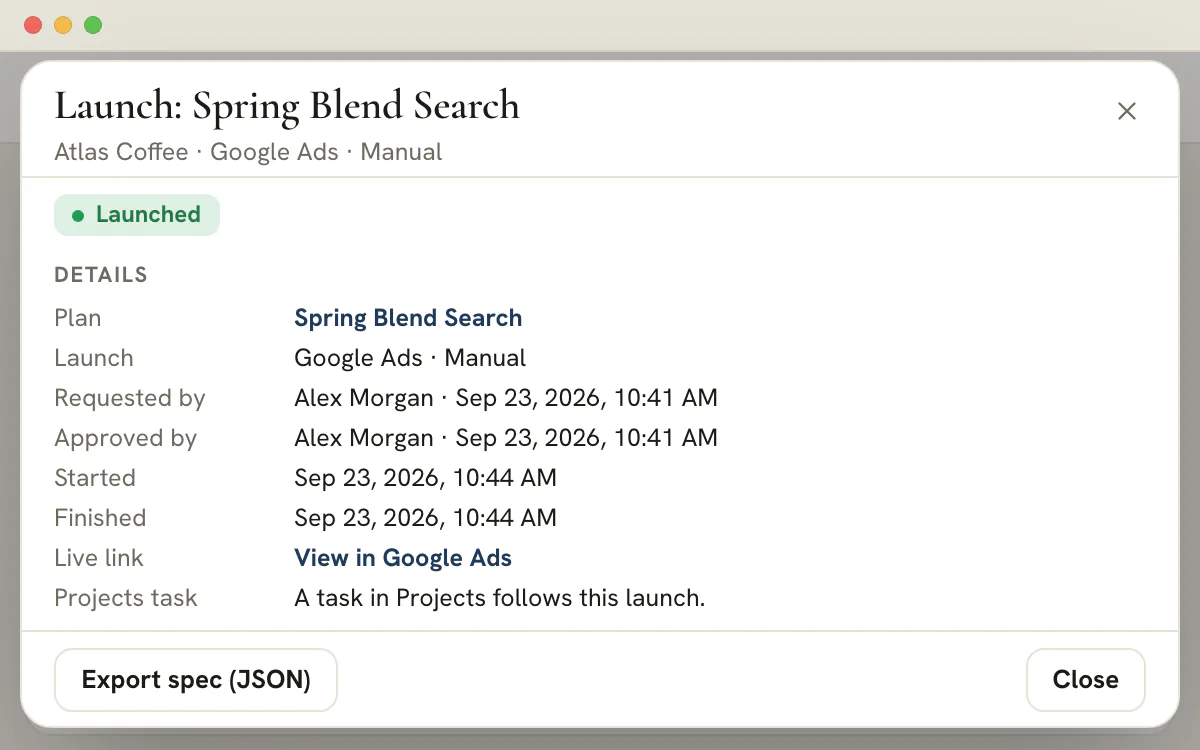
Paid launches go live by hand today. For a publisher the main button reads Create launch task. It freezes the approved plan as a spec and parks the launch as Waiting for manual launch. For Google Search the spec holds every headline, description, keyword and negative with its match type, plus the locations, languages, daily budget, bidding choice and landing page. For Meta it is an export of the campaign, ad set, ad creative and ad, with every status set to paused and the ids the app cannot know left blank and listed. Export spec (JSON) saves the file.
Beside the spec, the launch opens a Projects task filed under Marketing Plans for that client and titled with the plan and the platform, as in Launch Spring Blend Search on Google Ads. It goes to the person who set the launch up or approved it, flagged high priority, with a due date a week out and a link back to the launch, and it stays agency-only, so the client never sees it. Completing the task does not mark anything launched. The launch is recorded on the Launch page, so a ticked box and a live campaign are never confused.
Library edit access for the client is enough to run the checks and ask for a launch. Starting one directly takes the Publish permission as well, and approving a request or recording a launch takes the Publish permission for that client. When an editor chooses Request launch approval, the launch waits as Awaiting approval, an Approve launch task opens in Projects, the client's publishers are told in the bell and, subject to their notification settings, up to five of them by email, and the request shows under Launches in Team > Approvals. The requester can withdraw it while it waits.
A publisher opens the request, runs the checks again with their own access and either approves it or declines it. Approving records who approved it, freezes the spec again from the approver's own checks and moves the launch to Waiting for manual launch, with a new task for the approver and the requester watching. Declining needs a written reason, which the requester can read. The plan's approval is checked once more at that moment, so a request cannot start content that has changed since the reviewers saw it.
The page reads one client at a time through the client switcher, and All Clients asks you to pick one. Four counts open it: Ready to launch, Awaiting launch approval, In progress and Completed. Three lists follow. Ready to launch holds plans approved as they stand with no launch under way. Launches lists requests waiting for approval first, then launches in flight, then finished ones, newest first, up to a hundred, and says so when older ones exist. Not ready yet holds plans waiting for approval, sent back or changed since approval.
Every row wears a status chip and a plain line: Awaiting approval, Waiting for manual launch, Launched, Declined or Canceled, with who asked and how long ago. A plan whose last launch was canceled or declined says so on its Ready row instead of looking untouched. Opening a launch shows the plan it came from, who requested and approved it, the key facts of the frozen spec, the checks it passed and a timeline.
When the campaign exists in the ad platform, a publisher opens the launch and chooses Mark as launched. The campaign's https address can be attached as the link, the note runs to 2,000 characters, and both are optional. The row reads Launched, the task closes with a comment, the plan reads Active in the planner, and the requester and approver hear about it unless they recorded it themselves. The timeline keeps who did what and when, in the viewer's own time zone.
Treat the frozen spec as the yardstick. Before marking the launch, compare the campaign in Google Ads or Ads Manager with it: the budget, locations, keywords, bidding and landing page. If the platform made you change something, say what in the note, so the record shows both what was approved and what went live. If the campaign is never built, cancel the launch and the plan returns to the ready list. The page does not look inside the ad account, so Launched is a person's statement and not the platform's confirmation.
Every row is something the Launch page tests or asks you to confirm, with the person who usually fixes it and the place to do it.
A good checklist does two jobs. It stops a bad campaign from going out, and it shows afterwards that somebody looked. The Launch page tests what a program can test and leaves the rest to a person, and the table keeps the two apart. The third column names the people who usually own each fix on an agency team. They are habits, not roles the product assigns. Keep the table open while you prepare a launch, or paste its rows into the launch note.
| Check | What it tests | Who usually fixes it | Where |
|---|---|---|---|
| Approved as it stands | The plan's approval matches its current content | Whoever submitted the plan | The plan, then Team > Approvals |
| Campaign type | Google Search only. Performance Max, Demand Gen, Display and Shopping stay plan only | The plan's owner | The plan, Theme step |
| Headlines and descriptions | At least 3 distinct headlines and 2 descriptions, with extras beyond 15 and 4 dropped with a warning; each headline 30 characters or fewer and each description 90 or fewer; no exclamation mark in a headline | The copywriter | The plan, Copy step |
| Keywords and negatives | At least one keyword; each keyword 80 characters or fewer and 10 words or fewer; the app's own ceiling of 200 keywords and 200 negatives | The paid media lead | The plan, Keywords step |
| Landing page | A full https address on a public site, never the example.com placeholder | The account manager | The plan, Tracking step |
| Display path and tracking | Paths of 15 characters or fewer, the second needing the first. The plan's UTM parameters are added to the landing page, with a warning if it already carries them | The paid media lead | The plan, Tracking step |
| Budget and bidding | On Google Search, a daily budget as a number, because a lifetime budget fails; Target CPA and Manual CPC need an amount | The paid media lead | The plan, Targeting step |
| Locations | Typed places that match one of 6 countries, or a Library targeting group | The paid media lead | The plan, or Library, Audiences |
| Ad account | The Google Ads account mapped to the client, with its currency; without one, a hand launch only warns | An Agency Admin | Reports, Google Ads |
| Meta basics | An objective, ad copy, a picture or video, a budget that reads as a number and, for Sales, Leads and Traffic, a landing page | The paid media lead | The plan, at the step each check links to |
| Conversion tracking | Not testable here: a Google plan that bids on conversions carries a reminder to confirm a conversion action in the account | The paid media lead | The ad platform itself |
Note
A problem blocks and a warning informs
A problem switches the dialog's main button off until the plan is repaired. A warning never blocks. It tells you something a person has to weigh, such as a plan that bids on conversions in an account the page cannot inspect, or a typed place that matched no country.
The launch is recorded here and built in the ad platform, so the order of the steps matters.
Open the client's ready plan
Choose the client in the switcher and open Paid Marketing under Launch. Find the plan under Ready to launch. Anything under Not ready yet carries its reason, and Open plan goes to the plan itself.
Read every check
Choose Launch. Fix each problem at its link, then use Run checks again. Read each warning and decide whether it matters for this client.
Create the task or ask for approval
A publisher chooses Create launch task. Everyone else chooses Request launch approval and writes a note for the approver. Either way the launch freezes the spec.
Export the spec
Save Export spec (JSON) from the launch. It is the record of what was approved, and it stays as it is once a publisher has started or approved the launch.
Build the campaign from the spec
Set the campaign up in Google Ads or in Meta Ads Manager, working from the export. A Meta export leaves the ad account, the Facebook Page and the image uploads for Ads Manager to ask for. Keep the new campaign paused until the last two steps are done.
Compare the platform with the spec
Check the budget, locations, languages, keywords, negatives, headlines, descriptions and landing page against the spec. Where the platform made you change something, write it down for the note.
Enable it, then record it
Enable the campaign once the comparison is clean. A publisher chooses Mark as launched, adds the campaign's https address and the note, and the Projects task closes.
Two rules keep the procedure honest: build from the export instead of from memory, and record the launch only after the campaign exists. Results come later, and for a connected client they are read in Google Ads reporting.
Two permissions decide it, Library edit access and the Publish permission, and both are held per client.
| Action | What it needs |
|---|---|
| Run the launch checks | Library edit access |
| Ask for a launch | Library edit access, and the launch then waits for a publisher |
| Start a hand launch directly | Library edit access and the Publish permission |
| Approve or decline a request | The Publish permission, and a decline needs a written reason |
| Withdraw a request | The requester, while it waits; a publisher declines it instead |
| Cancel a launch that waits for a hand launch | The Publish permission |
| Mark a launch as launched | The Publish permission |
Both permissions are checked for the client the launch belongs to, so an agency team member who holds Publish on one client cannot record a launch on another. Approving the plan itself is a third permission, Approve, and the person who submitted a plan cannot approve it unless they are an Agency Admin, whose self-approval is recorded. The approval workflow software page shows where those decisions are made.
Many launch errors are small and boring, which is why a checklist finds them.
Four things the checks cannot see, so a person has to: whether the ad account has an active conversion action behind a plan that bids on conversions, whether the account's payment setup is complete, whether the platform approves the ads after its own review, and whether the campaign was built in the right account. For a Google plan the spec names the mapped account, which makes the last one quick to confirm.
Launch is the middle of a chain. Paid media planning decides the campaign and sends it for review, Team > Approvals is where reviewers and publishers answer, Launch tests the approved plan and records it going live, and Google Ads reporting is where a connected client's Search results are read afterwards. A plan can carry a paid targeting group, and its places, languages and exclusions are frozen into the spec with everything else. The same hand-launch pattern serves social posts.
Plan
Plan availability
Paid launches come with the Agency plan, $299 a month, and with the Scale and Enterprise plans above it. Studio, at $99 a month, has the Email and SMS tools but leaves Paid and Social out.
It is the list of things that must be true before a paid campaign goes live: the plan is approved, the copy fits the platform's limits, the landing page works, the budget and bidding are set, and someone owns the go-live. Here the Launch page carries the list: it tests the approved plan on the server and records who launched it and when.
No. Paid launches go live by hand today. The page keeps the approved spec as a frozen record, lets you export it as JSON and opens a task for whoever builds the campaign, and that person works inside Google Ads or Meta Ads Manager. A publisher then marks the launch as launched, with a link if there is one. The page does not edit ads, and it does not read the ad account afterwards.
The server reads the plan again and tests it: an approval that matches the current content; a minimum of 3 headlines and 2 descriptions, all different, each line within 30 or 90 characters; at least one keyword; a daily budget; an https landing page; and a bidding choice with its amount. Problems block the launch. Warnings, such as a list longer than the ad can use, leave the decision to you.
Anyone with Library edit access for the client can run the checks and request a launch. Someone with the Publish permission for that client can approve or decline a request and record the launch as done, and with edit access as well can start a hand launch directly. A requester can withdraw a request while it waits. Both permissions are checked per client.
Not until it is approved again. After the edit the plan reads Changed since approval and drops to Not ready yet, because an approval belongs to the content as it was reviewed. That covers the copy, the budget, the targeting and the landing page. While a launch is open the builder keeps the plan locked, and the frozen spec lives on the launch record, so it cannot drift away from what was approved.
A plan holds one open launch at a time, and once a launch is recorded as launched the plan cannot launch again. To go live with a new version, duplicate the plan, change what needs changing and send the copy through approval. A canceled or declined launch does not use the plan up, so it can be launched again after the problem is fixed.
It is the frozen record of the approved plan as a JSON file. For Google Search it lists the campaign, budget, bidding, locations, languages, keywords, negatives, headlines, descriptions and landing page. A Meta export has the campaign, its ad set, the ad creative and the ad, with every status paused, plus the ids the app cannot know. You build from it, and it stays as the record of what was approved.
No. The client portal has no page for launches, and the launch task belongs to an agency-only project, Marketing Plans, so it never reaches the portal either. What the client hears about a launch is whatever your team chooses to tell them, and the record keeps the answer to which version was approved and who recorded it as live.
Paid launches belong to the Agency plan and above, the same tier as the Paid planner. Agency is $299 a month in US dollars, and Scale and Enterprise include it too. Studio, at $99 a month, does not include Paid or Social, while the Email and SMS launches are available on every plan.
