
Agency team chat
Talk to your team and your clients in one place
Internal channels, client-facing conversations, threads, file sharing and built-in video calls — connected to the projects, files and CRM the conversation is actually about. Try the demo below, or start your own workspace.
Already have a workspace? Sign in
- Plans from $99/month
- Built for multi-client agencies
- Your brand across the console
Agency communication
Team chat and client communication, built into your agency console
Most agencies run their conversations across three or four disconnected tools — a team messenger for staff, email threads with clients, and a separate app for calls — and the context lives in none of them. Chat in AI Marketing Dashboard puts internal team chat and client-facing channels in the same workspace as the projects, files and CRM the conversation is actually about, so nothing is lost between apps and no message ever reaches the wrong audience.
Internal chat
Talk it through where the work lives
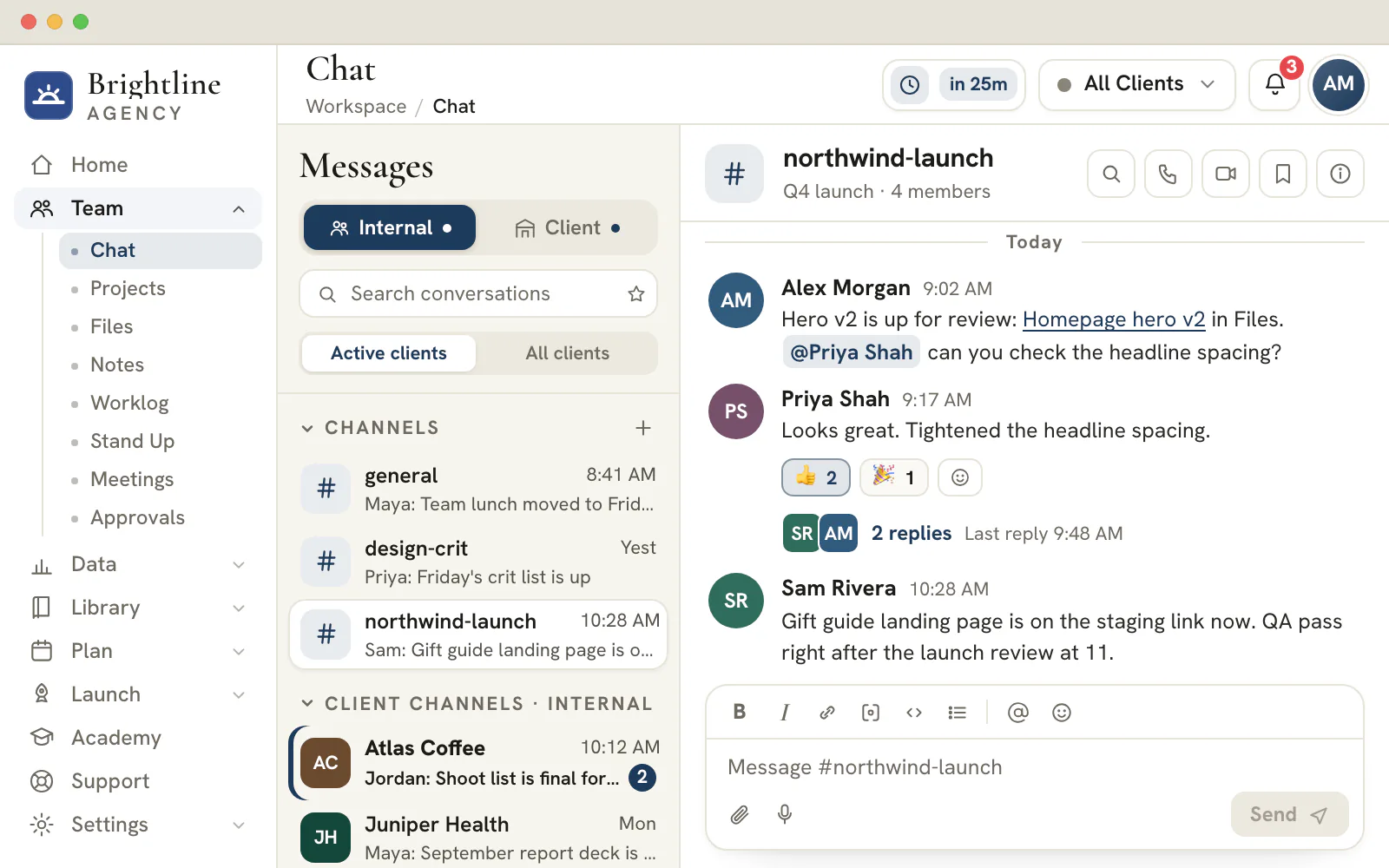
Channels, groups and direct messages sit beside the projects, files and CRM records they refer to.
Back of house
Candid account talk stays inside the agency
- Threads, reactions, pins and saved messages
- Chips that link a lead, task, file or meeting
- Audio and video calls start from any conversation
- Direct messages are readable only by the people in them, admins included
Client conversations
A shared channel, and a private thread with each teammate
- Internal channels never appear in the portal
- File attachments up to 10 MB, in both directions
- Tracked requests go to Support, with their own status and replies
Move client conversations out of the inbox
Open one workspace with internal channels, a shared channel for each client and calls built in.
Plans start at $99/month.
On this page

Internal team chat for the people running the work
Channels, groups and direct messages for your agency
Spin up public or private channels for the way your agency actually works — one per discipline, per project, or per leadership huddle — start a group for a specific initiative, or send a quick direct message to a single teammate. Favourites pin the conversations you live in to the top, and opening a channel clears its unread badge so the sidebar reflects what genuinely still needs you.
Internal chat stays internal. The Internal tab holds your company-wide channels, ad-hoc groups and DMs, plus a private per-client channel where the account team can talk candidly about an account without anything being visible to that client. It is the back-of-house conversation every agency needs, kept deliberately separate from the client-facing one.
Client communication channels, cleanly separated from internal chat
A shared space per client — and a hard wall around it
The Client tab shows only the channels you have chosen to share externally, so clients see a single, focused thread with their account team instead of a noisy inbox. Email back-and-forth gives way to a shared channel where approvals, questions and updates are all in one searchable place, attributed to a person and a timestamp.
Because the audience is decided by the tab — internal versus client — and by per-channel sharing, there is no risk of an internal aside landing in front of a client. A net-new client automatically gets its own pair of channels (one internal, one shared) the first time you work with them, so onboarding a conversation is never a setup chore.
Threaded conversations, reactions and file sharing
The expressive messaging your team already expects
Reply in threads to keep a side discussion from derailing the main channel, react to acknowledge without adding noise, and attach files directly to the message they belong to. Rich formatting, mentions and a tidy reading experience mean a channel stays useful as it grows rather than turning into an unscannable wall of text.
Every message, reaction and reply is durable, so a conversation reads the same when you come back to it tomorrow — in true chronological order, even when your team and a client are typing at the same time. The history is the record, not a transcript you have to reconstruct from memory.
Audio and video calls without leaving the conversation
Jump from a thread straight onto a call
When a message thread needs a face-to-face, start a real audio or video call from the channel, a direct message or a teammate's profile — no separate meeting link, no app-switching. The call opens a branded video stage with a participant grid, screen sharing, a live people roster and an in-call chat, so the discussion that started in writing carries straight through to the call.
Calls run on a dedicated video service, so the people panel, mute and camera controls and screen share all behave the way your team expects from a conferencing tool — only it lives one click from the conversation that prompted it.
Link any resource straight into a message
Reference a lead, project, task or file inline
Conversations are about something — a deal, a task, a creative, a meeting. The composer's resource picker lets you drop a clickable reference to a CRM lead, project, task, theme, form, creative, file, meeting or another channel right into a message, so the people reading it can jump to the exact record instead of hunting for it.
Each linked reference renders as a tidy chip that deep-links into the relevant tool and even sets the active client, turning chat from a place where context gets lost into the connective tissue between every other part of the console.
Per-client scoping keeps every account in its lane
Switch clients and the conversation follows
Select a client and chat narrows to that account — its shared channel under the Client tab, its private internal channel and direct messages under the Internal tab — so a multi-client agency never has to scroll past twelve other accounts to find the one in front of them. Choose All Clients to see the company-wide channels and groups that belong to the whole team.
That scoping is the same model the rest of the console uses, which is what lets a single workspace serve a roster of clients without anything bleeding across accounts. Your team's attention stays on the client they are working on, and the structure does the filtering for them.
Before you type: who will read this message?
Six kinds of conversation cover everything an agency says, and each one states who is listening before you write a word.
| Conversation | Who can read it | Typical use | Where it sits |
|---|---|---|---|
| Direct message | The two people in it and no one else, administrators included | A quick question or a private check-in | Internal tab |
| Group | The people who were added to it, private by default | A small crew on one launch | Internal tab, under All Clients |
| Channel | Anyone on the team if it is public, only invited members if it is private | A discipline, a topic or a leadership huddle | Internal tab, under All Clients |
| Client channel, internal | Your team only, never the client | Candid talk about an account | Internal tab, under the client's name |
| Client channel, shared | Your team and the people in the client's portal | Approvals, questions and updates the client should see | Client tab |
| Portal direct message | One member of the account team and the client's portal users | A question for one teammate that the rest of your team, administrators included, cannot read | Client tab, Direct Messages |
Three signals confirm the audience while you write: the tab you are in, a banner above the thread and a note beside the Send button. A shared channel says that everyone at the client can read it. An agency-only channel says the client cannot. Glancing at them takes a second, and it is the cheapest protection against posting something internal in front of a client.
Plan
Which plan the client side needs
Team chat, direct messages and calls are part of every plan. The client's half of these conversations lives in the client portal, so it begins at the Scale tier ($699 a month) and carries through Enterprise.
A message that gets answered: the request, the person, the date
A message is answered faster when its first line names the request, the person asked and the deadline. The rest is detail for whoever opens the thread.
| Easy to ignore | Easy to answer | What changed |
|---|---|---|
| Any news on the banners? | @Jordan, are the banner proofs approved? I need a yes or a list of changes by Wednesday 3 pm so Thursday's launch holds. | A named person, a clear question and a deadline with a reason |
| Can someone look at this? | Can one of the designers check the attached mock-up for contrast and spacing? Reply in this thread with changes by end of day. | A role, the checks to run and where the answer goes |
| FYI, new brief | New brief attached: three ad concepts due Friday. Please confirm in this thread that the scope is clear. | The file, the deliverable, the date and the acknowledgement wanted |
- Press Enter to send and Shift+Enter to start a new line. Chat reads simple markdown, so a line starting with a dash makes a bullet and square brackets make a checkbox for a short to-do list.
- Keep one topic to a message. Two questions in one message usually get one answer.
- Reply in a thread when you are answering a specific message, so the channel stays readable for the next person who scrolls it.
Threads, reactions, pins and saved messages: which one, when
Chat gives you five small tools for keeping a busy conversation useful. Each one answers a different need.
| You want to | Use | What it does |
|---|---|---|
| Keep the answer next to the question | Reply in thread | Opens the replies in a side panel and leaves the channel uncluttered |
| Show you saw it and agree | A reaction | Confirms without adding another message to read |
| Keep a decision in sight for everyone | Pin to conversation | Shows the latest pin in a banner above the thread and lists every pin in a side panel |
| Return to something later | Save for later | Adds it to a saved list that only you can see, kept in the browser you saved it from |
| Stay close to a conversation you live in | A favorite star | Lifts it into a Favorites section at the top of the sidebar, also kept in that browser |
Inside each sidebar section, the conversation with the newest activity comes first, and a dot on the Internal or Client tab tells you where something unread is waiting. Each conversation also keeps its own unsent draft while the screen stays open, so a half-written reply in one thread never follows you into another. Drafts live in memory only, and a page reload clears them.
What stays private, and how the agency speaks to a client
Trust in a shared tool depends on rules people can state in one sentence. These are the ones Chat keeps.
Agency owners
Set the walls once
Every client gets a shared channel and an agency-only channel, so the line between what the client sees and what the team says is drawn by structure, not by memory.
- Direct messages and private groups are readable only by their members, with no administrator exception
- The shared channel is a dated record of what the client was told
- With All Clients selected, every account's channels sit in one list, newest activity first
Your team
Talk plainly where it is safe
Use the agency-only channel for candid notes about an account and a direct message for anything personal. On a shared channel you choose how you appear.
- Send as yourself, or as the agency with the workspace name and logo
- An @mention reaches the person it names
Your clients
One thread with the account team
A client reads one shared thread with their account team and can write to one member of that team from the portal, in a thread the rest of your team cannot see.
- Files travel both ways, up to 10 per message at 10 MB each
- Internal channels never appear in the portal
The Send as menu appears only on a shared client channel. Choosing the agency shows your workspace's name and logo to the client, while your own team can still see which person typed the message. It suits an announcement, an approval request or any note that speaks for the agency rather than for one teammate.
When a conversation needs a call, a file or a task
Chat is where work gets asked for. The tools around it are where the work is recorded, so the handoffs are worth knowing.
Switch to a call when typing stalls
Start an audio or video call from any conversation, or from a person's profile. Minimize it to a small window you can drag around, and keep working while you listen. Calls started from chat are not recorded; recording and transcripts belong to scheduled client meetings on the Agency plan and up.
Send files where they can be found again
Pick files, drag them in or paste a screenshot. Each message takes up to 10 files of 10 MB each, and a file that can be previewed opens in place. Every file also appears in a read-only Chat attachments folder in Files, one folder per conversation you can open, so nobody has to scroll a thread to find a logo.
Turn a decision into a task
When a thread ends in a request, create the task in Projects and drop a link to it into the conversation. The owner and the date then live on the task, and the thread points at it instead of repeating it. A decision that must outlast the thread, such as an agreed scope, belongs on a page in Notes.
Reply without leaving the page
On a desktop, the Quick tools buttons in the header open Chat as a floating window over whatever you are working on. Messages sent from it go through the same path as the Chat screen, so they land in the real conversation.
Frequently asked questions
Can clients see my internal chat messages?
No. Internal channels, groups and direct messages never appear in the client portal. Each client also has an agency-only channel for candid talk about the account, and a banner above it says the client cannot see it. A client sees only the shared channel, plus the private threads with individual teammates.
Can an administrator read other people's direct messages?
No. A direct message or a private group is readable only by the people in it, and that includes administrators. The same rule covers calls started from a private conversation, which only its participants can join.
How big can a chat attachment be?
Each file can be up to 10 MB, and one message can carry up to 10 files. Pick files, drag them in or paste a screenshot. Sent files also appear in a read-only Chat attachments folder in Files, so they can be found without scrolling back through a thread.
What does the Send as menu do on a client channel?
On a shared client channel you can write as yourself or as the agency. The agency option shows your workspace name and logo to the client, while your own team still sees which person typed it. The menu does not appear in agency-only conversations or in direct messages.
Can a client message one person on my team privately?
Yes. From the portal a client can start a private thread with any member of the account team. It appears under Direct Messages in that teammate's Client tab. Only that teammate and the client's portal users can read it, and there is one thread per teammate for the whole client. Client messaging needs the Scale or Enterprise plan, because it runs through the client portal.
What formatting does a chat message support?
Chat reads simple markdown: bold with double asterisks, italics, strikethrough, inline code, links, bulleted and numbered lists, headings and checkbox lines. Links and email addresses turn clickable on their own. Press Enter to send and Shift+Enter for a new line.
Can I chat without leaving the page I am working on?
On a desktop, yes. The Quick tools buttons in the header open Chat, Projects, Files and the calendar as a floating window over any page. A message sent from the window goes through the same path as the Chat screen, so it appears in the real conversation.