
Agency sales CRM
A CRM built for marketing agencies
Multiple pipelines, editable lead records, a drag-and-drop Kanban board, a full per-lead activity trail and win/loss tracking — all scoped per client. Try the demo below, or start your own workspace.
Already have a workspace? Sign in
- Plans from $99/month
- Built for multi-client agencies
- Your brand across the console
Agency sales CRM
A CRM for marketing agencies — built around leads and pipelines
A marketing agency lives or dies by its pipeline, yet most teams track deals in a spreadsheet or bolt on a generic CRM that knows nothing about how an agency works. The CRM workspace in AI Marketing Dashboard is built into your console with multiple pipelines, fully editable lead records, a drag-and-drop board and a complete activity trail behind every deal — all scoped to the client you are working on. It is where new business moves from a first conversation to a signed retainer, without leaving the workspace your team already runs on.
Pipelines
Run the pipeline, share it, book the call
The agency's own sales and each client's pipelines live in one CRM.
For your team
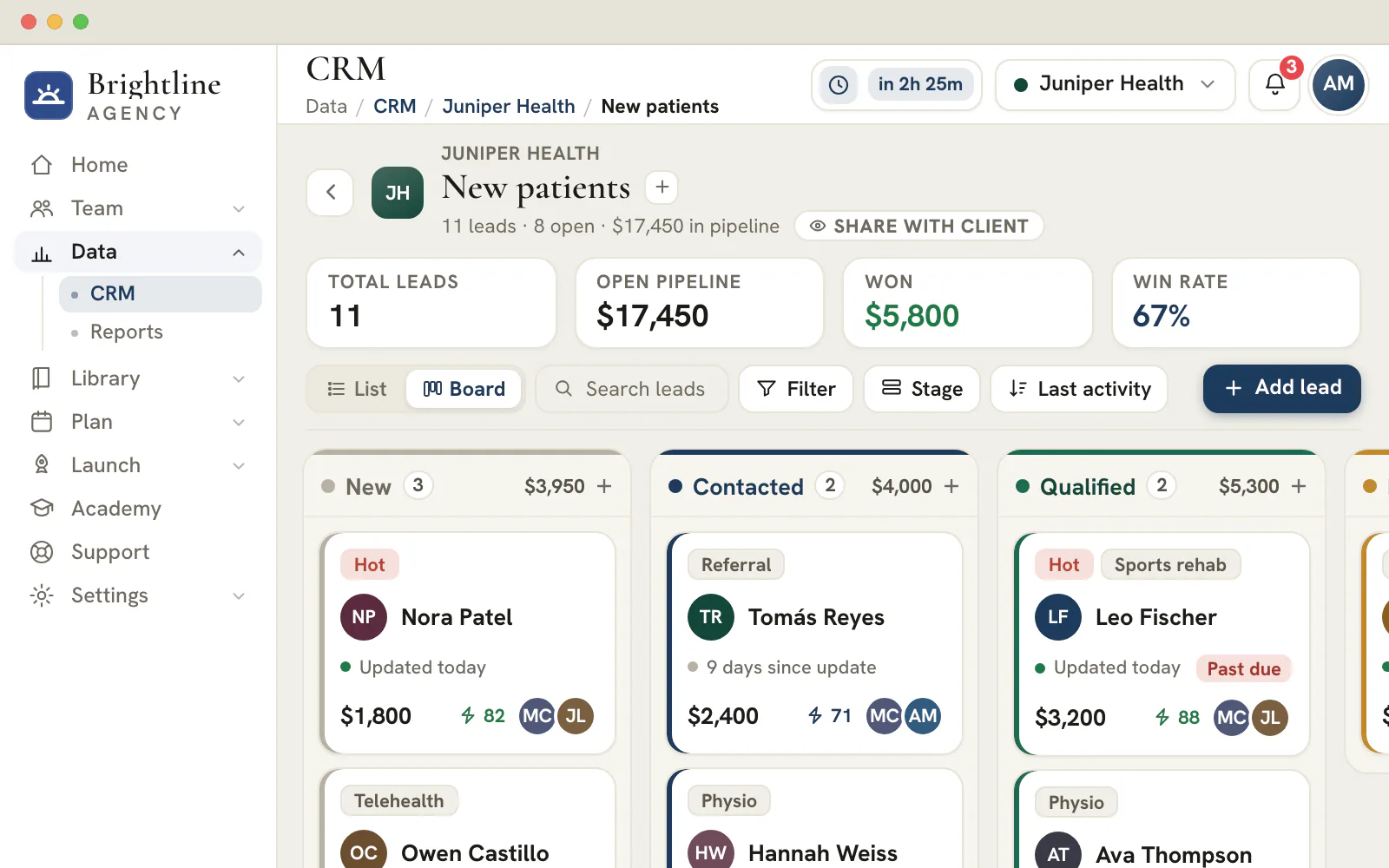
Drag a deal to its next stage
- Stages you name, colour and mark as open, won or lost
- Bulk-move, copy or export leads from the list
- Import and export every field as CSV
In the client portal
Let the client follow their own pipeline
- Share one pipeline at a time
- Only client admins edit leads
- A note a client adds reaches your team's Activity feed

Calls and appointments
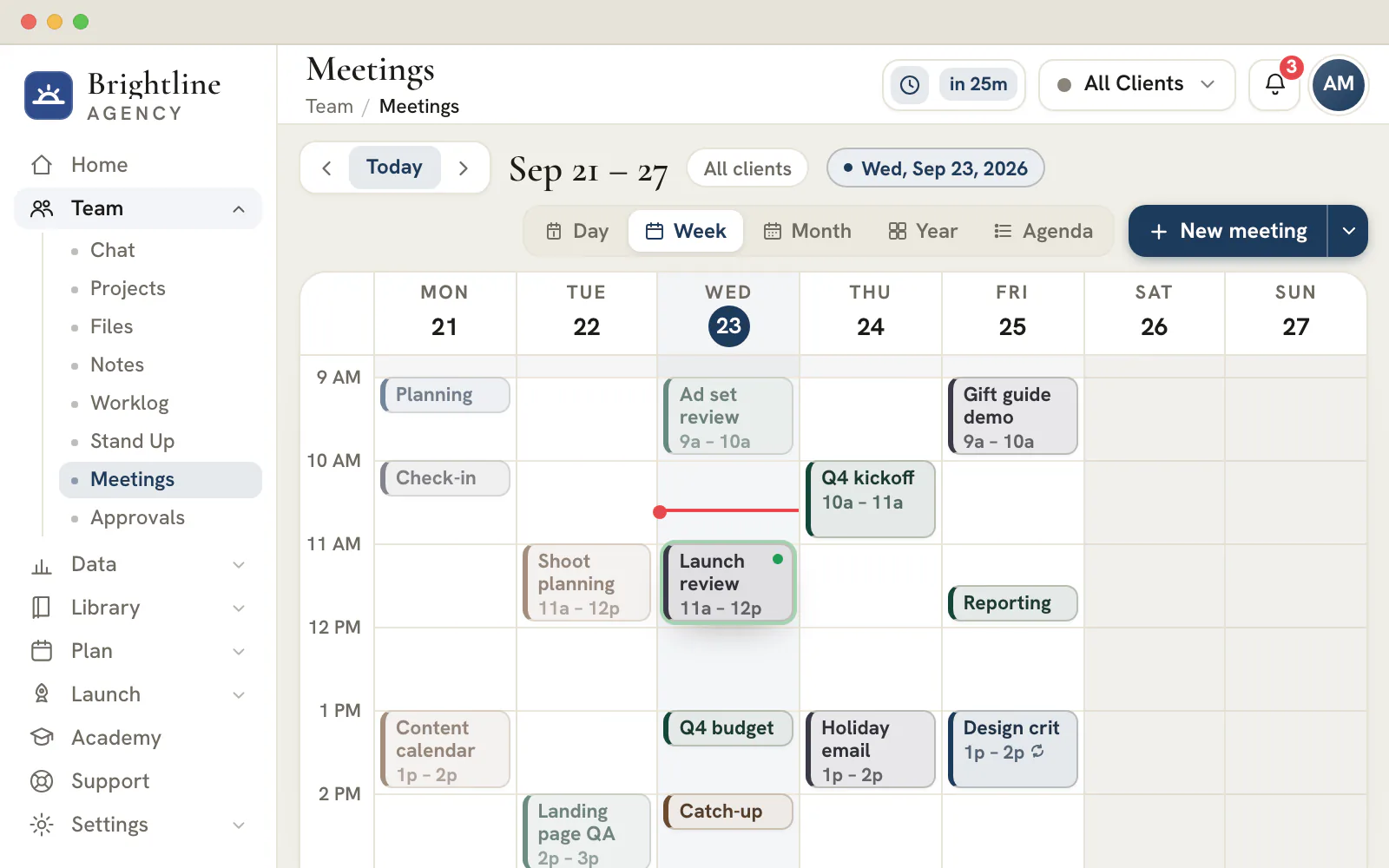
Book the call from the lead
- Appointments that remember their time zone
- Follow-up reminders that ring the person who set them
- Email a lead from its Messages tab and read the replies there
Lead sources
Leads arrive with their history attached
Whichever way a lead gets in, it lands in a pipeline with its source, notes and activity already on the record.
Forms
Every published form gets its own pipeline
Submissions arrive as leads in the New stage, with the visit's UTM and ad-click attribution attached. An email that comes back refreshes its existing lead, so the pipeline never fills with duplicates.Email
Reply from the lead
Email a lead from a verified sending domain, with attachments, and read the replies in the same thread.Booking pages
Bookings file the lead and the meeting
A booking adds the lead with its appointment and puts the meeting on the calendar. Its pipeline runs Booked, Completed, No-show and Cancelled.On the Agency plan and upBy hand
Add, import, bulk edit
Add a lead in a dialog, import a CSV, or select rows to move, assign, tag or export them together.API
Send leads from your own tools
A scoped API key lets an integration or an AI agent file a lead straight into a pipeline.On the Enterprise plan
Give your next deal a pipeline of its own
Open your workspace, pick a client and build their first pipeline.
Plans start at $99/month.
On this page


Multiple sales pipelines, one per service line or client
Model new business the way your agency actually sells it
Agencies rarely sell one thing through one process. A retainer deal, a one-off project and a referral all move differently — so the CRM lets you run several pipelines side by side, one per service line, deal type or client, instead of forcing every opportunity through a single rigid funnel. Each pipeline carries its own stages and its own leads, so the path a deal follows matches how that work is genuinely won.
Navigation is built for a multi-pipeline reality. You start at an all-clients overview, drill into a specific client to pick the pipeline you want, then drop into a list or board view of that pipeline before opening a single lead in full detail. Create, rename, duplicate or archive a pipeline whenever your sales motion changes — the structure bends to your process rather than the other way around.
Lead and contact records you can edit inline
Every field, every custom field, on one detail view
Open a lead and everything about it is editable in place — the name, title and company on the header, and the Contact, Company and Deal cards beneath. Reassign the owner, fix a phone number or update a deal value without ever leaving the record, and capture a brand-new opportunity through a focused Add/Edit Lead modal that drops it straight into the right pipeline and stage.
Because no two agencies qualify deals the same way, you define your own workspace-wide custom fields — text, number, date or single-select — and they appear on every lead automatically. Track the budget band, the referral source, the contract length or whatever signal actually predicts a close for your business, so your CRM holds the data you sell on rather than a fixed set of fields someone else chose.
A drag-and-drop board and a stage workflow you control
Move deals across stages and shape the stages themselves
See a pipeline as a Kanban board and drag a lead from one stage column to the next as the deal progresses — the visual, tactile way most teams want to work a pipeline. Switch to a list view when you would rather scan or sort, and reach the same leads either way. The board makes the state of your new business legible at a glance: what is stuck, what is moving and what is close.
The stages are yours to design. A CRM Settings panel lets you add, rename, delete and reorder stages and give each one a color and a kind — open, won or lost — so the workflow mirrors your real sales steps. Those kinds are not cosmetic: they tell the CRM which columns mean a deal is still live, which mean it closed, and which mean it walked, which is what drives the win/loss tracking and the convert controls.
A complete activity trail behind every lead
Notes, messages, scheduled calls and files, all logged
Each lead detail opens onto its own working tabs — an Activity log, Messages for email and SMS, Schedule for calls, and Files. Log a note from the last conversation, send a message, schedule a follow-up call or attach a proposal, and it all sits with the deal it belongs to instead of scattered across inboxes and someone's memory. When a teammate picks the lead up, the full history is right there.
Every meaningful action — a note added, a message sent, a call scheduled, a file uploaded, a stage move, a conversion — is written to the activity feed and attributed to the real signed-in user, so the record reads like an honest timeline of who did what and when. That history is durable, so it survives a reload and is still there the next morning. The deal's story is the record, not a reconstruction.
Multi-client scoping keeps every account's pipeline separate
Switch clients and the whole CRM follows
An agency manages new business for a roster, not a single company, so the CRM scopes to the active client by default. Pick a client and you see that account's pipelines and leads; switch to an all-clients overview to read the whole book of new business at once. Your team never has to wade past a dozen other accounts to focus on the one in front of them.
Working at volume is built in too. Bulk-select rows to move several leads to a new stage, copy them or delete them in one action, and copy and paste leads between pipelines when an opportunity belongs somewhere else. The same per-client scoping the rest of the console uses is what lets one workspace serve many clients without any account's deals bleeding into another's.
Convert deals and track win and loss per pipeline
Closed-won, closed-lost and the metrics that follow
Because every stage carries a kind, the CRM knows exactly when a deal is won or lost. Drop a lead into a won stage and the convert action marks it converted; move it to a lost stage and it is recorded as closed-lost. The win and loss CTAs surface on the lead itself, so closing a deal is a deliberate, tracked step rather than an edit that quietly disappears.
Those outcomes roll up per pipeline, so you can see how new business is actually converting across each service line or deal type instead of guessing. Knowing your win rate by pipeline is what turns a list of opportunities into a sales picture you can plan around — which deals to chase, which motion is working, and where the pipeline is leaking before it costs you the quarter.
What a CRM for a marketing agency needs to handle
An agency CRM has two jobs: it holds your own new business, and it holds the leads you generate for each client.
A typical CRM assumes one company selling its own product. An agency sells its services and also produces enquiries for the clients it serves, so every record must say whose lead it is. Here, each lead belongs to a client account or to your agency's own account, which sits first in the list with an Agency badge. The same pipelines, stages, custom fields and lead tabs work for both.
That answers the questions an agency keeps asking. Which client's form produced this enquiry? Who owns it? Is it shared with the client? The CRM shares a workspace with the client profile and onboarding record, the calendar, files and chat, so a lead's client, meetings and files all sit in one console.
| Requirement | Why an agency needs it | How it works in this CRM |
|---|---|---|
| Pipelines kept apart per client | Each client sells differently, and leads must never mix across accounts | Every client has its own lists, and an all-clients overview adds them up |
| Stages with a defined meaning | A win rate is only as honest as the definition of won and lost | Each stage is open, won or lost, and those kinds drive the win rate |
| Attribution on the record | Clients ask which campaign produced the enquiry | UTM values, referrer, landing page and ad click ids are stored on the lead |
| A client-safe view | Clients want results without your internal notes | A shared pipeline shows the client a reduced set of fields |
| Access limited by account | A contractor should reach only the clients they work on | Team members with the CRM permission reach the clients assigned to them, and admins reach all |
Set up a working agency pipeline in six steps
A pipeline stays useful when its stages describe things that happened, not things somebody hopes will happen.
Pick the account first
Choose a client in the header switcher, or your agency's own account, and open the pipeline you use daily. A client can hold several pipelines, so retainers and inbound enquiries never share a board.
Name stages after events
Write stages as moments you can point to, such as Discovery call booked or Proposal sent. Mark which stage means won and which means lost, because those kinds feed the win rate.
Bring leads in from every source
Let published forms and booking pages file leads themselves, add others in a dialog, or import a spreadsheet. The import shows a column-mapping step first, and nothing is created until you confirm.
Complete the record once
Open a lead to check contact details, deal value, owner and stage together. Add the custom fields your sales process relies on, and assign more than one teammate when a deal needs two people.
Advance a lead on evidence
Change the stage after the event has happened, not before. A board that runs ahead of reality makes the win rate meaningless, and a client who is shown it will notice.
Write down what was agreed
Add a note after each call so the next person knows where the deal stands. Every field change also writes an audit line to the lead's activity, so edits can be traced to a person.
Tip
Changing stages later is safe
Renaming or recoloring a stage keeps its leads where they are. Deleting a stage that still holds leads asks where they should go, and records the move on each lead's timeline. Without a won and a lost stage, the win rate and the convert and mark-lost actions stay off.
Starter stage templates for sales, onboarding, win-back, support and hiring
A pipeline is not only for sales. The board that tracks proposals can also track a new client's first month or a win-back campaign.
| Stage template | Stages, in order | Counts as won | Counts as lost |
|---|---|---|---|
| Sales Pipeline | New, Contacted, Qualified, Proposal, Won, Lost | Won | Lost |
| Client Onboarding | Kickoff, Discovery, Setup, Review, Live, Churned | Live | Churned |
| Reactivation / Win-back | Dormant, Outreach, Re-engaged, Offer sent, Won back, Unresponsive | Won back | Unresponsive |
| Support / Tickets | New, Triaged, In progress, Waiting on client, Resolved, and a closing no-fix stage | Resolved | The no-fix stage |
| Recruiting | Applied, Screening, Interview, Offer, Hired, Declined | Hired | Declined |
Choose one under Start from a stage template when you create a pipeline, then rename, recolor or reorder any stage to fit how you work. Use Save as template in CRM settings, on the Stages tab, to keep an arrangement you like and reuse it for the next client. Client Onboarding suits the weeks after a deal is won, from kickoff to live.
Track which ad, page or form produced each lead
Attribution is stored on the lead when it arrives, so the answer to where it came from never depends on anyone's memory.
What is captured when a visitor submits or books
Published forms and booking pages record the visit's UTM source, medium, campaign, term and content, the referrer, the landing page and the form or booking page that produced the lead. The visitor's first recorded visit is kept in separate first-touch fields, remembered for up to a year where consent allows.
Ad click identifiers are stored too, for Google, Meta, Microsoft, LinkedIn, TikTok, X, Snapchat, Pinterest and Reddit clicks. For leads from published forms, the Channel field turns those values into a network name such as Google Ads or Meta Ads, or into Email or Organic and Direct, while a booking-page lead keeps its UTM source there.
Reading attribution across the list
Group the list by stage, owner, source, tag, score, deal value, expected close, appointment or last activity, and filter by value or by a Hot, Warm or Cold score. Group by source to compare where leads arrived from, then open a lead and read Channel on its Marketing attribution card, or export the CSV, where Channel is a column.
Note
The CRM records origin, not cost
A lead carries where it came from, but not what the click cost. Spend and cost per lead belong in your ad reports, and the reporting hub is where those sit beside each client's results.
Keep follow-up honest with freshness, appointments and reminders
A pipeline decays quietly. The CRM shows how long each lead has been untouched, and gives you two different ways to promise a next step.
| Days since the last update | What the lead record tells you |
|---|---|
| Fewer than 7 | Recently touched |
| 7 to 20 | Cooling off |
| 21 to 44 | Going stale, and worth a follow-up |
| 45 or more | Gone cold, with no touch in over six weeks |
| No activity recorded | Shown as Never, not as zero days |
An appointment is a commitment made with the lead. It stores a date, a time and the time zone it was agreed in, so a call booked across zones keeps its meaning. Set it on the Overview, book it from the Schedule tab onto the team calendar, or let a visitor choose a slot on a booking page.
A follow-up reminder is a nudge for yourself. It sits on the lead and shows who set it, but it rings only that person, on their own device, and stays due until they clear it, so a missed reminder is still waiting rather than quietly expiring. When a contact asks to be left alone, switch on Do Not Disturb: email, SMS and call actions for that contact are paused, and the record says so.
Email a lead from the record and keep the whole thread
Email works from the lead itself, so the conversation sits beside the notes, calls and files for the same deal.
The Messages tab sends from an address on a domain your client has verified in its Data Settings, and replies arrive in the same thread. A message can carry attachments of up to 5 MB, can be scheduled for later, and shows whether it was delivered or bounced. A cross-lead inbox groups threads by lead and subject, with filters for conversations that need a reply, await an answer or have a problem.
Templates fill in the lead's first name, company, your name and your agency's name. Subject lines and texts saved in the copy library appear in the same picker, so approved wording is reused instead of retyped.
Note
Two limits worth knowing
A lead on your agency's own account has no verified client sender, so it cannot send email from the record. SMS messages are saved to the lead's timeline, and SMS delivery is not part of the CRM.
Frequently asked questions
Do marketing agencies still need a CRM if a spreadsheet works today?
A spreadsheet works until two people edit the same row or a client asks where a lead came from. A CRM adds stages with defined meanings, a history of who changed what, an owner on every deal and attribution captured when a lead arrives. Because you can import a CSV, you keep what you have and add structure from the first day.
Can one CRM hold my agency's sales pipeline and my clients' lead pipelines?
Yes. The agency's own account is a scope of its own and appears first with an Agency badge. Each client account has separate lists beside it, and an all-clients overview totals leads, open pipeline value and win rate. A team member needs the CRM permission and an assignment to a client, while admins reach every account.
Which stages should a marketing agency's sales pipeline have?
Start with stages that match events you can verify. The default set runs New, Contacted, Qualified, Proposal, Won and Lost. If your process includes a discovery call or a scoping workshop, add a stage for it between Qualified and Proposal. Keep clear won and lost stages so the win rate means something.
Can my clients see their leads in the CRM?
Yes, on the Scale and Enterprise plans. You share one pipeline at a time, and the client sees a reduced record without your notes, messages, calls, scores or custom fields. A client admin can change contact details and value, move the stage and add notes, and other portal members can view the pipeline without changing it.
Does the CRM send email and SMS to leads?
Email goes out from the lead's Messages tab using a domain your client has verified, and replies arrive in the same thread. SMS messages are saved to the lead's timeline, but SMS delivery is not part of the CRM. A lead on the agency's own account cannot send email from the record.
How do I move leads from another CRM or a spreadsheet?
Export from the old tool as a CSV file, open Import in the CRM and map the columns. Each row needs a name, common headers such as amount, mobile and gclid are matched for you, and unmapped columns are skipped. A summary shows how many rows are ready and how many were skipped before anything is created.
Does the CRM show which campaign or ad produced a lead?
It records where the lead came from, not what it cost. Forms and booking pages capture UTM values, the referrer, the landing page and ad click ids at submission, and a form lead's Channel field names the network. Spend and cost per lead come from your ad reports, not from the CRM.
Can I send leads to the CRM from my own tools or an AI agent?
On the Enterprise plan, yes. Scoped API keys, created in Settings, let an integration add leads, search and read them, update fields and attach notes. Intake fills empty fields only, so a repeated webhook cannot overwrite what a person curated, and each API edit writes the same audit line as a manual edit.