Launch · SMS
The SMS launch checklist, from approval to the record
Freeze an approved text with its segment count and its audience of leads with a valid phone, send it from your own SMS tool against a task, and mark it sent. Look inside the demo below, or start your own workspace.
Already have a workspace? Sign in
Launch · SMS
A text cannot be recalled. It reaches a phone in a pocket, costs a fee for every segment and every recipient, and its first mistake is the one the whole audience sees. Launch in AI Marketing Dashboard is the checklist an approved text campaign passes before it goes out. It freezes the message with its encoding and segment count, counts the leads with a valid phone number, runs the checks for opt-out wording, brand name, length and hours, and then hands the send to your own SMS tool with a task and a spec. Nothing is sent from here. When the texts have gone you mark the launch sent, and the record stays.
Approval to handoff
An approved text, frozen and ready to hand over
An approved text campaign gets one more round of checks before Launch prepares the handoff to your SMS tool.
Freeze, check, hand over, then record
The handoff
Five steps from an approved plan to a sent record
Each step has one owner and one visible result, so nobody has to remember what came before.
Open the launch
Clear what blocks it
Create the task
Send from your SMS tool
Mark it sent
Who does what
Four parties, four jobs
The checklist is shared out, so nobody assumes that someone else has it.
The agency
The client
The messaging provider
This product
Before and after
What the launch adds to a text sent from memory
A text is quick to send and impossible to take back, which is why the work belongs before the press.
A text sent from memory
It works until the first text that is longer, or wider, than anyone expected.
A text sent from a launch
The launch records the handoff. Whether the texts were delivered, and who replied STOP, lives with the provider.
Send the next text from a checklist, not from memory
Plan the text, get it approved and launch it with the segment count, the phone audience and the handoff already in front of you.
Plans start at $99/month.
Creating the launch captures the text exactly as it was approved, together with its encoding, its character count and the number of segments it will cost. One emoji or curly quote moves a text out of plain GSM-7, where a segment holds 160 characters, into Unicode, where it holds 70, so the figure is worked out on the real text and never estimated. Those numbers then travel with the launch for as long as it exists.
The launch warns when a text runs past one segment, because every segment is billed for every recipient, and it refuses one longer than ten. The approval is bound to the plan's content, wording included: an edit afterwards leaves the plan marked Changed since approval, and no launch can be created from it until it is approved again.
After the plan checks, six rows read the message and the audience. Message fails when there is nothing to send. A text with no STOP-style wording shows No opt-out language as a Warning, and one that never says who it is from shows Brand name missing. Message length passes at one segment, warns up to the limit and turns into Message too long beyond it, and an audience with no valid number in it shows Nobody to text as a Problem.
The sixth row, Quiet hours, appears on every text launch as a Warning, a reminder of the 8 AM to 9 PM window rather than a test. Checks that need action link to the place that fixes them, usually the plan, and Run checks again reads the result afresh. Beside them, a Warning headed SMS sending isn't connected yet says plainly that a launch can only be manual.
A lead is counted when its phone field holds a number that can be turned into a full international one. Spaces, dots, dashes and parentheses are forgiven and an extension is dropped, since a text cannot dial it. Without a country code only a North American number is accepted; any other number must start with a plus sign or 00 and its country code, or it is left out as unreadable. Valid here means well formed: the product cannot tell a mobile from a landline.
Among the leads your audience selects, the launch counts who is in and who is out, with a reason for each: no phone, an unreadable number, a repeat, a Do Not Disturb mark, or a lead that arrives through a saved list from a restricted CRM list. A filter that names a list the person launching may not use is refused outright. The total is a head count of well-formed numbers, not of delivered texts or of permission, and email unsubscribes are not read, so a contact who opted out of email stays in a text audience until marked Do Not Disturb.
Rather than filtering the CRM a second time, the plan can name an audience already saved in the client's Library, either a segment or a list. Its count runs through the same rules as any other audience, under the access of the person launching, and the launch keeps the saved audience as the approval saw it: its name, its kind and a fingerprint of its definition.
If that audience is edited after approval, the approval stops matching, and the plan goes back for a fresh decision before any launch can be created. Someone who may not see a contact's CRM list cannot count or launch to it.
No text leaves this product. Someone with Library edit, Publish and CRM access chooses Create launch task, which opens a task in the client's Marketing Plans project in Projects and puts the launch in Waiting for manual launch. Export spec (JSON) downloads the frozen message with its encoding, character count and segment count, and the audience it names, so whoever sends is working from the approved text and not from a memory of it.
Someone with Library edit and CRM access but no Publish permission chooses Request launch approval instead, and a publisher with CRM access approves the manual launch from the approvals inbox. The spec holds no phone numbers, so the sender brings the people. For a filter audience, filter each CRM pipeline the way the audience did and export that view as a CSV; for a saved audience, rebuild the same people with a CRM filter. The export does not apply the launch's exclusions, so remove anyone with no phone, an unreadable or repeated number, or a Do Not Disturb mark, and load the rest into the tool.
Registration is not something this product does. In the United States, a business that texts from ordinary phone numbers is generally expected to register its brand and campaign with the messaging provider before sending, a step known as 10DLC registration, and other countries set their own sender rules. The launch looks in the message for the brand name and for STOP, opt out or unsubscribe wording, and it reminds you of the 8 AM to 9 PM window, judged by the recipient's clock.
It does not keep proof of consent, and it does not process STOP replies. Keep the consent record somewhere you control, such as a CRM note or custom field or the SMS tool, confirm that the provider answers STOP on your sending number, and mark anyone who opts out Do Not Disturb so the next audience drops them. None of this is legal advice.
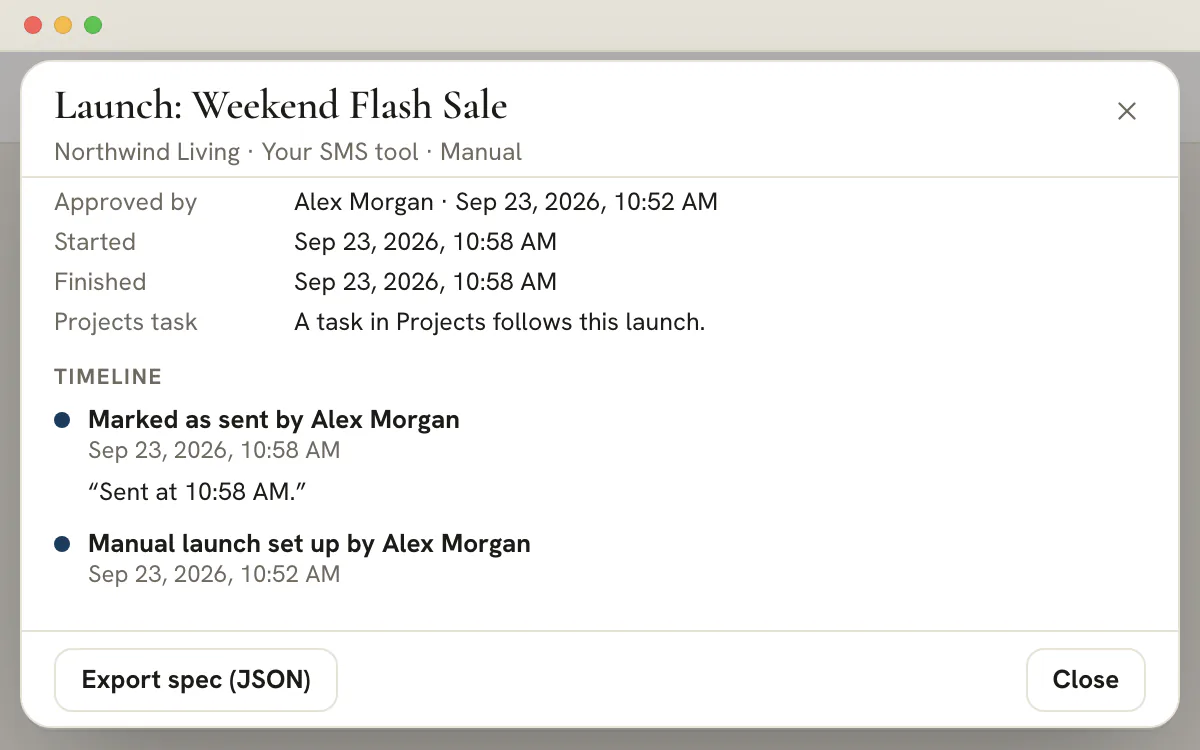
When the texts have gone, a publisher chooses Mark as sent, with an optional link to the live message or the send report and a note. The timeline then reads Marked as sent, with the person's name and the time shown in the viewer's own time zone, beside the moves before it: Launch requested or Manual launch set up, and the approval. The list shows the launch as Sent, and the task in Projects follows the work.
Mark it only once the texts are out, because other people will read the record as fact. A launch that must stop can be canceled instead. A plan whose launch has been marked sent cannot be launched again, so duplicate it to send a new version.
Some items are tested for you when the launch opens. The rest are yours. Where Launch tests an item, the item says so.
| Item | In the launch record? | Detail |
|---|---|---|
| Message text | Yes | Exactly as approved, and in the exported spec |
| Encoding, characters and segments | Yes | Counted on the real text when the launch is created |
| Brand name | Yes, when the plan has one | Stored as the sender label, and empty when the plan's Brand name field was left blank |
| Opt-out wording present | Yes | A yes or no taken from the check |
| Audience | Yes | The filter, or the saved audience's name and kind, never a list of people |
| Recipients' phone numbers | No | They stay in the CRM, so export them from there |
| Send time | No | Chosen in your SMS tool. The timeline records when the launch was marked sent |
| Delivery, failures and replies | No | Reported by the SMS tool |
| Consent and STOP replies | No | Kept in the CRM or in the SMS tool |
Because the spec holds no numbers, the audience count on the launch is the figure to reconcile against. A CRM export covers one pipeline's view at a time and carries every lead in it, whatever the launch counted out, so take out anyone without a phone, every repeated or unreadable number and anyone marked Do Not Disturb before loading the list. A saved audience has no phone export of its own, so rebuild its people with a CRM filter first. The tool's list should then match the launch's count.
Providers bill per segment per recipient, so a campaign costs the segments in the message multiplied by the people it reaches. The launch freezes the segment figure with the message, which makes the cost of the approved text knowable before anything is sent. It passes one segment, warns from two to ten, and fails a longer message.
| The text | Encoding and segments | Segments billed in all |
|---|---|---|
| 160 plain characters | 1 segment · GSM-7 | 1,500 |
| 161 plain characters | 2 segments · GSM-7 | 3,000 |
| 306 plain characters | 2 segments · GSM-7 | 3,000 |
| 307 plain characters | 3 segments · GSM-7 | 4,500 |
| 68 letters and one emoji | 1 segment · Unicode | 1,500 |
| 69 letters and one emoji | 2 segments · Unicode | 3,000 |
The jumps come at fixed lengths. Plain text needs a second segment at 161 characters and a third at 307, because every part of a longer message gives up a few characters to its header. A single emoji turns the whole text into Unicode, where the limits fall to 70 for a lone segment and 67 once the text is split, and the emoji itself counts as two.
The audience comes from CRM pipelines, stages and tags, or from a saved audience. Each lead's phone field is read and cleaned into a full international number, or rejected. The rules are small and strict:
| Reason | What the launch saw | What to do |
|---|---|---|
| No phone | The lead has nothing in its phone field | Add a number in the CRM |
| Invalid | The number cannot be read as a full phone number | Correct it, or add the country code |
| Duplicate | An earlier lead already holds the same number | Nothing: the number is counted once |
| Do not contact | The lead, or another lead with the same number, carries the Do Not Disturb mark | Leave it out, or clear the mark if the person asked to be texted |
| Restricted list | A saved list carries in a lead from a restricted CRM list that the person launching cannot address | An Agency Admin has to launch it. A filter naming such a list is refused outright |
Note
An email unsubscribe does not apply to texts
The text audience reads Do Not Disturb marks, not the email unsubscribe list. A contact who opted out of a client's emails can still be counted for a text. Mark them Do Not Disturb in the CRM if they should not be texted.
If nobody qualifies, the check reads Nobody to text and fails. If the client's CRM holds 25,000 leads or more, it reads Audience too large to check and fails as well. A saved segment or list can stand in for the filter, and saved audiences explains how each is built.
A text campaign has four parties, and launch trouble often comes from a job that two of them each assumed the other held.
| Job | Agency | Client | Messaging provider | This product |
|---|---|---|---|---|
| Register the brand and campaign | Prepares the submission and chases the approval | Supplies the business details | Reviews and approves the registration | Does not take part |
| Obtain and keep consent | Keeps the record where it can produce it | Collects opt-ins on its own forms | May ask to see the proof | Does not record consent |
| Honor STOP replies | Confirms they are honored and marks Do Not Disturb | Respects them in its own channels | Usually answers STOP on its numbers | Checks the wording only |
| Write and approve the text | Writes it and submits the plan | Signs off the wording outside the product, if asked | Applies its content rules | Counts, checks and freezes it |
| Send at a sensible hour | Chooses the time | Agrees the window | Delivers when told | Reminds you of the window |
| Keep the record | Marks the launch sent | Can ask to see it | Holds the delivery reports | Keeps the launch, the task and the timeline |
Treat the provider column as something to confirm rather than assume. Rules and providers differ, so ask yours how it handles registration and STOP for your sending number before the first campaign. None of this is legal advice.
Send first, record second
Choose Mark as sent once the texts are out, not before. Other people read the record as fact, and a launch marked early says something that has not happened yet.
Add the link and a note
A live link has to be a full https address, and it is optional. The note is the place for what the tool reported, such as how many numbers it accepted.
Read the timeline
It lists the moves this launch made, such as Launch requested, Approved for a manual launch or Manual launch set up, and Marked as sent, each with a name and a time shown in the viewer's own zone.
Let the task close itself
The Projects task is assigned to the publisher who set up or approved the launch and falls due in seven days. Marking the launch sent completes it. The reverse does not hold: completing the task does not mark the launch.
A launch that has to stop is canceled rather than marked, and the plan can be launched again. A launch marked sent locks its plan, so a new version starts from a duplicate. The approvals inbox holds any request still waiting for a publisher.
Plan
Plan availability
Text launches are included in every plan, starting with Studio at $99 a month. Paid and Social launches ask for the Agency plan at $299 a month or higher. Planning the text itself is covered in SMS campaign planning.
Four things: the message (brand name, STOP-style wording, length and segments), the audience (people with a valid phone number, and who was left out), the handoff (a task, the exported spec and the contacts loaded into your SMS tool) and the record (marking the launch sent). Launch tests the first two and keeps the last. Registration and consent stay with you and the provider.
No. SMS sending is not connected, so every SMS launch is a manual handoff. The launch freezes the approved message and audience, creates a task and offers the spec for download. You send from your own SMS tool and then mark the launch sent, which records who did it and when.
Someone with the Publish permission for the client. A person with only Library edit access can request the launch, and a publisher approves it and later marks it sent. Requesting, starting or approving the launch also needs access to the client's CRM, since the audience is drawn from its leads.
The frozen message, its encoding, character count and segment count, the audience as a filter or a saved audience's name and kind, the plan's brand name when one was entered, and whether the text has opt-out wording. It holds no phone numbers, so export the matching contacts from each CRM pipeline (a saved audience has to be rebuilt there with a filter), leave out anyone the launch counted out, and load the rest into your SMS tool.
No. Registration, where a country requires it, is done with your messaging provider, and so is processing STOP. What the launch does check is wording: whether the message names the brand and includes a STOP, opt out or unsubscribe line. It also shows an 8 AM to 9 PM quiet hours Warning as a reminder.
The audience starts from the leads your filter or saved audience selects. Of those, only leads whose phone field holds a well-formed number are counted, each number once. A lead drops out, with a named reason, when it has no phone, when its number cannot be read, when the number repeats, when Do Not Disturb is set or when a saved list carries in someone from a restricted CRM pipeline. Leads in archived pipelines, or in ones your access does not cover, are never counted. A contact who unsubscribed from email is still counted, because only Do Not Disturb applies to texts.
The client does not see Launch, because the client portal has no such page. The client's part happens outside it: supplying the business details a registration needs, confirming the brand name, and owning the relationship with the people being texted. Recipients see the text itself, from the number your provider sends it on.
SMS launches need no upgrade: they are included from Studio, at $99 a month. Only Paid and Social launches ask for the Agency plan at $299 a month. A text launch does need access to the client's CRM, and a publisher to create the task and mark it sent.
