
Agency project management
Plan and ship client work, your way
Five views, subtasks that are real tasks, comments with @mentions that notify the right people, and statuses, priorities and fields you define — scoped per client and connected to the briefs, files and conversations the work comes from. Try the demo below, or start your own workspace.
Already have a workspace? Sign in
- Plans from $99/month
- Built for multi-client agencies
- Your brand across the console
Agency project management
Project management software built for marketing agencies
A general-purpose task tool does not know that your work is organized by client, that a campaign needs a sign-off before it ships, or that one task should be visible to a client while the next stays internal. The Projects workspace in AI Marketing Dashboard is a full project manager — five views, subtasks that are real tasks, comments with @mentions, and statuses, priorities and fields you define — built the way an agency delivers: per client, with approvals.
Delivery
Client work, laid out the way each person thinks
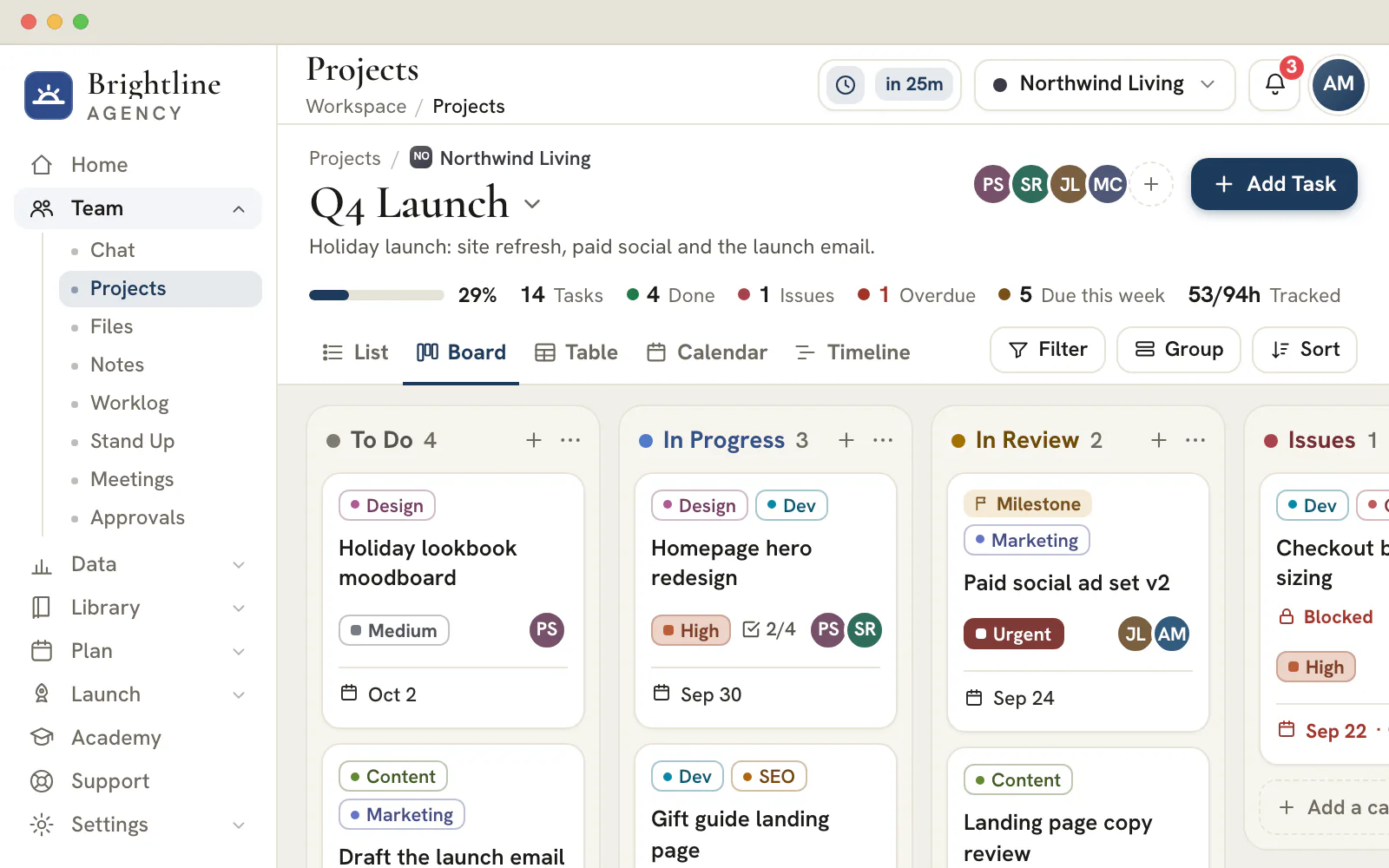
A strategist lives in the calendar and a designer on the board. Same tasks, five views.
Five views
One set of tasks, read the way you need
- Save the filter and grouping combinations you return to
- Show subtasks, or keep a view to top-level tasks
- One client's portfolio, or every client in a single view
On every task
Detail deep enough to run the work
Subtasks
Break a task down, keep the detail
Each subtask has its own assignee, dates, status and comments, one level under its parent. Checklists stay for the small stuff, and any item can be promoted when it grows.Your vocabulary
Statuses and fields you define
Rename statuses, add priorities and give tasks custom fields, all from one panel in Settings. Make a field required and any task that leaves it empty is flagged.Mentions
@mentions that ring the right bell
Name a teammate in a comment and they are notified in the bell and the Activity Center, with a link straight to the task.Time
Hours land on the task
The task drawer shows the time logged against it in the Worklog, with a shortcut to log more.
Client approvals
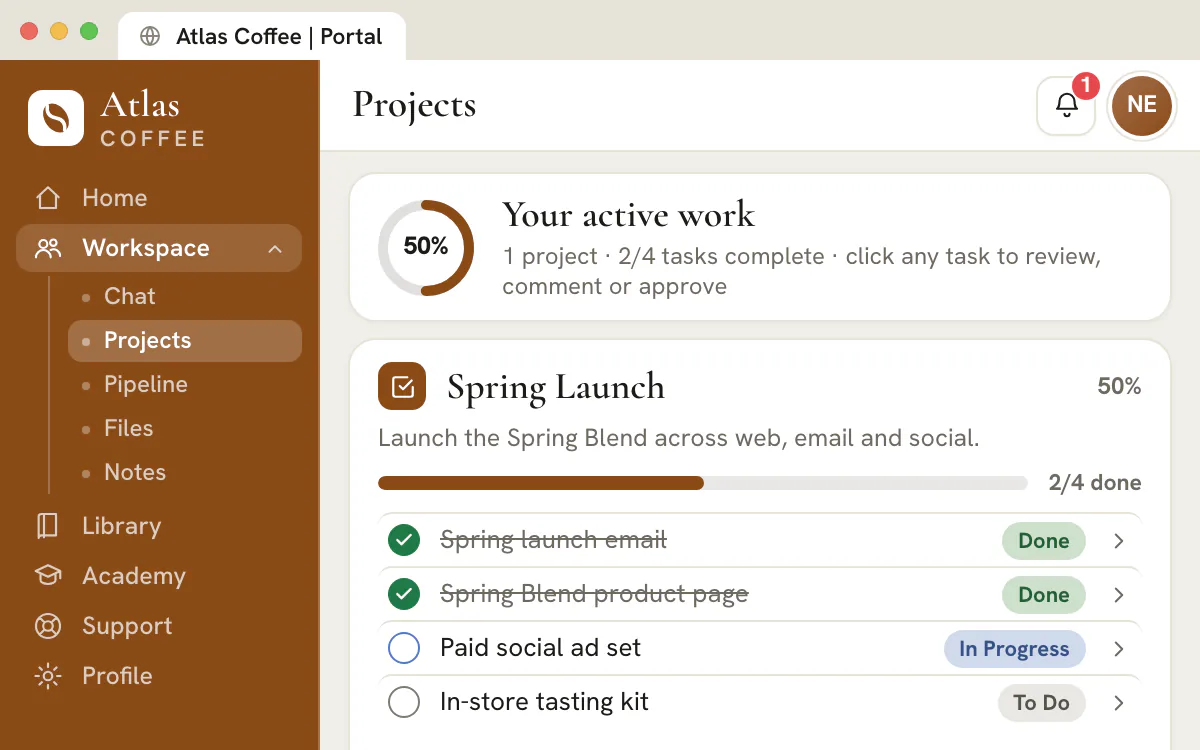
Clients sign off on the task itself
- Nothing is shared until you switch it on
- A task can stay internal inside a shared project
- What clients write appears in the discussion your team already follows
- Shared projects
- Task comments
- Approve & mark complete
- Reopen this task
Plan the next campaign where your client can follow it
Set up your workspace, add a client and share the first project when it is ready.
Plans start at $99/month.
On this page


Five views of the same work, for the way each person thinks
Board, list, table, calendar and timeline
Move the same tasks between a Kanban board for the daily catch-up, a list for a focused worklist, a table for bulk edits, a calendar for deadlines and a timeline for sequencing a campaign. A strategist can live in the calendar while a designer works the board.
Group the list, table and timeline views by status, assignee, priority, due date, tag, client or project, filter it by assignee, priority, tag, status or date, and save the combinations your team returns to. The list is a twelve-column table you trim to what you actually read, and long collections keep loading as you work instead of stopping at a page break.
Task detail deep enough to actually run the work
Description, assignees, dates, tags, attachments, estimates and a full activity trail
Open a task into a full drawer: description, several assignees, start and due dates, priority, tags, real file attachments, an estimate and logged hours, watchers, blockers and comments. A context strip names the client and the project it belongs to, and the project name links straight there.
Everything you touch is written down. The activity trail records status moves, reassignments, date edits, comments and custom-field changes against the person who made them, and a quiet chip reads Saving, All changes saved or Retrying, so nobody wonders whether an edit landed.
Subtasks that are real tasks, not just checkboxes
One level deep, everything a task has — plus a checklist for the small stuff
Break work down and each subtask is a genuine task: its own title, description, assignees, due date, priority, status, tags, attachments and comment thread. Open one in the same drawer, hand it to a different specialist, give it its own deadline — it still rolls up into its parent's progress.
The hierarchy is deliberately one level deep, and a subtask always stays in its parent's project and client account, so a breakdown never becomes a tree nobody can navigate. Views hide subtasks until you switch them on, and project stats count top-level tasks only.
When a step does not deserve a whole task, the checklist is still there: named items you tick off inside the task. Any checklist item can be promoted into a real subtask the moment it grows teeth, and deleting a task takes its subtasks with it under one undo.
Statuses, priorities and custom fields your agency defines
One workspace vocabulary, managed in Settings → Projects
Rename, recolor, reorder, add and delete status columns so the board mirrors your real pipeline — Backlog, In Progress, Client Approval, whatever your shop calls them — with one column marked as the done state. Priorities work the same way: keep Urgent, High, Medium and Low, add your own, or reset in a click.
Custom fields let a task hold what your process needs and no template ships with: single-line text, long text, a number, a date, a checkbox, a URL, or a single-select with your own options. Mark one required and an empty value is flagged on the task; a field created through the Projects API wears a From API chip.
All three lists live in one panel — Settings → Projects — so the vocabulary the columns, filters, groupings and API share cannot drift into three versions. Retiring a field hides it without deleting the values already stored, and deleting a status moves its tasks to the first column.
Three levels of scope, one set of views
One project, one client's whole portfolio, or the entire agency
Every project belongs to a client, so selecting an account filters the board to that client's work and hides the rest — the structure a multi-client agency needs to stop twelve accounts blurring into one backlog. Nothing lives in a general bucket outside an account.
Switch to All Projects for one client's entire portfolio in any of the five views, grouped and badged by project: the view you open before a client call. Choose All Clients and the same views widen into a cross-client aggregate, every row badged with its client.
Approval workflows that start from a campaign brief
Turn a submitted plan into a review task automatically
When a marketer submits a paid, social, email or SMS plan for approval, the console creates a real task in a per-client Marketing Plans project — assigned to the approver, due in a few days, tagged for marketing and deep-linked to the plan.
The reviewer approves or requests changes in Team > Approvals or on the plan itself; the task points there, and completing it alone approves nothing. The review task lives where the rest of the work lives — on the board, in the assignee's own list, surviving a reload — rather than in an email nobody can find later.
Share the right work with the right client
Per-project and per-task client visibility
Flip a project to client-visible and its tasks come along, so a client sees a clean view of the program you run for them in their own portal — while a per-task override keeps anything internal out of sight. The default is private until somebody decides to share.
That double gate lets one board serve your team and your client without two trackers drifting apart. Clients comment on what they can see, and their replies land in the thread your team is already reading, instead of arriving as a screenshot in an email.
The whole tool on the phone your account manager answers on
Every view, the task drawer and the comment composer, down to a 360px screen
Projects is responsive to roughly 360 pixels wide. The sidebar becomes a drawer, the list stacks into readable cards, dense tables scroll on their own axis instead of pushing the page sideways, and the task drawer opens as a full-height sheet.
That matters because agency work does not stay at a desk. Reassigning a task between meetings, ticking off a subtask in a client's reception, answering an @mention on the train — the mention picker, the field editors and the composer are built for a thumb.
Why agencies outgrow a generic task tool
The difference is the client dimension, not the feature count
General-purpose work managers are good software, and plenty of agencies run on one. What they ask is that you rebuild the client dimension yourself: a workspace per account, a tag convention everyone has to remember, client access granted person by person, a separate portal bolted on later.
Here the client is part of the model. A project belongs to a client account that already holds that client's files, chat channel, meetings, notes, CRM pipeline, campaign plans and reports — so a task can point at the brief it came from, and sharing it with the client is a switch.
The honest trade: this is a project manager for agencies running client work, not a build-anything platform. No task automations, no recurring-task generators, no app directory — one workspace where the work, the approvals and the client are the same records.
From a client request to an owned task in six steps
A request becomes work when one person owns it, a date is attached and what the client sees is a decision rather than an accident.
Open the account and the project
Pick the client in the switcher, then the project that holds the work from the project menu. If nothing fits yet, start one with New project and name it the way the client would.
Name the task for its result
Write what will be true when the task is done, such as Approve the landing page headline, not Landing page. A result is easy to check off and reads clearly in the Calendar, the Timeline and a portal.
Give it one owner and one date
A task can carry several assignees, but a single name is what stops it being everyone's job and no one's. The due date feeds the Calendar, the Timeline and the Overdue count.
Set the priority and keep the reasoning on the task
Choose the priority that matches the real deadline. Write why a choice was made in the comment thread and use @ to bring in whoever needs to see it, so the decision stays attached to the work.
Read it in List and in Board
The List sorts and groups for a focused session. The Board shows the flow through your statuses and lets you drag a card to move it. Switching changes how you read the work, never the work itself.
Decide what the client sees
Sharing a project from its menu shares every task in it, and each shared task wears a Client chip in its drawer. One task can be hidden again from its own actions menu. Nothing is shared until someone chooses to share it.
Plan
Plans and client sharing
Projects, tasks, comments and all five views are included on every plan. Shared work reaches a client through the portal, an upgrade that starts at Scale ($699 a month) and is also part of Enterprise.
Three keys worth learning
- Press C to create a task and open its drawer straight away, where you click the title to name it.
- Press 1 to 5 to switch between List, Board, Table, Calendar and Timeline, in that order.
- Press / to jump to the search box.
The keys step aside while you type, while a menu or dialog is open and while a task drawer is open, so they never change something you cannot see.
The words of client delivery, as this tool uses them
Eight terms cover almost everything on a board. Using the right one is what keeps a client's work readable months later.
- Account
- The client a piece of work belongs to. Choosing an account in the client switcher narrows every view to that client's projects and tasks.
- Project
- A body of work for one account: a campaign, a site build or a single month of a retainer. A project can be shared with the client, archived, copied as a link or saved as a template.
- Task
- One result with an owner, a date, a priority and a status. It keeps its own comments, files, tags, estimate and history.
- Subtask
- A real task placed one level under another. It has its own owner and dates and stays inside the parent's project.
- Checklist item
- A line inside a task that one person ticks off. It has no owner or date of its own, and it can be promoted to a subtask when it grows.
- Milestone
- A task marked as a milestone. The Timeline draws it as a diamond on its date instead of a bar.
- Blocked by
- A link to another task that must finish first. The drawer shows a Blocked by badge until every blocker is done.
- Watcher
- A teammate who follows a task without owning it and hears about its comments.
One rule settles most arguments about structure. If a step needs its own owner, its own date or its own conversation, make it a subtask. If one person will simply tick it off, keep it on the checklist and promote it only when that stops being true.
Status and priority conventions that keep a board honest
The tool does not decide what a status means. Your team does, so write the meanings down once and the board will say the same thing to everyone.
| Status | What it should mean | It moves on when |
|---|---|---|
| To Do | Accepted, owned and dated, but not started | Its owner starts the work |
| In Progress | One named person is working on it now | The work is ready to be checked, or something blocks it |
| In Review | Finished by its owner and waiting for a second pair of eyes, inside the agency or on the client's side | The reviewer signs it off or returns it with notes |
| Issues | Stalled by a missing answer, a missing file or a broken handoff | The obstacle is cleared or the task is re-planned |
| Done | Delivered and accepted | Reopened only if the client asks for another pass |
Statuses and priorities are edited in one place by an admin, under Settings in the Projects section, where anyone with the Projects edit permission can also manage custom fields. Rename a column once and every view, filter and grouping follows. The Issues chip in the stat band appears only while a task sits in that column, so its arrival is worth a glance each morning.
Treat priority as a promise about order. If Urgent means today and High means this week, say so in your convention. A board where half the tasks are Urgent has stopped telling anyone what to do first.
Reading a client's work in two minutes before a call
Most questions an account lead asks before a client call have an answer somewhere on the screen.
| You ask | Look here | You see |
|---|---|---|
| What is late? | The Overdue quick view, or the Overdue count in the stat band | Tasks past their due date that are not done |
| What is due soon? | The Due this week quick view, or the Calendar view | Work due today and over the next seven days |
| Who is carrying too much? | Group by Assignee in List or Table | One section per person with every task assigned to them, plus an Unassigned section |
| What is stuck? | The Issues column and any task marked Blocked by | Work waiting on an answer, a file or another task |
| How far along are we? | The progress bar and the Done count | The share of the project's tasks that are finished |
| What did we promise to ship? | The Timeline, with milestones as diamonds | Dated work in sequence, with the key dates marked |
| Which client is behind? | The All Clients scope, grouped by Client | Every account's tasks side by side, each labeled |
Read the counts with one caution. A very large project loads in pages, and until the last page arrives the stat band says Loaded tasks and Loaded overdue instead of Tasks and Overdue. The wording tells you when a number is a floor rather than a total.
Save the combination you rely on under Views, such as overdue work grouped by assignee, and it returns with its view, grouping, sort, filters and columns. Saved views are kept in your browser, so each person builds their own set.
Turning a good retainer month into a reusable template
Projects has no recurring-task rule. Repeating work repeats through a saved project: build the month once, save it, and start the next one from it.
| Comes along | Stays behind |
|---|---|
| Task names, descriptions and their order | Comments and the activity trail |
| Statuses, priorities and tags | Attachments and files |
| Estimates and milestone flags | Hours that were logged |
| Checklist lines, reset to unticked | Client sharing, so the new project starts private |
| Assignees, if you choose to include them | Completed tasks, if you choose to leave them out |
| Dates, saved as distances from the earliest task | The original dates themselves, which move to your new start day |
- Open the project that went well and choose Save as template from the project menu.
- Name it for the job, such as Monthly SEO retainer, and decide whether to keep completed tasks and assignees.
- Next month, choose New project and pick the template under Start from. If it has dates, set the Schedule from day and every date moves with it, keeping the original spacing.
- Trim what does not apply this time, then share the project with the client when it is ready.
Note
Templates belong to a browser
Saved templates are kept in the browser you saved them from, within your workspace, and not on a server. A colleague on another device builds their own set, so agree who maintains the playbooks and save a fresh template after you improve one.
Where work arrives from and where the hours go
A task rarely starts in Projects. The tools around it hand work in and take hours out, and each handoff leaves a trace you can follow.
From a meeting
When a client call ends, each action item in the Meeting Hub can be sent to Projects. The tasks land in a project named after the meeting, so every follow-up traces back to the conversation that produced it, and sending an item twice updates the task instead of duplicating it.
From a conversation
A task can be dropped into a Chat message as a link that opens it with the right client already selected, so the thread and the work point at each other.
To the timesheet
The drawer shows the hours recorded in the Worklog against the task, how many people logged them and a Log time shortcut. The drawer's own +1h, +4h and Log buttons keep a separate tracked-hours counter, so pick one place for hours and keep to it.
To the files
Attachments are real files. Drag them onto the drawer or paste a screenshot, then open one in the preview to check it. Final versions a client should keep belong in the client's shared drive in Files.
To the daily check-in
A blocker raised in Stand Up is tagged with the clients involved. Moving the matching task to Issues makes the board and the check-in tell the same story.
Frequently asked questions
Can subtasks have their own assignees and due dates?
Yes. A subtask is a real task: its own title, description, assignees, start and due dates, priority, status, tags, attachments and comments. It sits exactly one level under its parent, always inside the same project and client account, and its completion rolls up into the parent's progress.
How do @mentions in a task comment notify people?
Type @ in the composer and pick a teammate; the saved comment carries the mention. They are notified in the header bell and the Activity Center, deep-linked to the task. The task's assignees and watchers are notified of the comment too, and you are never notified about your own.
Can I add my own priorities and statuses?
Yes. Both are a workspace vocabulary you edit in Settings → Projects: add, rename, recolor, reorder and delete them, mark which status means done, and reset priorities to Urgent, High, Medium and Low whenever you want a clean slate. Editing those lists is limited to workspace admins.
What kinds of custom fields can a task have?
Seven types: single-line text, long text, number, date, checkbox, URL and single-select with your own options. Any field can be marked required, reordered and used on every task in the workspace. Removing a field hides it from tasks but keeps the values already stored.
Is there a client-facing view of a project?
Yes. Every project and every task carries a client-visibility switch, and shared work appears in that client's own portal beside their files, chat, notes and reports. Nothing is visible by default: a project has to be shared, and a task inside a shared project can still be kept internal.
Does it work on mobile and tablet?
Yes. Every view, the task drawer, the mention picker and the custom-field editors work down to a screen about 360 pixels wide. The sidebar becomes a drawer, the list stacks into cards, wide tables scroll on their own axis, and the drawer opens as a full-height sheet.
How is this different from Asana or ClickUp for an agency?
Those are strong general-purpose work managers, built for a company organizing its own work. Here the client is part of the data model: every project belongs to a client account that also holds that client's files, chat, meetings, CRM pipeline and reports, and sharing work with that client is a switch.
How do I see everything overdue across all of my clients?
Choose All Clients in the client switcher, open the Views menu and pick Overdue. Then group by Client to see which account holds the late work. Overdue counts tasks past their due date that are not done, and its label changes to Loaded overdue while a large project is still loading.
Can a client approve a task from their portal?
Yes, when the person is the client's administrator. A shared task offers Approve & mark complete, and a finished one offers Reopen this task for another pass. Other portal users can still read and comment. The client portal comes with the Scale and Enterprise plans.
Does a project template copy comments and files?
No. A template carries task names, descriptions, statuses, priorities, tags, estimates, milestone flags and dates, with assignees if you choose them. Comments, attachments, logged hours and client sharing stay behind, so a new project starts clean and private.
Can I set up recurring tasks or automations?
There is no recurring-task rule and no automation builder. The approach that fits agency work is a template: save the month's tasks as a project, then start the next month from it with a new schedule date. That keeps the process visible and easy to edit each time.
Where should my team record the hours spent on a task?
Record them in the Worklog and link the entry to the task. The task drawer then shows the total, how many people logged it and a link to the report. The +1h and +4h buttons in the drawer keep a separate counter that does not sync with the Worklog, so choose one habit.
What happens to action items from a client meeting?
From the Meeting Hub an action item can be sent to Projects. It becomes a task in a project named after the meeting, with a description that points back to it. Sending the same item again updates that task. A client contact who owns an item is named in the description, because only teammates can be assigned.
Can I send a teammate a direct link to one task?
Yes. Open the task actions menu and choose Copy link, or choose Copy project link from the project menu. A task link opens that exact task for a signed-in teammate. From a single-project view it selects the task's client and project first; from All Clients or All projects it opens the task over that wider view.
Comments with @mentions that reach the right people
Mention a teammate and the header bell and Activity Center do the rest
Type @ in a task comment and a people picker opens over the composer, the same one your team uses in chat. Pick a name and the mention becomes a chip in the thread. Teammates who are not on the project are still offered, clearly marked, so you can pull in whoever knows the answer.
A mention notifies the person named; a new comment notifies the task's assignees and watchers. Both land in the header bell and the Activity Center, deep-linked to the exact task, and a mention outranks a plain comment so it files under mentions. Your own comments never ring your own bell.
That same thread is what a client sees on a shared project, with mention tokens rewritten to plain names on the server — so a portal never shows your internal member keys, and nobody keeps a second, sanitized conversation elsewhere.