Launch · Email
Email drips, sent from the client's verified sender
Launch an approved email campaign, or a drip of up to nine follow-ups, from a domain or address the client has verified. The audience is worked out on the day the first email goes, every message carries an unsubscribe, and each person gets each email once. Look inside the demo below, or start your own workspace.
Already have a workspace? Sign in
Launch · Email
Many email mistakes are made at the moment of sending: a list pulled last month, a follow-up that reaches someone who has since unsubscribed, a message that leaves from the wrong address, a send that fires twice after a timeout. Launch in AI Marketing Dashboard is where an approved email plan becomes mail, and it is built around those mistakes. It sends a one-off or a drip of up to nine follow-ups from a domain or address the client has verified, works out who receives the first email at the moment it goes, checks every later email against unsubscribes and Do Not Disturb marks, fills each message for its recipient with a working unsubscribe, and sends each person each email once. The page then shows who was reached, who was left out and why.
Plan to inbox
An approved plan becomes mail, and the page keeps count
Once a plan is approved, Launch checks it again and sends it from a sender the client has verified.
Check, schedule, send, then wait for the next step
The sequence
A four-email drip, laid out by delay
Every delay counts from the email before it, and every follow-up goes to the people that email reached.
Email 1, when the launch starts
Email 2, 2 days later
Email 3, 4 days after that
Email 4, 7 days after that
Who stays out
Six reasons a contact is left out, each one counted
The tally is shown before the launch starts and kept in its record. One launch sends to at most 2,000 people.
No email address
Not a valid address
Already counted
Unsubscribed
Marked do not contact
In a restricted list
Before and after
What the launch takes off the person pressing send
A lot of what goes wrong in a send is a step someone did from memory.
A send put together by hand
Each step works until the day one of them is skipped.
A launch from the approved plan
A reply, a booking or a new deal stage does not remove anyone from a drip. To stop someone's next email, mark the lead Do Not Disturb, remove it or cancel the launch.
Run the next sequence from the plan you approved
Plan the emails, get them signed off, then send from the client's verified sender and watch each step go out.
Plans start at $99/month.
A one-off email goes out once, to the audience the plan names. A drip is a first email plus follow-ups: up to nine of them, each with its own Library template, subject line and preview line, and each sent from 1 to 90 days after the email before it. The whole sequence belongs to the plan that was approved, so a follow-up cannot be slipped in or swapped after sign-off without the plan going back for another decision.
Before you start it, Launch lists the sequence in order: Email 1 with its subject, then each follow-up with the days it waits after the one before, and a Preview button on every row, which fills the email with sample details so a reviewer can read it as a recipient would. Once it runs, the launch reports how many of each email have been sent, how many failed and how many are still waiting.
The client's sending domain is added under its data settings, its DNS records are published, and the panel shows the domain as active once they are verified. A launch will not start from an address that is neither on a verified domain's list of From addresses nor a single address verified on its own, and the check runs again before each batch, so a sender removed in the meantime stops the launch instead of mail going out from somewhere else.
The mail is DKIM-signed for the client's domain through records published in its own DNS, and bounces return to a subdomain of it, so the sender a recipient sees is the client's, not the agency's or the platform's. A single verified address is accepted for clients who cannot edit DNS, but it has no DKIM signing and the panel itself warns of worse inbox placement. The domain panel refuses free-mail domains such as Gmail, and when a root domain is added it suggests a dedicated subdomain for marketing mail, which keeps campaign reputation apart from the client's day-to-day email.
Planning counts who could receive the email. Sending works the audience out again when the first email actually goes, so a scheduled launch reaches the people who qualify on the day, not the people who qualified when someone chose a date. Each follow-up then goes to the people the email before it reached, checked again for unsubscribes and for a Do Not Disturb mark on the lead itself. One set of rules runs for the launch checks, the audience count and the send, so the figure that was approved and the figure that goes are computed one way.
Every contact the audience selects but the send must skip is counted under a reason: no email address, an address that is not valid, a duplicate of one already counted, an unsubscribe from this client's email (hard bounces and complaints join that list where delivery receipts are recorded), a Do Not Disturb mark on the lead or on another lead sharing its address, or a lead on a saved list that the person launching may not see. A filter or segment that names a restricted CRM list fails the checks instead. The launch prints the tally in one line, such as 37 left out (unsubscribed 21, do not contact 9, invalid 7).
Templates take merge tags for the first name, last name, full name, company, city and the recipient's own unsubscribe link. They are filled in for each recipient on the server and made safe for the place they land, links included, so a name can never change where a link goes. A tag the product does not know is filled with nothing and flagged beforehand in a check called Unknown merge tags, which turns a typo into a warning rather than a stray tag in someone's inbox.
The first email can carry up to three subject lines, which makes an A/B split. A fixed calculation on the recipient's address picks the line, so the shares come out roughly equal and the same person always gets the same line, however many passes the send takes. Follow-ups carry one subject line each. The split is fixed by arithmetic rather than chance, and no winner is declared for you, because the Launch page reports no opens or clicks.
Each email gets its own unsubscribe link, added up to three ways: as a visible footer line in the HTML, as a line in the plain-text part, and as the standard List-Unsubscribe and List-Unsubscribe-Post headers that let a mail app offer a one-click button. A template written as plain text has no HTML part, so it gets the text line and the headers. In a designed template, a footer Unsubscribe link left blank or set to # is repointed at the recipient's own link, and any other link set to # raises a warning in the checks.
Opening the link shows a confirmation page with the address partly hidden. Only pressing its button, or the mail app's one-click, records the unsubscribe, so a security scanner that fetches the link removes nobody by accident. The record is kept per client and address and applies to every later campaign for that client, and the next step of a drip checks it again before anything is sent.
Each step is queued as one list with a row per person, and the send record will not hold two rows for the same person and step. A batch of up to 100 rows is marked as in flight before it reaches the mail service, then goes out ten at a time at a steady pace, and anything unsent returns to the queue if the service throttles or goes down.
If a send is interrupted halfway, the rows that were in flight are not sent again. They count as failed, with a note that the send could not be confirmed, and everyone else carries on from the queue. The trade is deliberate: a recipient whose row is marked failed misses that email and the follow-ups after it, but nobody gets the same email twice. Five passes in a row that the service refuses stop the launch and report how many went out and how many did not.
Choose Send now or Schedule and set the first email's time in your own zone, from a minute away to 90 days ahead. Someone with Library edit and Publish access starts the launch. Someone with Library edit access alone requests it, and a publisher approves it in Team > Approvals, with the checks run again on the publisher's access first. Both routes need access to the client's CRM, because the audience is its contacts.
While an email launch is in flight and the page is in view, it refreshes itself every 20 seconds and shows the step, how many have gone and when the next email is due. Cancel, which needs the Publish permission, stops it before the next group of ten, and emails already sent stay sent. There is no pause: a launch finishes, fails or is canceled, and a plan that was canceled can be launched again, with a warning of how many people the earlier launch already reached.
Pick the client and find the plan
Choose the client in the header switcher, since the page works on one client at a time. A plan that is approved as it stands, with no launch in flight, is listed under Ready to launch. One that is not ready sits under Not ready yet, and its row says why: Waiting for approval, Changes requested, or Changed since it was approved.
Read what will go out
Launch opens a dialog that states the type of send, the From address and the audience, then lists each email in order with its template, subject and timing: the first when the launch starts, every other one a set number of days after the one before. Preview opens any of them with sample details filled in.
Run the checks
The checklist marks each check Passed, Warning or Problem and, where a fix exists, links to it. A Problem blocks the launch and a Warning does not. Fix what blocks, choose Run checks again, and read the warnings before deciding they can wait.
Choose when
Send now starts the launch at once. Schedule asks for the time of the first email, in your own time zone, between a minute from now and 90 days ahead. Follow-ups keep their own delays.
Start it, or ask for it
A person with Library edit and Publish access for the client chooses Launch, or Schedule launch when a time is set. Someone with Library edit access alone sees Request launch approval instead. A publisher then approves it from the approvals inbox or from the launch itself, and the checks are repeated under the publisher's own access before anything goes out. Starting or approving also needs access to the client's CRM.
Follow it to the end
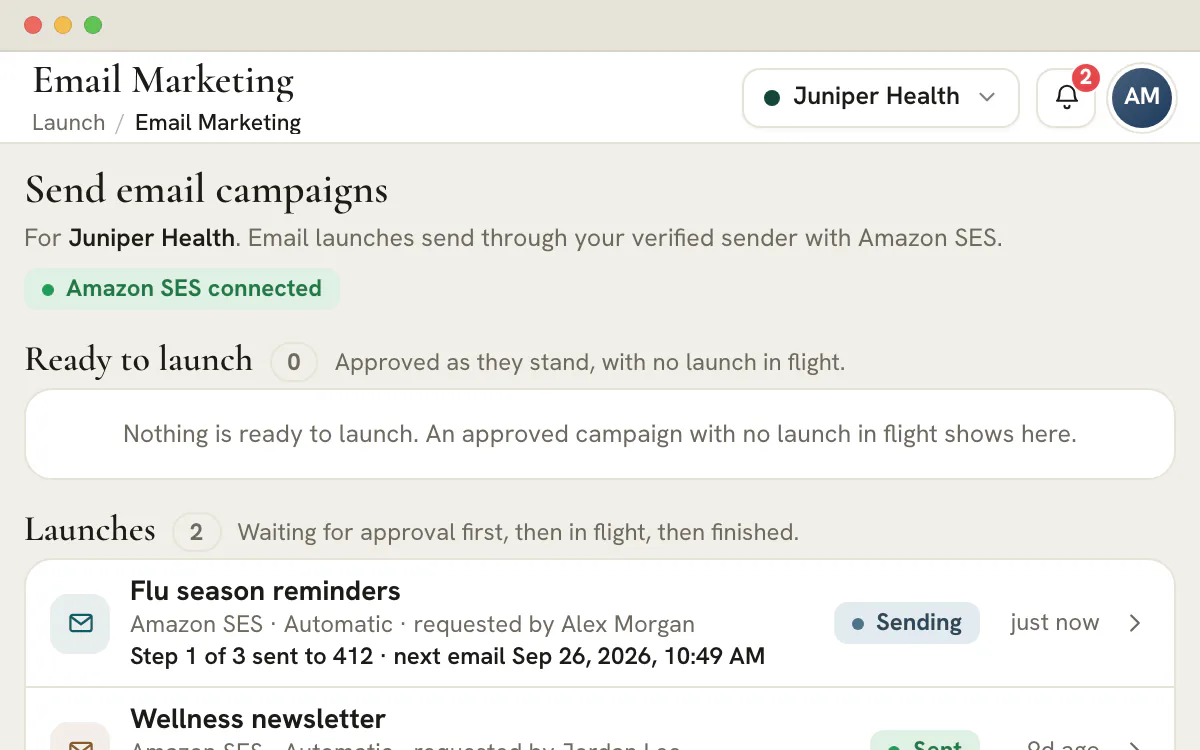
The launch row carries a status chip and a line of progress: the step it is on, how many of that step's recipients have gone and, between steps, when the next email is due. The page refreshes itself every 20 seconds, but only while the launch is scheduled, starting or sending and the page is in view. At the end the status reads Sent, with counts for every email.
A drip is a first email plus up to nine follow-ups, each from 1 to 90 days after the one before it. The delay is counted from the moment the previous email finishes sending, not from the start of the launch.
| Delay after the one before | Its job | Who receives it | |
|---|---|---|---|
| 1 | None: it starts the launch | Deliver what was promised and ask for one action | Everyone who qualifies on the day, minus those left out |
| 2 | 2 days | Remind, with one new detail rather than a repeat | The people Email 1 reached |
| 3 | 4 days | Show a worked example or a piece of proof | The people Email 2 reached |
| 4 | 7 days | Answer the objection raised most often | The people Email 3 reached |
| 5 | 14 days | Say it is the last one and make the next step easy | The people Email 4 reached |
Delays of 2, 4, 7 and 14 days end the sequence 27 days after it starts. They are a starting pattern, not a product default.
Note
A drip does not watch for replies
After the first email, a follow-up is not filtered by stage, tag, reply or booking. People leave a sequence by unsubscribing, by carrying a Do Not Disturb mark on their own lead, by leaving the CRM, or when the launch is canceled. Build the audience so that everyone in it should hear the whole sequence.
The count in the dialog and the audience used by the send come from the same rules. The launch reads the client's CRM leads, up to 25,000 of them (at 25,000 or more, the check fails with Audience too large to check), applies the audience the plan chose and takes out everyone who cannot or must not receive the email. Pipelines the launcher cannot address, such as archived ones, sit outside the audience and are not counted. Each contact is counted under the first reason that applies, and the tally appears beside the audience as one line.
| Reason | What it means | What to do |
|---|---|---|
| No email | The lead has no email address | Add one in the CRM, or accept the gap |
| Invalid | The address does not read as an email address | Correct it in the CRM |
| Duplicate | The same address was counted earlier in the list | Nothing: at most one email goes to the address |
| Unsubscribed | Someone at this address opted out, or, where receipts are recorded, the address hard-bounced or complained | Leave it out. It stays out of every later campaign for this client |
| Do not contact | A lead with this address carries the Do Not Disturb mark | Clear the mark only if the person asked to hear from you again |
| Restricted list | A saved list holds a lead from a CRM list that only an Agency Admin may address | Ask an Agency Admin to launch. A filter or segment that names such a list fails the checks instead |
A filter audience, built from pipelines, stages and tags, is resolved when the first email goes out. A saved segment keeps the rules it had when the launch was created, and who matches those rules is worked out on the day. A saved list keeps its members. Whichever you choose, the launch is checked against what the approval covered: if the segment's rules or the list's members changed afterwards, nothing is sent and the plan has to be approved again. Saved audiences explains how each kind is built.
Tip
Use the Campaign email received condition
A saved segment can use the Campaign email received condition, set to not in the last 7 days, so two campaigns do not email the same person in one week. Where delivery receipts are recorded, the Email bounced or complained condition set to No keeps addresses that bounced out of the next audience.
Launch checks the parts of a send it can see. Whether the people on the list expect the email is not one of them.
| Item | What the product does | What you do |
|---|---|---|
| Sending domain | Fails unless the From address is on a verified domain's list, or is a single verified address, and checks again before each batch | Add the client's domain under its data settings, publish the DNS records and wait until it is verified |
| Authentication records | Lists an ownership record, three DKIM records, the bounce-domain MX and SPF records and a recommended DMARC record | Publish them all, start DMARC at p=none and tighten it once the reports look clean. A single verified address has no DKIM signing |
| Free-mail domains | Refuses a free-mail provider's domain as a sending domain, since its DNS cannot be edited. A single verified address is not blocked | Send from the client's own domain, ideally a dedicated subdomain for marketing mail |
| Unsubscribe | Adds a link to every email, in the headers, the text part and any HTML footer, and honors the list at every step | Leave the footer in place and keep any unsubscribe link in the template working |
| Permission to email | Does not record or check consent | Email people who expect to hear from the client, and keep the proof where you can produce it |
| Subject and preview | Fails an empty line, the starter placeholder, a subject over 200 characters or a preview over 140 | Say what the email is. The planner flags subjects past 80 characters because inboxes cut them |
| Merge tags | Fills six known tags and blanks any other, with a warning | Write greetings that read well when a name is missing, because there is no fallback value |
| Links and images | Warns about links that point at # and about images embedded in the email | Use full web addresses and host images online |
| Size | Warns above 102 KB, where Gmail clips a message, and fails above 500 KB | Trim the template or drop heavy images |
| Volume | Caps one launch at 2,000 recipients and sends at most 14 a second | Split bigger lists by pipeline, stage or tag, and warm up a new domain with smaller sends |
| Delivery receipts | Warns when delivery, bounce and complaint receipts are not recorded | Remember that a bounce counts as sent, not failed, and the page shows no bounce figure |
The first two rows decide whether the others matter, because mailbox providers weigh who signed a message as well as what it says.
| Status | What it means | What you can do |
|---|---|---|
| Awaiting approval | A request is waiting for someone with the Publish permission | A publisher chooses Approve & launch, or Decline with a reason; the requester can choose Withdraw request |
| Scheduled | Approved and waiting for the time you set. Due launches are looked for every minute | A publisher can choose Cancel launch |
| Launching, then Sending | The first email is queued, then emails go out while the line shows the step, the counts and the next date | A publisher can choose Cancel launch. Emails already sent stay sent |
| Sent | Every step has finished, and the requester and the approving publisher are told in the bell and, if their settings allow, by email | Read the counts for each email |
| Failed | The launch stopped. Opening it shows why, in plain words | Fix the cause and launch again |
| Canceled or Declined | A person stopped it, or a publisher declined the request and left a note | Launch again if the send is still wanted, or revise the plan and ask again |
| What it reports | What happened | What to do |
|---|---|---|
| The audience is now N people, more than the 2,000 one launch can send to | The audience grew past the cap before the first email, so nothing was sent | Narrow it by pipeline, stage or tag and launch again |
| Nobody in the audience can receive it now | Everyone was left out by the time the first email went | Check the exclusions and the filter |
| The address is no longer a verified sending address for this client | The domain or address lost its verification | Verify it under data settings, then launch again |
| The plan, one of its email templates or its saved audience changed after it was approved | Something the approval covered was edited | Submit the plan again for approval |
| The mail service kept refusing to send (throttled or unavailable), so the launch stopped | Five passes in a row got nothing out | Read the counts, then launch again once the cause is clear |
A send that is interrupted is never repeated blindly. Rows in flight when a send breaks off are never resent. They show as failed, with a note that delivery could not be confirmed, so up to a batch of a hundred recipients may show no email afterwards and, in a drip, drop out of the steps that follow, and nobody has two. Launching the same plan again will email people the first launch already reached, and the dialog says how many.
Plan
Plan availability
Email launches come with every plan, Studio at $99 a month among them. Templates are made in the Library's email builder, which belongs to the Agency plan from $299 a month. A Studio workspace cannot make new templates, so it can launch only the ones that already exist. The text-message counterpart is the SMS campaign launch checklist.
Plan the sequence, get it approved, then open Launch for that client. Add up to nine follow-ups with their own templates and delays, run the checks and pick Send now or Schedule. The launch sends from a sender the client has verified and reports sent, failed and waiting counts for each email.
Yes, and a verified domain is the normal route. The From address must be on a domain verified for that client and be listed among that domain's From addresses. A single verified address is accepted too, without DKIM signing. Launch checks this when you open it and again before each batch, so a sender that loses its verification stops the send.
No. A launch has no goal or reply exit, and a follow-up goes to the people the previous email reached, minus anyone who has since unsubscribed, left the CRM or had their own lead marked Do Not Disturb. To stop a person's next email, mark their lead Do Not Disturb, take the lead out of the CRM, or cancel the launch for everyone.
Emails already sent stay sent. After a cancel, the rest stop before the next group of ten. After an interruption, rows in flight are not sent again and count as failed with a note, and the launch carries on from the queue. Anyone whose row is swept up this way misses that email and every follow-up after it, but nobody receives the same one twice.
Yes. Every email carries its own unsubscribe link: in a visible footer line when the template has an HTML part, in the plain-text part, and in the standard one-click headers that mail apps use. The opt-out then holds for all of that client's later campaigns, including the next step of a running drip.
Up to 2,000 recipients. If more people than that can receive the email, the launch checks fail, and an audience that grows past the cap before the first email stops the launch with nothing sent. Split a bigger list by pipeline, stage or tag and launch each part.
No. Launch is an agency page, and the client portal has no Launch section. The client's contacts see only the email, with its unsubscribe link. Share the sent, failed and waiting counts with the client in your own report or message.
Email launches are part of every plan, from Studio at $99 a month. The templates a launch sends are built in the email builder, which comes with the Agency plan from $299 a month, so a Studio workspace can launch only the templates it already holds.
